How to Build a Dental App: Features, PMS Integration and Cost in 2026

Updated November 2026
If you're deciding how to build a dental app, give the first version one job patients can do without calling the front desk, like booking a cleaning or filling out intake forms. Software agency Kanopy's 2026 estimate for a standalone dental office app and staff dashboard is $60,000–$120,000 and 3–5 months, before any connection to the practice's existing system.
Quick answer: What should go into the first version of a dental app?
Choose the work the app needs to do: booking and intake, practice operations, teledentistry, imaging or aligner monitoring. Kanopy estimates $60,000–$120,000 and 3–5 months for a standalone patient app and staff dashboard. Get a separate quote for connecting to the practice management system (PMS).
- Pick the first workflow and how you'll measure it.
- Confirm access to the practice management system.
- Choose the build path and tech stack.
- Prepare the production environment for patient data.
- Build the minimum viable product (MVP) and test it with synthetic records.
- Launch at one site and track patient adoption.
Key takeaways
- Appointment ownership: If patients can book in two places, decide which calendar gets the final say before you build the booking screen.
- Existing booking tools: If the practice already has online booking, test that workflow with the front desk first.
- Clinical features: Assess the FDA pathway for software that flags suspected findings on X-rays separately from the workflow for a dentist reviewing photos.
What a dental app does and who it's for
A dentist app helps a practice book visits, collect intake forms or manage care. Types include patient portals, practice operations tools, teledentistry apps, imaging tools and aligner monitoring services. Kanopy estimates $60,000–$120,000 and 3–5 months for its standalone patient app and staff dashboard, before integration with an existing PMS.
Types of dental apps
Decide who needs to act when a patient submits a form or books a visit. A dental service organization (DSO) can use the same front desk workflow across its practices.
| Type | Patient app for a practice or DSO | Teledentistry app | Practice operations app | AI imaging tool | Remote aligner monitoring |
|---|---|---|---|---|---|
| Who uses it | Patients and front desk staff | Patients and licensed dentists | Front desk, billing staff and office managers | Dentists and other medical professionals reviewing images | Patients and orthodontic teams |
| Core features | An app for dental clinic scheduling and intake, with appointment confirmations | A virtual dentist app for video follow-ups and case review | Recall lists, chart access and a queue for insurance checks | Image review and flags for suspected findings | Progress photos and an orthodontist review queue |
| Integrations | PMS and messaging service | Video service and visit documentation | PMS and clearinghouse | Dental imaging software and patient records | Photo capture and the treatment record |
| Regulatory risk | HIPAA when the app handles PHI for a covered practice | State practice and consent rules, plus HIPAA where applicable | HIPAA for PHI handled for covered practices, plus PCI DSS for card payments | FDA device review depends on the intended use | Image analysis used to assess treatment can be a device function |
Digital-first patient engagement
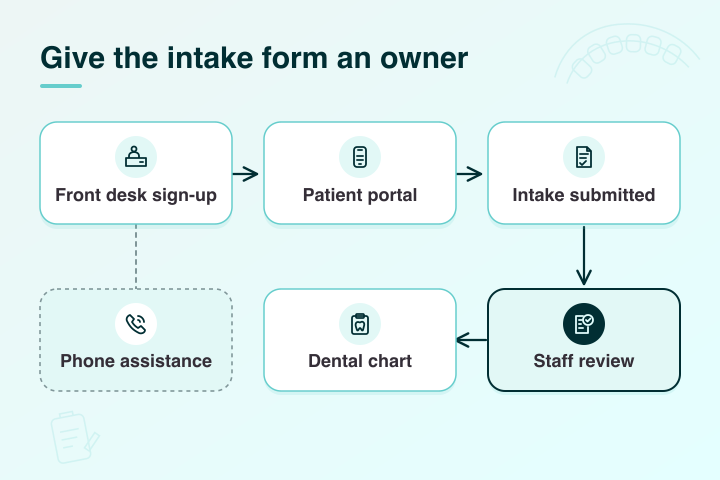
Let patients confirm a recall visit or finish intake forms on their phones before they get to the clinic. Borrow the sign-up approach from our guide to building a patient portal for real-world adoption and offer enrollment at the front desk. Keep a phone number available for patients who need help.
Custom dental software development: build, buy or extend?
Start with the dental practice management software you already pay for. Open Dental's eServices, for example, includes options for web scheduling, recall reminders and intake.
Watch a staff member confirm a cleaning. If they have to check two calendars, test whether an add-on can sync changes back to the practice schedule before you quote a new app.
| Build path | When it fits | What to check |
|---|---|---|
| Off-the-shelf PMS | Your practice needs the standard booking and intake workflows | Whether your edition supports the workflow your staff needs |
| PMS add-on | You want to add reminders or self-booking to the existing calendar | Whether a cancellation or reschedule writes back to the PMS |
| Custom build | A DSO needs one branded experience across locations, or a specialty team needs a new care workflow | Which locations, patient records and clinical steps are in scope |
| AI builder | You want to test a custom workflow with synthetic records before committing to a build | Whether you can secure production data and get the PMS access you need |
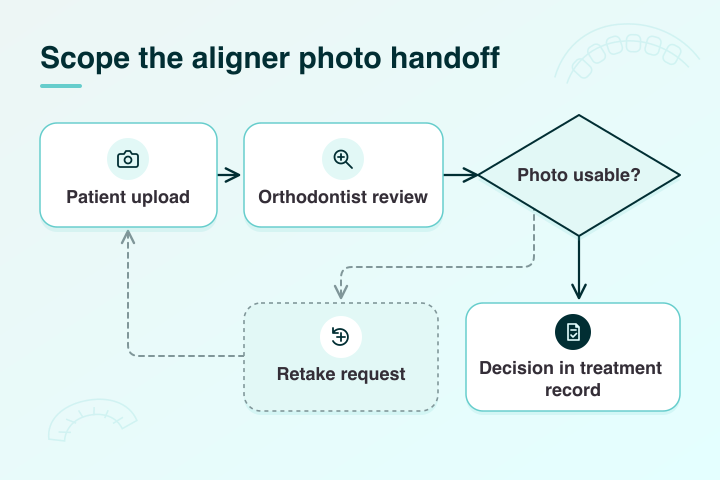
For a specialty workflow like aligner monitoring, follow one patient photo from upload through orthodontist review. Decide who sees it, what happens when the image needs a retake and where the clinician's decision is recorded. Use the health app development guide for the overall build and custom healthcare software development for scoping work outside the existing PMS.
Essential features of a dental practice mobile app
For a patient-facing dental mobile app, start with booking, reminders and intake. Have the front desk try a reschedule on the practice calendar and open a submitted form in the chart before you add clinical or billing features.
MVP vs. version 2 feature checklist
The MVP rows cover scheduling and intake. Bring a v2 feature forward if your first release depends on it.
| Feature | MVP or v2 | Why |
|---|---|---|
| Booking and recall | MVP | Patients can book or reschedule without calling. |
| Digital forms and e-consent | MVP | Staff can review updates to the chart before the visit. |
| Insurance checks | v2 | Test what each payer returns and how staff handle missing benefits. |
| Perio charting | v2 | Test how practitioners and assistants record measurements and findings for teeth and gums. |
| Imaging bridge | v2 | Test image formats and patient matching on the practice's equipment. |
Online booking and recall reminders
A dental appointment app shows open slots and confirms appointments. Put a reschedule link in the confirmation. Send recall and hygiene reminders when a patient is due, with a link back to online booking.
Cancel one visit in the app and another at the front desk. Check whether each change appears on the practice schedule.
A 2022 study of public dental services found mixed attendance results after introducing SMS reminders. Track missed visits and cancellations separately against your baseline. The same scheduling questions come up in doctor appointment app development.
Two-way patient messaging
Let patients confirm or reschedule in your dental patient messaging app. If you use two-way patient texting, verify the number and keep the exchange brief.
HHS allows treatment-related appointment reminders without separate HIPAA authorization. Honor reasonable requests for confidential contact.
Move treatment questions and clinical images to a signed-in conversation. If the SMS vendor acts as a business associate, check that its BAA covers the messaging service.
Digital intake and e-consent
Patients can send medical history and allergies before check-in. Have staff review the form before updating the chart. Open Dental's eClipboard workflow supports that handoff.
For patient intake management app development, plan where the signed form goes and how the dentist documents the consent discussion.
Teledentistry consults
Report CDT D9995 for live teledentistry or D9996 when records go to the dentist for later review, along with the applicable procedure codes. Before enabling visits on a white-label telehealth platform, verify the patient's location, the dentist's authorization to practice there and the state's consent rules.
Practice management system integration
The practice management system (PMS) owns the schedule and dental chart. Check what the app can read or write in the practice's edition before you estimate the integration.
- Dentrix: Desktop API access requires approval and an agreement, with separate read and write permissions. Ascend has a cloud API, and Dentrix Enterprise has version-specific interfaces. For desktop claims or financing, check the program's protected categories before you quote the work.
- Eaglesoft: For server-based Eaglesoft, check the Patterson Innovation Connection vendor program and confirm setup for the installed version.
- Open Dental: Choose a local, server or remote API mode. The Remote API requires the practice's eConnector and credentials.
- Curve Dental: Confirm API access and permissions with Curve Account Management.
A legacy server may need a vendor connector or an approved partner's sync agent. If your workflow also shares records with a medical provider, scope EHR integration separately.
Billing, insurance verification and payment processing
CDT codes identify procedures. Use X12 270/271 to check insurance eligibility and benefits. Give staff a way to recheck incomplete or outdated responses.
Use X12 837D to submit dental claims. Confirm enrollment with the payer or clearinghouse before sending the first claim.
Use payment gateways that host checkout and handle card payment processing. Confirm the practice's PCI DSS obligations with its acquirer. If you offer patient financing, show the lender's terms and any deferred interest before the patient applies.

AI features in dental apps: what needs FDA clearance
An AI dental app can handle administrative tasks like reminders and eligibility checks. If the app drafts notes for dental charting, have staff review them before saving. Software that analyzes X-rays for signs of disease performs a device function.
Pearl's Second Opinion Panoramic received FDA 510(k) clearance on November 14, 2025 under K250525. The AI imaging tool flags suspected findings for dental professionals reviewing panoramic X-rays of permanent teeth in patients aged 16 and older.
Imaging integration: X-rays and intraoral scans
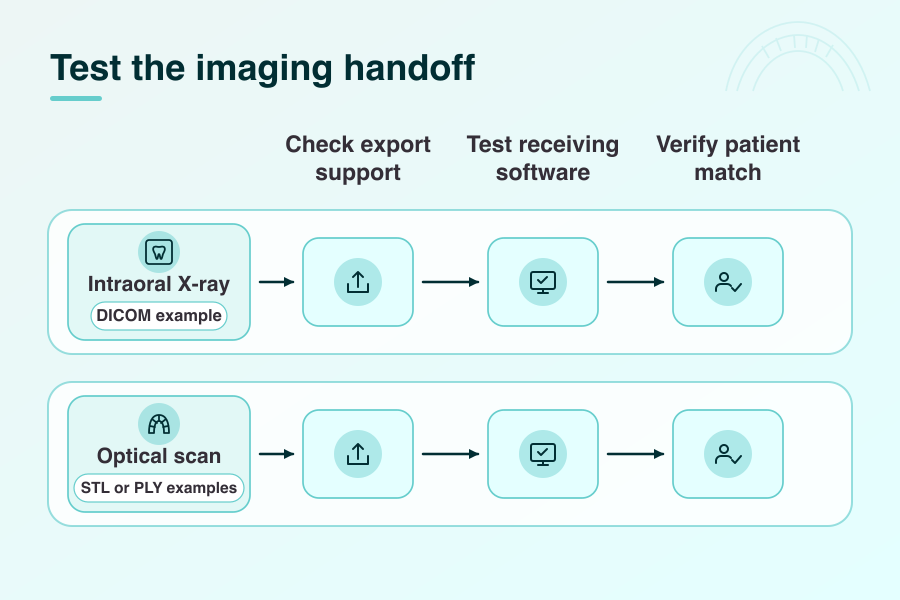
Dental imaging integration starts with the formats the clinic's equipment can send. DICOM defines a format for digital intraoral X-rays. Optical intraoral scans can use 3D formats such as STL and PLY in 3Shape Unite.
An imaging bridge can open a patient's images from the chart for review during diagnosis. Patterson lists DEXIS Imaging as an Eaglesoft integration. Check the equipment's conformance statements and test whether the bridge opens the right patient's images.
HIPAA and compliance for dental apps
For a US dental app, identify who can see patient data and where the app sends or stores it. That tells you which safeguards and vendor agreements you need to check.
Does a dental app need to be HIPAA compliant?
HIPAA applies when the app handles protected health information (PHI) for a covered practice. A practice that submits standard electronic claims is a covered entity under HIPAA.
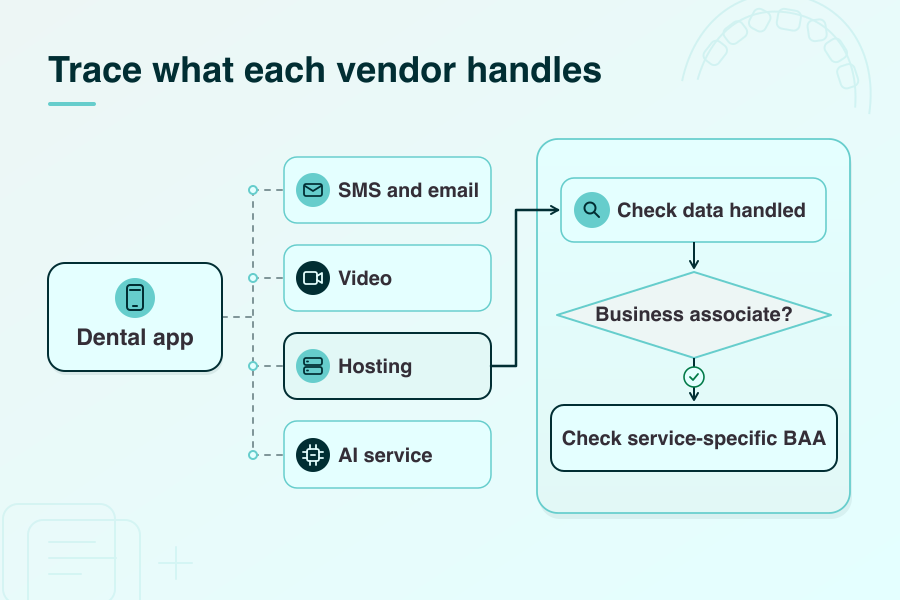
A DSO's obligations depend on its role as a covered entity or business associate. Map what each SMS, email, video, hosting and AI service does with PHI. When a vendor handles PHI on the practice's behalf as a business associate, sign a business associate agreement (BAA) that covers the specific service.
Security baseline
Build around the HIPAA Security Rule's safeguards for electronic PHI. Start with four controls.
- Use encryption in transit and at rest.
- Require multifactor authentication (MFA) for staff.
- Use role-based access to let receptionists manage appointments. Limit clinical notes to staff who need them.
- Keep audit logs that record who accessed or changed patient information.
For more on putting those safeguards into practice, see HIPAA compliance in no/low-code app development.
Teledentistry, FDA and payments rules
For teledentistry, verify the patient's location and the dentist's authorization to practice there. Set up consent for the state's requirements. If you add AI that analyzes X-rays for diagnosis, confirm the applicable FDA pathway.
For card payments, keep card numbers out of the app with hosted checkout and confirm your PCI DSS responsibilities with your acquirer. If you add an e-prescription feature for controlled substances, check state rules and use two-factor signing under the DEA's EPCS requirements.
How to build a dental app: 6 steps
Choose one workflow the front desk can test and confirm what the PMS lets you read or write before you pick a stack.
- Pick the first workflow and decide how you'll measure it.
- Map the patient data and confirm PMS access.
- Choose a build path and decide how patients will open the app.
- Set up the production safeguards and vendor agreements.
- Build the MVP and test it with synthetic data.
- Pilot the app with patients and track what happens to their appointments.
| Step | Deliverable |
|---|---|
| 1. Goals and requirements | First workflow and baseline metrics |
| 2. PMS access | Data map and permissions by site |
| 3. Build path | Delivery plan and distribution choice |
| 4. Infrastructure | Production safeguards and signed agreements |
| 5. MVP | Tested patient workflow and staff handoff |
| 6. Launch | Pilot results and rollout decision |
Step 1: Define goals and requirements
Pick a workflow the front desk can test end to end, such as confirming a hygiene recall. If you're working on recall, record the current no-show rate. If you're following up on proposed care, measure treatment plan acceptance.
Step 2: Map your PMS integration and data
Confirm access before you estimate the integration. Document these details for each practice location.
- Record the PMS edition, version and where it runs. Check vendor approval, fees and any local connector.
- Name the system that owns the appointment. List the patient fields and the actions the app needs, such as reading a booking and writing back a confirmation.
Step 3: Choose a build path and tech stack
If patients will usually open a recall link, test responsive web first. Scope native development if you need app-store distribution.
Use the build-path comparison to decide what stays in the PMS. See what a build on Specode involves.
Step 4: Set up HIPAA-ready infrastructure
Check the production environment against the HIPAA safeguards and vendor agreements before you bring in patient data.
Step 5: Build the MVP
Use the MVP feature checklist to decide what the first release needs.
On a test phone with synthetic data, confirm a visit and check that the change appears in the appointment record.
Step 6: Test, launch and drive patient adoption
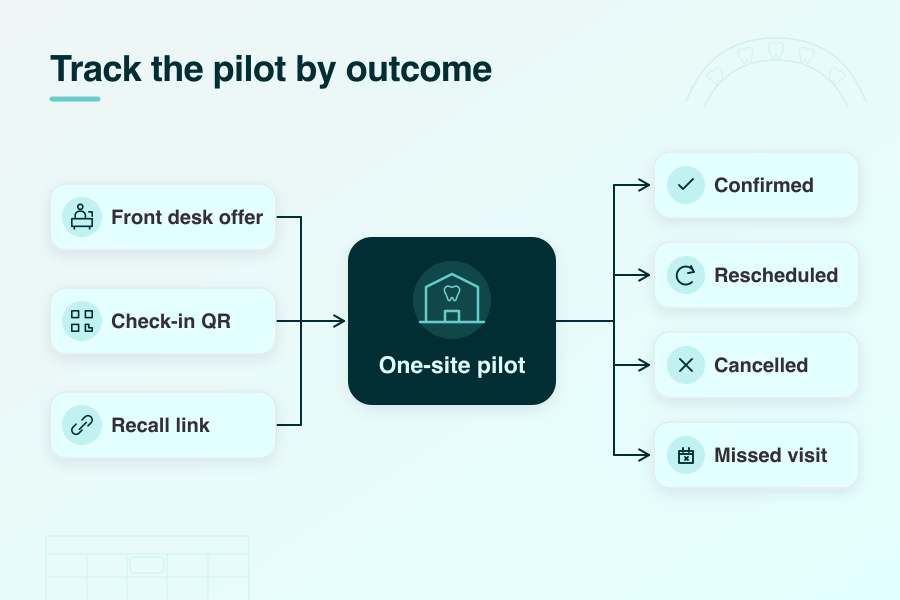
Pilot at one location. Put a QR code at check-in and have the front desk offer to enroll patients. Send recall links with options to confirm or reschedule.
Track confirmations, reschedules, cancellations and missed visits separately.
Dental app development cost and timeline in 2026
For standalone dental app development, Kanopy's 2026 agency estimate puts a patient app and staff dashboard at $60,000–$120,000 and 3–5 months with a US or nearshore team.
| Scope tier | Standalone patient MVP | PMS-connected workflow | Clinical workflow platform | Multi-site DSO platform |
|---|---|---|---|---|
| Agency scope example | Mobile app and staff web dashboard for booking, intake, reminders and secure messaging, before an existing PMS connection. | Booking or intake with a defined sync, permissions and site rollout | Charting, eligibility, payments and imaging hardware | Full PMS integration, DICOM imaging, claims and analytics |
| Specode subscription | Pro, $1,000/month for a responsive web app | Pro plus separately scoped integration work, or Custom from $5,000/month | Custom from $5,000/month for managed engineering | Custom from $5,000/month. Scope the program and vendor services. |
| Agency cost (USD) | $60,000–$120,000 | Quote after confirming PMS access | $120,000–$250,000 | $250,000–$450,000+ |
| Agency time | 3–5 months | Set after confirming the connector and rollout | 5–9 months | 9–18 months |
Specode Pro covers app building and production deployment. Custom includes managed engineering. Ask for a quote that breaks out build labor, vendor accounts and any native iOS or Android work. Price standalone imaging or aligner monitoring on its own.
NexHealth’s 2023 case study reports that Jefferson Dental & Orthodontics connected patient intake to Dentrix Enterprise and Dolphin in under 4 weeks with an existing connector. Velvetech’s Smylen case study describes a 6-month project to build marketplace scheduling and connect Dentrix, Eaglesoft and Open Dental.
Hidden costs: compliance, maintenance and support
Set aside a recurring budget for hosting, monitoring, security updates and vendor support. Get a separate estimate for FDA work for regulated diagnostic features. If you're pricing standalone teledentistry, use the telemedicine app development cost breakdown for video and vendor fees.

Building a dental app on Specode
Start dental app development by writing out the booking or intake flow in Specode's AI app builder. Test appointment scheduling, intake and role-based sign-in in a no-code web prototype. If you need a native app, price that work separately.
For example, set up a post-op follow-up flow and let the front desk test who gets each submission. If the workflow includes video, plan the handoff and vendor requirements covered in telemedicine app development.
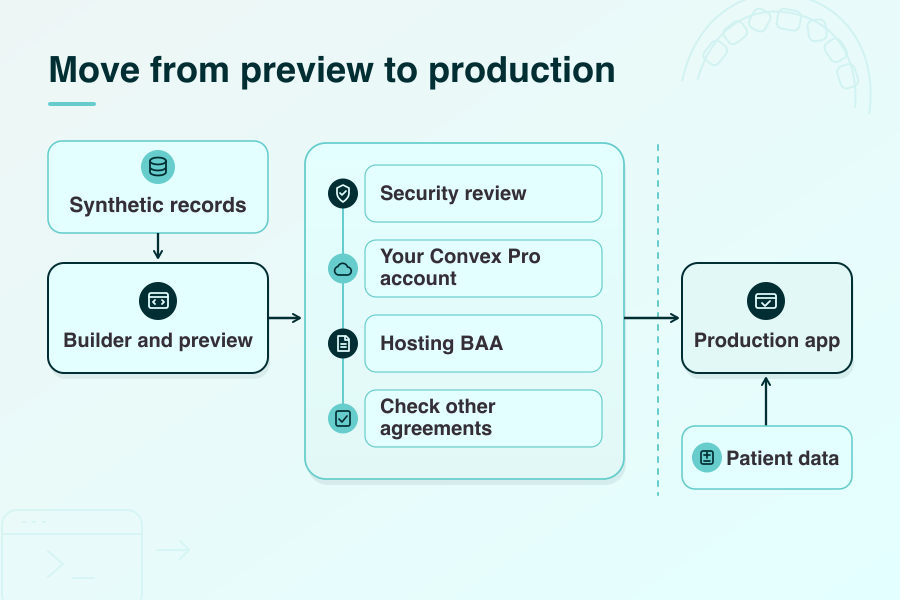
Use synthetic data in the builder and previews. Before using patient data, connect your own Convex Pro account, sign its hosting BAA and run the production security review. Check whether you need a separate Specode agreement and which vendors need their own BAAs.
A PMS connection is custom integration work. Ask whether the PMS will let you read a visit or write a completed form.
Specode vs. general AI app builders
Check where PHI will live, which agreement covers it and what you can take with you if you move the app.
| Builder | Specode | Bubble | Lovable |
|---|---|---|---|
| BAA | Convex hosting BAA. Confirm separate Specode and vendor agreements. | Signed BAA with Dedicated Enterprise HIPAA add-on | Confirm BAA coverage. PHI requires express permission in the plan or a written agreement. |
| PHI hosting | Your Convex Pro production account | Dedicated US hosting with the add-on | Confirm covered services in writing before using PHI |
| Dental PMS access | Custom connection subject to vendor access | REST API connection, subject to vendor access | Custom API connections, subject to vendor access |
| Code portability | Own and export app code | Export data. Rebuild application logic off Bubble. | Export through GitHub |
See the medical app builder comparison for other options. If you're weighing Bubble against another builder, the Bubble alternatives guide covers the BAA options and what you can export.
Let's build your dental app
Before you scope dental app development, follow one appointment from booking to intake review. Schedule a Specode demo to walk through that handoff and the PMS access it needs.
Frequently asked questions
Kanopy estimates $60,000–$120,000 for a standalone patient app and staff dashboard. Get a separate quote for a connection to your existing practice management system.
Kanopy estimates 3–5 months for a standalone patient app and staff dashboard. For a connected release, check vendor access and which locations are in scope.
You can use an AI builder to prototype a responsive web app. Plan for technical help if you need a practice system connection or production safeguards.
HIPAA applies when an app handles protected health information for a covered dental practice. Sign agreements with vendors acting as business associates and verify the app's safeguards.
Dentrix and Eaglesoft have vendor programs. Open Dental's Remote API uses an eConnector. Check which edition you run, what the app can write back and whether it needs a local install.
Administrative reminders fall outside device regulation. If the app analyzes X-rays for diagnosis, its intended use determines the FDA pathway. Pearl's Second Opinion Panoramic is one cleared example.
Give patients a way to confirm or reschedule from a reminder. Dental studies report mixed results, so track cancellations and no-shows separately against your baseline.