Introducing the Specode MCP: Build, Scan and Fix HIPAA-Ready Healthcare Apps from Your AI Agent

Keep building your healthcare app in the tool you already use. Through MCP, Specode connects with Claude Code, Codex, Cursor, Lovable, Replit, Base44, and Bolt (more coming soon) to bring healthcare-specific tools into your workflow.
Ask your coding agent to run a HIPAA scan of your app's code. The results separate must-fix issues from optional security improvements, with detailed explanations, code references, and recommended fixes your agent can apply. You can also add a Convex development backend for HIPAA-ready development in supported frontend-only projects or new Lovable and Replit projects.
This article is not legal advice. Confirm your approach with your compliance lead.
What does Specode's MCP server do?
Through MCP (Model Context Protocol), the server brings development backend setup, HIPAA scans, and implementation guidance into the tools you use to build healthcare apps. Your coding agent writes the app code and applies fixes using the findings and recommendations. Production deployment is handled separately.
Key takeaways
- Keep building your healthcare app in your current tool. Add a development backend optimized for HIPAA compliance while your coding agent handles the app code, using tools such as Lovable or Claude Code.
- Get detailed guidance for fixing HIPAA issues. Must-fix issues and optional security improvements come with detailed explanations, code references, and recommended fixes for your agent. Results arrive by email and are available in the dashboard or in your coding tool when you ask.
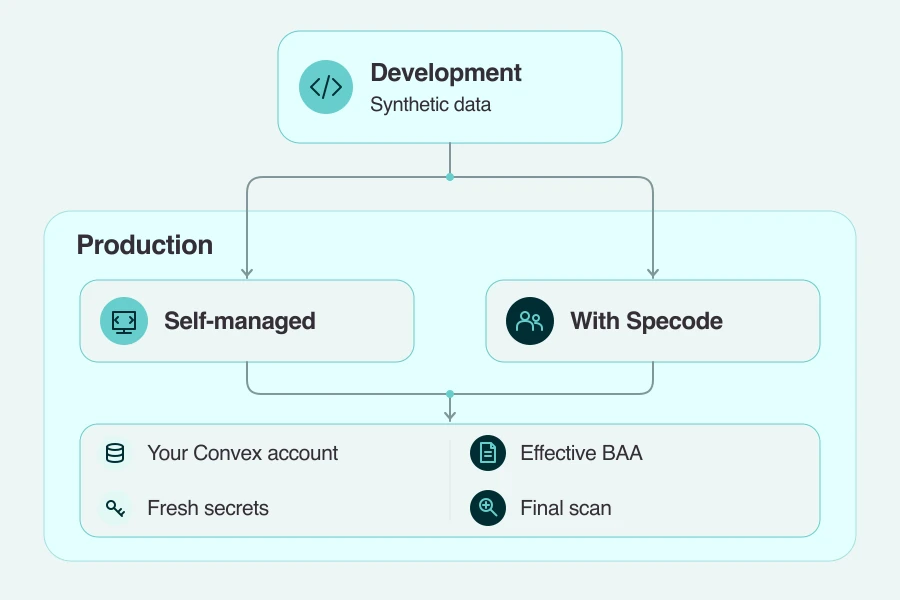
- Take your app to production as a separate step. Use synthetic data in the development backend, which is outside your business associate agreement (BAA). To use this backend with real protected health information (PHI), deploy it to your own Convex environment under an effective BAA, either yourself or through the Pro service.
What the Specode MCP does
For healthcare app development, you can use your coding tool to add a development backend optimized for HIPAA compliance, scan your health app code, ask your agent to fix and recheck findings, and get HIPAA guidance before changing sensitive features.
Add a HIPAA-ready backend to your frontend
For a supported frontend-only React + Vite project, MCP can set up a Convex development backend with authentication. Your coding agent connects the interface after you approve the changes. Backend setup is also available for new Lovable and Replit projects.
Use synthetic data while developing. To take this setup to production with a HIPAA compliant backend, you'll need your own Convex deployment under an effective BAA ($25/m).
Scan your health app code for HIPAA issues
Your agent gets detailed explanations, code references, and recommended fixes from a HIPAA scan. For example, add a scan to your HIPAA workflow in Codex:
The HIPAA compliance checker reviews your health app's code for HIPAA-related security and privacy issues, separating must-fix findings from optional security improvements. It also shows what PHI your app sends to integrated third-party services, so you can see where sensitive data goes.
Results are emailed to you and available in the dashboard. To see them in your coding tool, ask your agent to show the results. You also get a HIPAA score that summarizes the findings; it isn't a compliance certification.
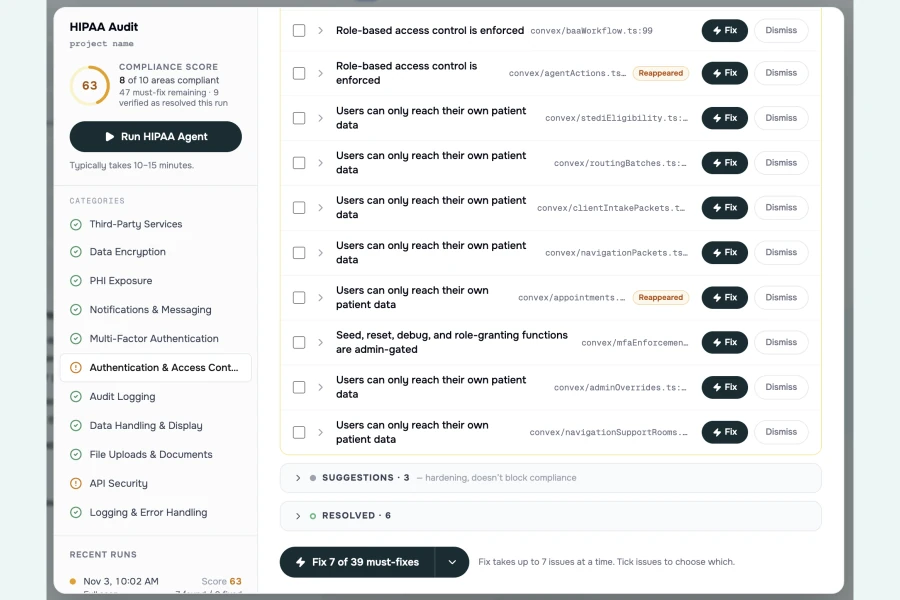
Fix, recheck and dismiss findings
Ask your coding agent to address the must-fix issues using the detailed findings, code references, and recommended fixes:
Then ask your agent to check the updated code:
The recheck evaluates your updated code and reports whether each finding is fixed or still present. You can then work through the nice-to-fix security recommendations.
If you decide to dismiss a finding, ask your agent to dismiss it with a reason. That records your decision rather than fixing the code. You can restore dismissed findings later.
Get HIPAA guidance while you build
Before changing authentication, logging, file uploads, or other sensitive features, your coding agent can request HIPAA-specific implementation guidance through MCP.
For example, you can ask HIPAA questions in Cursor:
You can also ask about PHI handling in browser storage, URLs, email, SMS, and analytics. Use the answers to guide code changes while keeping real patient data out of prompts and development inputs.
Connect your AI coding agent
Start with the AI coding agent you already use. Whether you're setting up a Claude Code HIPAA workflow or connecting Codex or Cursor, follow the Specode MCP setup guide to add the MCP connection and sign in with your account.
For app-builder projects, MCP connects the builder's agent to the healthcare tools, while GitHub provides the project code for scanning and rechecking. The guide covers both connections, so you can finish setup and keep building in your usual tool.
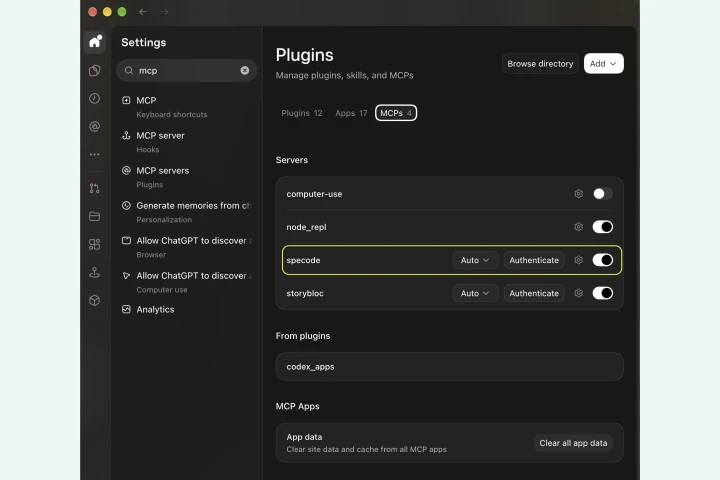
Add a backend and scan in Lovable or Replit
You can keep developing in Lovable or Replit and use the MCP to bring healthcare-specific tools into your project. For new projects, that includes setting up a Convex development backend. This gives your app a database and user authentication, so the interface you've built can save information and support signed-in users.
For an app you're already working on, you can run a HIPAA scan and have the builder's coding agent make fixes from the findings.
Check the supported scope
Your app's stack affects scan coverage, including findings on audit logging, sessions, browser storage, and other areas.
- Code coverage. The scanner reads TypeScript, JavaScript, and SQL. It has its best coverage on React + TypeScript frontends and supports Convex, Supabase, and Node.js with Postgres backends.
- Other stacks. Coverage can be less complete. Dependency detection may also be incomplete in some non-template apps.
- Editing. The dashboard provides a read-only view of external projects and their scan results; make code changes in your coding tool.
- Deployment. The MCP does not deploy apps; production setup is a separate step. Deploying with Specode requires a Pro subscription.
From development to production
If you added a Convex backend through MCP, you can handle the move to production yourself or get migration help. Keep synthetic data in development. For production, use your own Convex deployment under Convex's standard BAA, with no bespoke contract negotiation needed. This Convex HIPAA deployment is available at $25/m, whichever route you choose.
Before launch, generate fresh production keys and credentials, and run a final scan of the exact code you're releasing as part of your security review. Put the applicable BAAs in place with any other services handling patient data.
After signing each business associate agreement (BAA) separately, you can record its signed status through your coding tool.
For more detail, see Convex for HIPAA apps and the steps for going live with Specode.
How it fits with the Specode builder
With MCP, you keep your current coding agent. The healthcare app builder lets you develop responsive web apps from plain-English requirements.
- Healthcare-specific guidance as you build. The AI follows structured playbooks for workflows such as patient intake, scheduling, and provider search.
- Control over the plan and design. Review each stage of a new app before implementation, and return to earlier stages as your requirements change.
- Scan, fix, and recheck in one place. Run a HIPAA scan on your project, send findings directly to the built-in AI coder, and recheck the changes.
- A guided route to production. On Pro, use the built-in publishing flow to connect your own GitHub repository and Convex production deployment.
If you stay with MCP, your app appears as a read-only external project in the dashboard, which shows scans and score. Results also arrive by email or appear in your coding tool on request.
To move your app into Specode and continue building there, contact support for help with migration. If you're evaluating a HIPAA compliant app builder, see our HIPAA-compliant app builders comparison.
Connect the Specode MCP and run a scan
Take the next step toward HIPAA compliant app development in the coding tool you already use. Connect your agent and scan your project using synthetic data, then use the findings to decide what to address first.
Frequently asked questions
It provides HIPAA-focused development tools, while your app's compliance depends on how you deploy and operate it. The backend created through MCP is for development with synthetic data and sits outside your BAA.
No. The MCP helps you build and review code; production deployment is a separate step. You can manage it yourself or move your app into Specode on Pro with migration help.
No. Use synthetic data in the development backend. Keep real patient data and secrets out of prompts, uploaded code, and project snapshots. Real PHI belongs in your separate production setup under the required agreements.
You can use it with Claude Code, Codex, and Cursor. Lovable and Replit support scans, fixes, and new-project backends; Base44 and Bolt have partial support. The connection alone doesn't establish HIPAA compliance in Lovable and Replit.
It reads TypeScript, JavaScript, and SQL, with best coverage on React + TypeScript frontends. You can run a HIPAA scan for Supabase, Convex, or Node.js/Postgres backends; coverage on other stacks can be less complete.
Yes. Direct coding agents submit a snapshot of your project code. For connected app-builder projects, GitHub provides the code for scanning and rechecking. Keep real patient data and secrets out of that code.
Backend setup is for supported frontend-only projects. If you want to move an app with an existing backend into Specode and continue building there, contact support for migration help.
Yes, you need a Specode account. See current pricing for MCP access. The Pro production service is separate; the production table above covers its price, migration support, and optional penetration test.
Connecting the MCP does not make Claude Code HIPAA compliant. Keep real patient data out of this development workflow. Our guide explains how to connect Claude Code to a HIPAA-compliant backend.