Healthcare CRM: Build vs Buy

Last updated November 9, 2026
Buy a packaged CRM if it fits how your team handles referrals and intake and the vendor confirms it supports your intended use of patient data. Consider healthcare CRM development if your team needs to control referral routing or what gets sent back to your existing electronic health record (EHR).
This healthcare CRM build vs buy comparison uses the same workflows for all three routes. In our November 2026 model for 50 staff, three-year base costs are $180,000 for the lower-cost Buy case, about $400,000 for Build, and about $128,000 for Compose. Estimated launch times are 1.5 months for Buy, 10 months for Build, and 6 months for Compose.
Buy if you can configure a packaged CRM to fit your workflow within the vendor’s approved data scope. Build from scratch if your workflow and integrations justify owning and running the whole stack. Compose if you need to own a custom patient workflow and want to move faster with a reusable foundation you’ve vetted for your HIPAA requirements.
Key takeaways
- Test all three options with the same referral. Follow it through intake and check whether staff can see what’s done and who needs to act next.
- Verify patient data permissions and EHR access before you choose. Check what each business associate agreement (BAA) covers and test the specific EHR read or write the workflow requires.
- Compare three years of costs for the same workflow. When you estimate the cost of healthcare CRM software development, include the work to connect to the EHR and keep the CRM running after launch. For a packaged product, add setup and ongoing administration to the license bill.
What is CRM in healthcare, and how does it differ from an EHR?
Your team can use healthcare CRM systems to track which patients need outreach and who should follow up. An EHR holds the clinical record over time (see the electronic health record definition), and practice management system functions commonly include scheduling and billing.
For healthcare providers, a medical CRM can bring several patient engagement tasks into one workflow, including
- tracking outreach for patient acquisition,
- collecting forms during patient intake,
- sending appointment reminders,
- following up on referrals,
- and checking back in to support retention.
| System | Main job | Typical workflow |
|---|---|---|
| Patient CRM | Coordinate patient outreach and follow-up | Track which calls are still due. |
| EHR | Maintain the patient’s clinical history | Review prior visits and update the chart. |
| Practice management system | Run practice operations | Schedule appointments and handle billing. |
Say a referral comes in. The intake coordinator tracks it in the CRM, checks whether the forms are complete, and assigns the next call. The front desk books the visit in the practice management system. The clinician updates the EHR, which is the source for the clinical chart in this setup.
If two systems show the same appointment, decide where staff should update the booking when a patient reschedules and where everyone should look for the new time. If scheduling or billing is the work you need to improve, use the medical practice management app guide to scope it.
Which CRM workflows can handle PHI?
A generic CRM can handle protected health information (PHI) only when the specific service supports the data and the intended use is permitted. If a cloud provider handles electronic PHI on your behalf as a business associate, you need a business associate agreement (BAA) under HHS cloud computing guidance, even if the provider only stores encrypted data and has no key.
An email address on a general mailing list may be ordinary contact data. Tie it to a referral or visit in a covered healthcare workflow, and it can become PHI.
If a vendor offers a “HIPAA compliant CRM,” use a referral to test what the product supports in practice.
- BAA coverage. Check that the signed agreement covers each service that will handle PHI.
- Feature limits. Verify that each tool supports the data you’ll send and how you plan to use it.
- Access and logging. Test who can see referral details and what the audit log records.
Your organization remains responsible for its risk analysis and safeguards.
On an eligible HubSpot Smart CRM Enterprise account, for example, you can use designated features for PHI after you enable Sensitive Data for HIPAA and accept the BAA. The HubSpot Sensitive Data Terms exclude biometric data, and Sensitive Data properties are unavailable in chatbots. (Vendor terms checked November 9, 2026.)
Under HHS guidance on appointment reminders, routine reminders count as treatment. Certain care coordination messages can also fall outside HIPAA marketing when the covered entity receives no financial remuneration for sending them. The HIPAA marketing authorization rule generally requires individual authorization to use or disclose PHI for marketing, separate from the vendor BAA.
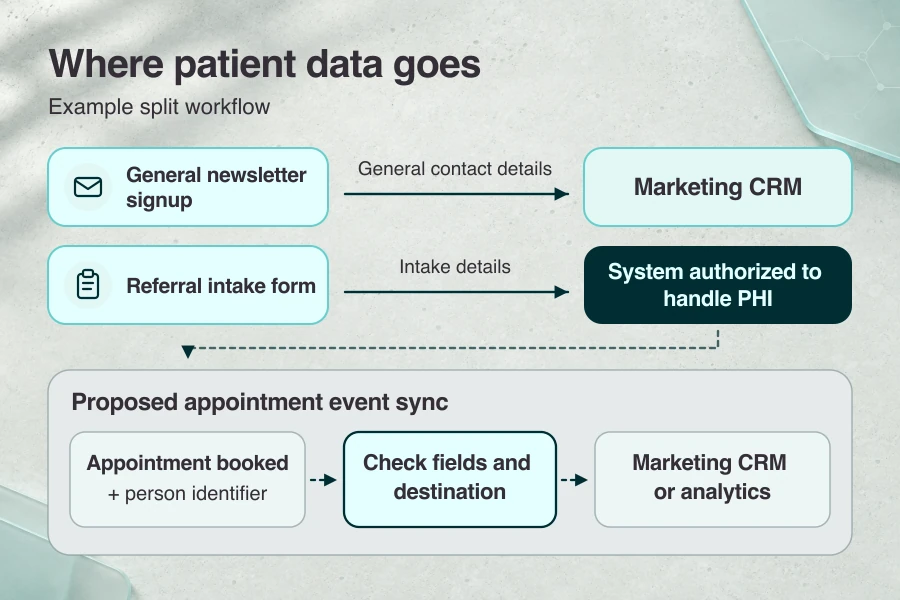
To find the best HIPAA-compliant CRM software for your workflow, trace what goes to forms, email, messaging, and analytics. If you split the workflow, use marketing automation for a general newsletter list that contains no care-linked data. Send intake and referral forms directly to the system that handles PHI. Check what syncs back and what tracking events disclose. An “appointment booked” event tied to a person can reveal a care relationship.
Healthcare CRM build vs buy: three paths
When choosing a CRM for healthcare, you can configure a packaged product, build and run your own stack, or compose a custom workflow on a HIPAA-ready foundation. Compare who gets the next call and how each setup passes referral status between systems.
- Buy. Set up a referral queue in an off-the-shelf CRM and use its built-in rules to assign the next call. Check whether the available EHR connector can pass the referral status your team needs.
- Build. Develop the referral queue and EHR connection from scratch on a stack your team owns. You set the routing rules, such as which referrals go straight to a specialty team. Budget for someone to maintain the application and integration after launch.
- Compose. Start with reusable intake forms and staff access controls if you want to move faster. Build the referral rules and EHR handoff your team needs to own. Verify that the foundation and connected services support the PHI they’ll handle and that your agreements cover those services where required.
Whichever route you choose, name an owner for the EHR handoff. If the CRM and EHR show different referral statuses after launch, your intake team needs to know who can reconcile them. For a walkthrough of the broader build process, see our guide to custom healthcare software development.
When do off-the-shelf healthcare CRM solutions fit?
Buy healthcare CRM software when you can use settings the vendor supports to handle referrals, intake, and outreach. For a small team without in-house engineers, buying makes sense if the vendor supports your use of patient data and the EHR connection you need, and someone on your team can lead the rollout.
Vendor terms checked November 9, 2026.
| CRM | Why shortlist it | What to verify |
|---|---|---|
| Salesforce Health Cloud | Guided referral workflows in supported editions. | Check Salesforce Business Associate Addendum coverage for Health Cloud and any add-on that will handle PHI. |
| HubSpot Smart CRM Enterprise | Staff-led follow-up using supported one-to-one email. | HubSpot Sensitive Data setup includes BAA acceptance. The HubSpot tool-specific Sensitive Data limits exclude personalization tokens and sandboxes. |
| Zoho CRM | Configurable tracking with PHI flags on supported fields. | Request a BAA and confirm the edition. Zoho HIPAA settings can’t flag lookup fields as PHI. |
| Microsoft Dynamics 365 Sales | Lead follow-up on Dataverse for teams already using Microsoft tools. | Microsoft’s HIPAA offering lists Dynamics 365 in scope. Confirm the BAA covers your deployment and verify connected services separately. |
| RovingCRM | Intake forms and reminders in a practice-focused CRM. | Roving Health says every plan includes a BAA. Keep PHI out of media fields. |
When evaluating CRM software for medical practice workflows, ask each vendor to run the same sample referral in the configuration it quoted.
- EHR handoff. Have staff receive the referral, complete intake, and assign follow-up. Check what the connector can read from the EHR and what it can write back if the workflow requires it.
- Access. Ask the vendor to switch between intake and outreach roles so you can see which patient details each role can access. Check what the audit log records when a referral changes.
- Rollout. Count paid seats and confirm who will set up and maintain the connection. If you need an implementation partner, separate the work they’ll handle from what your team will own after launch.
For a brief look at a broader practice platform, see Healthie vs. Specode.
When does a custom healthcare CRM pay off?
A custom CRM pays off when your team needs to control how referrals move between locations or how the CRM updates the EHR. It can also make sense when intake and referral tracking are part of the product other practices use.
- The patient journey varies by site. A specialty group might route referrals to different teams by location and send incomplete referrals back to intake. Test those exceptions in a packaged CRM before scoping custom work.
- Staff need to write back to the EHR. If coordinators must send an accepted or returned status back to the EHR, confirm that the EHR permits the update and decide who handles a failed sync.
- The CRM is part of your product. If independent practices submit and track referrals in a shared portal, decide which records each practice can see. That access boundary is a design question for a multi-tenant healthcare platform.
Verify who controls the referral data and what your agreement lets you export. Test whether an export includes status history and attachments. Name who will cover hosting costs and keep the EHR connection working after launch.
Before you build your own CRM, test whether reusable components can handle your routing and access rules. Compose if they can. Build from scratch if you need to control the whole stack and have a team to run it.
Healthcare CRM development: what building one involves
Start the scratch build with outreach, intake, and a referral queue. Set up role-based access and audit logging for those workflows, and scope the first release to one read-only EHR connection.
Who leads healthcare CRM software development?
Name a clinic workflow owner who can settle who gets each referral and approve the pilot. On the development team, assign someone to lead delivery and someone to own the EHR connection. Decide who will review security, test the workflow, and run the CRM after launch.
How to build a custom CRM
- Map the workflow. Follow a sample referral from first contact to the next assigned action. Decide which system owns each status and what information needs to move.
- Test what the EHR can return. Use a test referral and approved access to see which fields the EHR can return in the clinic’s intended environment.
- Build the queue and its controls. Set up intake and staff outreach, grant access by role, and log who changes referral status.
- Validate with realistic test data. Try a duplicate referral and an incomplete intake. Check what the coordinator sees when the EHR read fails.
- Pilot with a fallback. Start with a small team. Verify that staff can see who owns the next action before expanding the pilot. Agree when to switch back to the existing process if referrals get stuck.
- Assign post-launch work. Name who will monitor failed reads and patch the application. Use the NIST secure development framework as a reference for secure development and vulnerability response.
Our November 2026 model assumes 10 calendar months to launch. At 40 hours per week each, three full-time equivalents have 22.5 weeks of work capacity for the modeled 2,700 hours. Procurement, EHR access, security review, migration, and rollout can affect the schedule.
For the steps that apply beyond the CRM, see the general healthcare software build process.
How do buy, build, and compose compare?
Compare what each route costs through launch and over the next 36 months. Then look at who handles HIPAA safeguards, the EHR connection, and data export.
| Decision factor | Buy | Build from scratch | Compose with Specode Pro |
|---|---|---|---|
| Implementation through launch | $20,000 HubSpot, $30,000 Salesforce | $250,000 | $41,000 over six months ($35,000 staff time + six $1,000 monthly Pro payments) |
| Seats and base hosting (36 months) | $135,000–$630,000, hosting included | $900 base hosting | $900 base hosting |
| Admin, support, and maintenance (36 months) | $25,000 staff time | $148,500 operating labor | $86,000 ($50,000 operating labor + $36,000 ongoing Pro) |
| Three-year base cost | $180,000 HubSpot, $685,000 Salesforce | About $400,000 | About $128,000 |
| Estimated time to launch | 1–2 months | 10 months | 4–6 months |
| Responsibility for HIPAA compliance | Verify vendor BAA scope and configure staff access. | Run app safeguards and arrange applicable hosting and service BAAs. | With Specode Pro, sign the hosting BAA directly with Convex. A direct BAA with Specode is available on Custom. Verify applicable BAAs for connected PHI services. |
| EHR integration | Configure and test an available connector. | Build and maintain the authorized read. | Connect and test the read from the custom workflow. |
| Data ownership and exit | Check data rights and what records and history you can export. | Control the data model. Confirm code rights and plan a usable data export. | You own and can export app code you create with Specode. Test patient data export separately. |
| Customization ceiling | Vendor-supported settings and extensions. | Control the stack within EHR and staffing limits. | Custom logic on reusable components, within foundation and EHR limits. |
The November 2026 cost model compares the same outreach, intake, and referral workflows for a US practice with 50 staff and one read-only EHR connection. The first three cost rows add up to implementation plus 36 months of operation before rounding. Buy uses published seat rates and budgeted rollout labor. Build and Compose use estimated staff time and base hosting.
Launch times are planning estimates, and Compose budgets six months of staff time and Pro through launch. Connector fees, EHR access, usage, third-party services, and extra Specode credits are separate where applicable.
The practice handles its own risk analysis and safeguards in every route.
What a healthcare CRM costs over three years
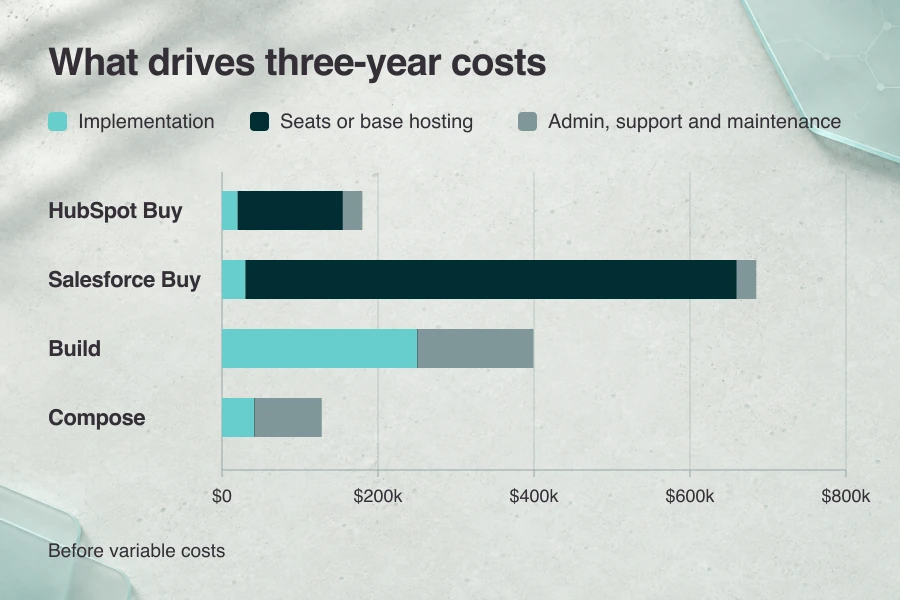
Our model puts the total cost of ownership for a US practice with 50 staff at $180,000–$685,000 across the two Buy cases, about $400,000 for Build, and about $128,000 for Compose. Those totals include implementation and 36 months of operation. Every case covers the same outreach, intake, and referral workflows, access and audit controls, and one authorized read-only EHR connection (vendor rates checked November 9, 2026).
| Cost | Buy (HubSpot to Salesforce) | Build from scratch | Compose with Specode Pro |
|---|---|---|---|
| Implementation through launch | $20,000–$30,000 | $250,000 | $41,000 ($35,000 staff time + $6,000 Pro) |
| Seats or base hosting (36 months) | $135,000–$630,000 | $900 | $900 |
| Admin, support, and maintenance (36 months) | $25,000 | $148,500 | $86,000 ($50,000 labor + $36,000 Pro) |
| Three-year base total | $180,000–$685,000 | $399,400 | $127,900 |
Buy
With per-user licensing, HubSpot Enterprise seat pricing starts at $75 per Core Seat per month on standalone Smart CRM Enterprise ($135,000 for 50 seats over 36 months). Salesforce Health Cloud pricing lists Sales & Service Core at $350 per user per month, billed annually ($630,000). Both include hosting and support. The HubSpot case uses staff-led outreach.
For example, eligible HubSpot Smart CRM Enterprise accounts can use permitted PHI in designated forms, sensitive fields, and one-to-one CRM email after you enable Sensitive Data for HIPAA and accept the BAA. Salesforce lists Health Cloud as a service its BAA can cover. Whichever CRM you shortlist, confirm the seats in your quote and ask the vendor which features and connectors your signed BAA covers. Test the EHR access your workflow needs.
At $100/hour, the HubSpot rollout budgets 200 hours for $20,000 (78 practice, 72 setup, 50 training). Salesforce budgets 300 hours for $30,000. That includes 172 setup hours for configuration, mapping, and testing, plus the same practice and training hours. Both assume one clean import and a supported read-only connector. Use a vendor quote in place of any labor it covers.
Three hours of admin and support per week across 48 weeks a year gives 432 hours over three years. At $58/hour in employer compensation, $25,056 rounds to $25,000.
Build
How much does it cost to build a CRM? The modeled custom CRM development cost through launch is $250,000. Budget 15% of implementation per year for maintenance ($37,500), plus $1,000 per month for admin and staff support. That’s $148,500 over three years, or 41.25 hours per month at a modeled $100/hour. Build and Compose each use one $25/month developer seat under Convex Professional pricing for $900 over 36 months. The plan offers a BAA.
Compose
The Compose case budgets one team member for five hours a day, five days a week, for 24 weeks. At $58/hour, 600 hours cost $34,800, rounded to $35,000. Six months of Pro at $1,000/month add $6,000 through launch. One Pro subscription covers the builder’s work on the CRM and EHR connection.
After launch, six hours weekly for 48 weeks a year gives 864 hours over three years. At $58/hour, $50,112 rounds to $50,000. Keeping Pro for edits and publishing adds $36,000 over 36 months.
Rates and seats stay constant. Budget separately for connector and EHR access fees, metered usage, third-party services such as PHI email, and extra Specode credits. Base totals exclude taxes, financing, the existing EHR subscription, domain registration, and unmodeled opportunity cost. Include telehealth only if every route needs it.
Outside the model, RovingCRM setup pricing lists Multi-Location at $1,800/month with unlimited users and setup from $18,000. Healthie Enterprise onboarding includes an implementation manager and two standard imports at Core. Specode Custom offers a team-led build for deeper integrations with project-specific pricing. See also HIPAA-compliant app development cost.
How do you choose the best CRM for healthcare?
Score each CRM proposal against the same seven questions and shortlist the highest-scoring route that clears your PHI and EHR checks. For healthcare organizations with proposals in hand, this is a five-minute first pass.
Score Buy, Build, and Compose separately on the same workflow, such as referral intake and follow-up. Give a 0 if the route falls short or you lack enough evidence. Give a 1 if a fix you’ve budgeted makes it workable. Give a 2 if you’ve verified the fit. Each route can score up to 14.
Put a proposal on hold if permission to handle PHI is unresolved or a required EHR connection is unproven, regardless of its score.
- Workflow fit. Can the CRM handle outreach, intake, and referral follow-up with the roles your practice needs? Check who owns the next step when a referral comes in with missing information.
- PHI and BAA scope. Do the applicable BAAs cover the services handling PHI and how you plan to use them? Trace where PHI goes and name who owns your organization’s safeguards.
- EHR integration. Has the team demonstrated the EHR operations your workflow requires with approved access? Check required reads and writes, plus how staff reconcile records when the systems disagree.
- Launch date. Can this option go live by your deadline? Count procurement, EHR access, validation, and staff rollout alongside setup or development.
- Operating owner. Who will keep the CRM running after launch? Name who handles access reviews, workflow changes, integration failures, and security patches.
- Three-year cost. Can your budget cover launch and three years of operation? Use realistic staff usage, support effort, and integration costs for each proposal.
- Exit. Can you get the records, history, and workflow configuration you’ll need if you switch? Check the export format and your rights to any app code.
Before you choose, check the biggest cost assumption in the leading proposal. If eligible routes tie, test the workflow step you’re least certain about.
Which healthcare CRM features matter across all three paths?
Whether you buy, build, or compose a CRM, look for referral tracking, intake and consent records, appointment reminders tied to the current schedule, and access and audit controls. Test who acts at each step, which fields they need, and where the official record lives.
CRM for healthcare providers: a minimum feature set
- Referral management. Show coordinators each referral’s status and who should follow up.
- Intake and consent management. Show intake staff which forms are missing and what consent is on file. Keep signed records in the designated intake system.
- Scheduling and appointment reminders. Use the scheduling system’s current booking status to send reminders through the patient’s permitted contact channel.
- Role-based access and audit logs. Limit staff access to the records they need and verify the logs show who viewed or changed them. These features support the access and audit safeguards described in the HHS Security Rule summary.
If your goal is fewer no-shows, track the rate before and after rollout. Limit marketing automation to the audiences and data fields you’re permitted to use.
What should you verify before connecting a CRM to clinical systems?
Before connecting a CRM to a clinical system, confirm which system owns each record, which fields can move, and in which direction. Test each connection with your organization’s approved access and make sure staff can recover from a failed update.
In a HIPAA-covered workflow, a name linked to a referral, visit, or payment can be PHI. Check what each connected service is allowed to receive before enabling the sync.
- EHR integration. Check the deployed EHR’s FHIR CapabilityStatement for supported resources and operations. The ONC standardized API criterion covers authorized reads. Test any write your workflow requires separately. After sandbox testing, confirm that the endpoint, permission scopes, and field mappings work in your organization’s environment. Try a case where the CRM finds two plausible patient matches.
- Scheduling. Reschedule and then cancel a test appointment in the scheduling system. Confirm both updates reach the right CRM record. If you connect a medical referral system, verify that the status change reaches the correct referral and the coordinator sees the follow-up task.
- Telehealth. Use a test appointment to confirm the authorized patient and provider get the right visit link. Verify that the expected visit status reaches the CRM if staff use it for follow-up.
- Billing. Send only the billing reference and status the CRM needs, such as whether a payment posted. Replay the event and check that it updates the same record only once.
- Messaging. Simulate a delivery failure. Confirm the failure reaches the CRM and that the staff member responsible can retry or take over through an approved channel.
For each connection, test that retrying a failed update leaves one correct record. Assign who fixes sync failures, reconciles mismatched records, and reviews the audit logs. The ONC SAFER guides cover EHR interface validation and maintenance.

How do you switch from a generic CRM?
Move off a generic CRM by testing what you can export, deciding which PHI to move or retain, and running both systems in parallel. Switch when staff can find each open referral’s owner, status, and history in the new CRM.
Test the export
Inventory fields, record IDs, relationships, consent history, activity, and attachments. The Salesforce data export instructions show how to include files and attachments. The HubSpot records export instructions cover current field values and associations, with separate options for notes and calls (vendor docs checked November 9, 2026). Check your edition, export permissions, and file formats.
Reconcile records and clean up PHI
Map the fields in a representative export to the new CRM, then import it. Compare record counts and follow a few referrals to make sure their forms, consent history, and attachments still link correctly. Limit access to export files and verify applicable BAAs for services handling PHI. Use your approved retention rules to decide what to migrate, archive, or securely delete, including temporary exports and copies left in the old system.
Run both CRMs before cutover
Have staff record live changes in the old CRM while they check the same workflow in the new one. At cutover, pause edits, reconcile the last changes, then move staff updates to the new CRM. Rehearse rollback, including how you’ll recover updates made after the switch.
Before you sign, check data rights, usable exports, and code portability separately. Each can contribute to vendor lock-in. If you’re also replacing the app’s underlying platform, see how to migrate to a HIPAA-compliant stack.
How can Specode help?
When your referral workflow needs custom routing, you can compose a responsive web CRM with Specode. You own the app code you create with Specode and can export it to keep developing it elsewhere.
Describe the screens, workflows, data model, permissions, and integrations in plain English. Specode’s AI follows healthcare playbooks for intake and scheduling. With Specode’s MCP, you can build or refine the CRM from Codex or Claude Code.
Specode’s HIPAA Agent can scan the app code for potential issues before launch. Address any findings and rerun the scan.
With Specode Pro, publish from the builder to your own Convex account and sign the backend hosting BAA directly with Convex. Your team handles production setup, risk analysis, validation, and app safeguards. Verify applicable BAAs for connected services that handle PHI.
For the demo, bring one referral or intake workflow you want your custom healthcare CRM to handle. Tell us what the CRM needs from the EHR and which staff roles need access.
Frequently asked questions
Seat prices can flip the answer. In the November 2026 model for 50 staff, three-year base costs are $180,000–$685,000 to buy and $399,400 to build from scratch. Workflow scope and variable fees also matter.
The November 2026 model budgets $250,000 to launch a scratch-built CRM for 50 staff with one authorized read-only EHR connection. Implementation plus 36 months of operation totals $399,400 before metered usage and third-party fees.
Salesforce Health Cloud can handle PHI within a signed BAA’s scope. On eligible HubSpot Enterprise accounts, enable Sensitive Data for HIPAA and accept the BAA. Verify which tools are covered (vendor terms checked November 9, 2026).
The November 2026 scratch-build model assumes 10 months to launch. Three staff at 40 hours a week each provide 2,700 hours of work in 22.5 weeks. Procurement, EHR access, security review, migration, and rollout can affect the calendar.
Yes, if your contract lets you take the data and you can get a usable export. Verify fields, relationships, consent and activity history, and attachments. Reconcile a sample in the new CRM and plan the cutover.
A healthcare CRM helps staff manage outreach, intake, and referral follow-up. An EHR holds the patient’s clinical record over time, including diagnoses and treatment notes. A practice can use the CRM alongside its EHR for coordination.