How to Launch a Medical Referral System: A Step-by-Step Implementation Guide for Healthcare Organizations

Building a medical referral system is easy to underestimate—until you watch referrals fall into the black hole between “we sent it” and “the patient was seen.” That gap shows up as delayed specialty care, duplicate work, frustrated staff, and patients who simply give up.
This guide breaks down what a referral management system actually includes, what “closed-loop” means in practice, which features matter (and which are just shiny demos), how integrations typically work, and how to measure ROI without hand-wavy math.
If you’re still living in fax-land, don’t worry—many orgs are. The point is to get you to a workflow that’s trackable, auditable, and boringly reliable.
Quick Question: How to launch a medical referral system?
Quick Answer: To launch a medical referral management system, treat referrals as a measurable workflow: define “closed-loop” (scheduled, seen, results returned), pick software that can enforce statuses and ownership, then integrate it bidirectionally with your EHR so the referral doesn’t become “another inbox.” Pilot with one high-volume specialty, instrument KPIs (time-to-schedule, completion, consult-note return, leakage), and iterate weekly until the workflow is boringly reliable.
Key Takeaways
- “Closed-loop” is the whole point: a referral isn’t done when it’s sent; it’s done when the patient is seen and the outcome returns to the referrer.
- Integrations decide whether you modernize or just digitize chaos—bidirectional updates and a single source of truth beat pretty dashboards.
- Measure success weekly with a small KPI set (cycle time, completion, consult-note return, leakage, staff touches), then optimize the top bottleneck first.
What Is a Medical Referral Management System?
A medical referral management system is a healthcare IT platform that automates, tracks, and optimizes the process of referring patients from primary care providers to specialists or other healthcare facilities—while preserving context, accountability, and follow-through.
It replaces manual, fax-based workflows with digital workflows featuring real-time tracking, bi-directional communication, EHR integration, and analytics to reduce referral leakage, improve care coordination, and enhance patient access to specialty care.
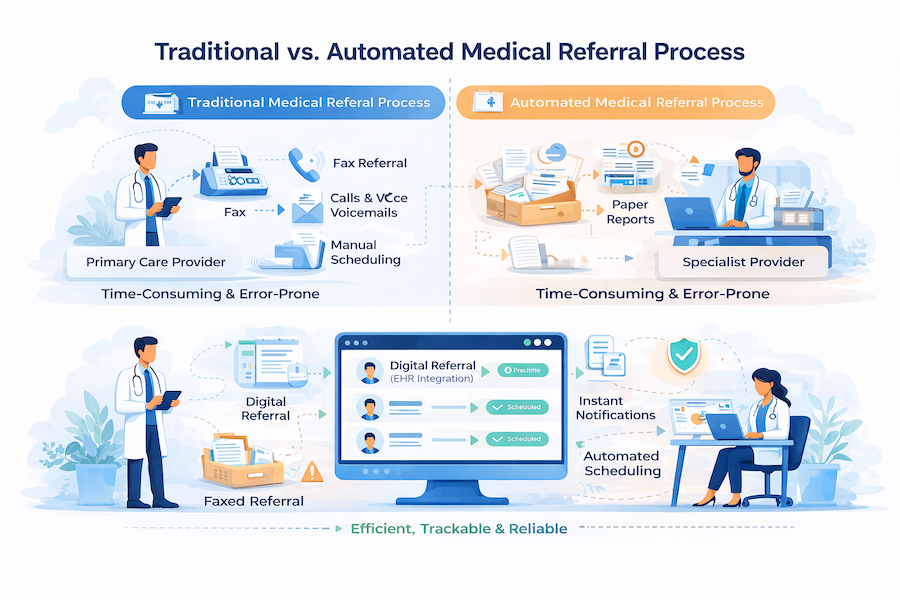
In a modern, cloud-based setup, it’s a tracked, auditable process with clear ownership at every handoff.
At a minimum, a referral system handles two directions:
- Inbound referrals: your organization receives a request to see a patient.
- Outbound referrals: your clinicians send a patient to an outside specialist or facility.
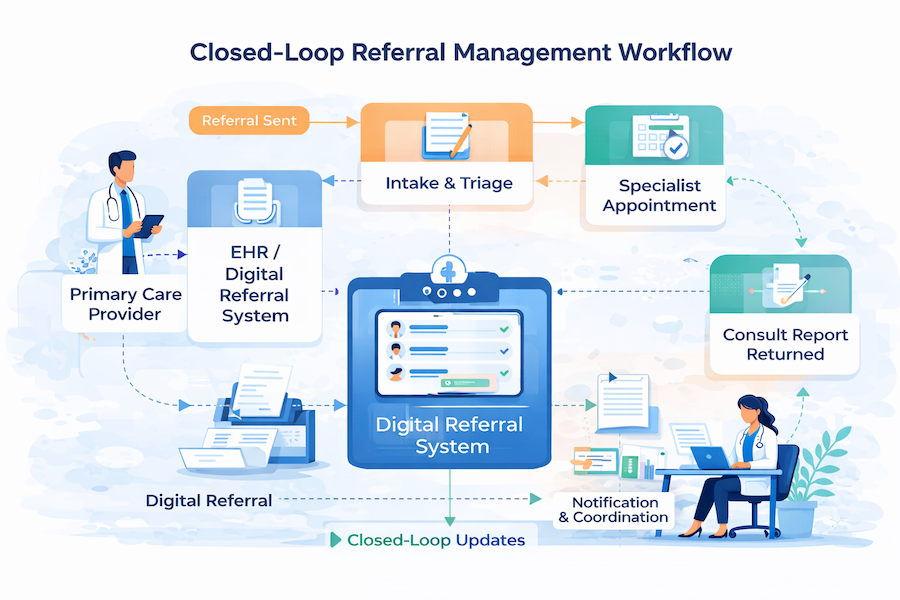
What makes it “management,” not just “sending,” is the closed-loop referral expectation: the referral doesn’t end when it’s submitted—it ends when the patient is scheduled, seen, and the results make it back.
Core components usually include:
- A referral portal (intake for inbound/outbound requests, sometimes provider + patient-facing)
- A tracking dashboard showing referral status (new → missing info → scheduled → completed)
- Communication tools for secure messaging and bi-directional coordination
- Document exchange for attachments and consult reports
- Analytics for referral analytics and referral metrics (leakage, cycle times, completion rates)
Referral Management vs. Patient Scheduling
Scheduling is one event (booking an appointment). Referral management is the full workflow around it: intake, required clinical docs, routing rules, authorization, status tracking, communication, loop closure (results back to the referrer), and analytics. If you only “fix scheduling,” you still lose referrals to missing info, no-shows, and unreturned consult notes.
Referral Leakage vs. Referral Denial
Leakage is a network/workflow failure (the patient never completes the referral in-network—often because nobody followed up, the handoff was messy, or access was slow). Denial is a coverage/payer decision (the referral or service is rejected or requires prior auth/medical necessity support). One is solved by visibility + ops; the other is solved by documentation + utilization management.
Why this matters: fax-based referrals break down under scale—poor visibility, repeated data entry, missing documentation, and delayed follow-up. In digital health, the referral is not paperwork; it’s a clinical workflow that either completes… or quietly leaks.
Why Healthcare Organizations Need Medical Referral Systems
A healthcare referral management system stops referrals from behaving like “somebody else’s problem” and forces them to behave like a measurable workflow inside your enterprise stack—because the real cost shows up in missed care, wasted effort, and lost revenue, not in the line item for software.
The scale alone justifies tightening the process: one nationally representative analysis found ambulatory physician visits resulting in referrals reached 105 million annually by 2009 (Barnett et al., Archives of Internal Medicine / JAMA Internal Medicine, 2012). When that many handoffs exist, even small drop-offs become systemic failure.
And the drop-offs are not small. In one Epic-based health-system study (103,737 referral scheduling attempts), only 34.8% were documented as a completed specialist appointment with results available back to the PCP, while 38.9% had no documented status or appointment ever scheduled (Patel et al., Journal of General Internal Medicine, 2018). That gap is exactly what “closed-loop” is trying to fix: not just “the patient got seen,” but “the referring clinician got the outcome.”
Meanwhile, patients are waiting. Average new-patient appointment wait time across six specialties was reported at 31 days, up 19% since 2022 (AMN Healthcare / Merritt Hawkins, 2025 Survey of Physician Appointment Wait Times, May 27, 2025). In a value-based care world, delays don’t just annoy people—they compound risk.
Operationally, referrals are still shockingly analog. MGMA reported 89% of healthcare organizations still use fax machines, often for referrals and record sharing (MGMA Stat poll, Nov 2019). Fax-first workflows create pure administrative burden: duplicate data entry, missing documents, and endless “did you get it?” calls that clog clinics and frustrate patients.
And then there’s the money: Advisory Board data found only 55% of referral revenue stays in-network (so 45% leaks), costing an estimated $388M per health system per year (Advisory Board, Sept 26, 2024). That’s referral leakage turning into a strategic problem for healthcare delivery—and why healthcare IT keeps getting pulled into “access” conversations.
One more practical point: if your access strategy includes virtual services, referrals can’t be “fax-first.” Done right, telehealth integration becomes a pressure valve—routing patients faster to the right clinician, with tracking and documentation that doesn’t disappear the moment someone hits “send.”
Key Benefits of Implementing a Medical Referral System
Done right, patient referral management software pays off in five places—some obvious, some sneaky.
1) Operational Efficiency (where the hours come back)
Most gains come from eliminating rework: missing fields, status-chasing, duplicate data entry, and “did you get my fax?” follow-ups. In vendor-reported benchmarks, referrals managed digitally can save 21 minutes of staff time per referral (Phreesia reports). That’s not a “nice to have”—it’s straight-line capacity unlocked through workflow automation.
2) Financial Impact (the leakage plug)
Referral ops isn't just overhead; it's a revenue-control system. In one published case study, an East Coast nonprofit health system attributed $37M in downstream revenue to 37,000 additional in-network referrals captured in a single year (Clarify Health / AHA, 2024). The lever isn't more dashboards — it's optimization of routing, scheduling, and loop-closure so referrals actually convert.
3) Clinical Outcomes (faster handoffs, fewer blind spots)
When referral steps are tracked and standardized, the right clinician sees the right patient sooner, with the right context. The biggest clinical win is reliability: fewer dropped handoffs and fewer “no one owns this” moments.
4) Patient-Facing Benefits (less limbo, more clarity)
Better patient access is often just fewer dead ends: confirmed scheduling, automated reminders, and clear next steps. That’s how you improve patient experience without asking your front desk to become a call center.
5) Visibility (turn chaos into measurable improvement)
Good systems expose bottlenecks by specialty, clinic, payer, or location—so you can actually run performance analytics and tie improvements to ROI measurement, not vibes.
And yes—none of this matters if you can’t deploy it as HIPAA compliant software.
Types of Medical Referral Management Systems
There isn’t one “best” referral management platform—there are a few system shapes, and the right one depends on where your bottlenecks live.
1) Standalone Referral Platforms (best for speed + visibility)
Good when you need clean workflows, status tracking, and communications without waiting on a big EHR project. Often the fastest path to consistent handoffs across primary care providers and downstream teams.
2) EHR-Native Referral Modules (best for tight chart workflows)
These live inside the EHR and can feel “one less system.” Great for documentation-heavy flows, but may be limited when you need network-wide coordination across multiple referring physicians and locations.
3) Cloud-Based vs. On-Premise (best for governance realities)
referral management platformoptions tend to move faster (updates, scalability, remote access). On-premise is usually chosen for legacy constraints or specific risk postures—not because it’s more fun.
4) Specialty-Specific Systems (best for unique workflows)
Some teams need purpose-built tooling for behavioral health, dental, imaging, etc., where rules, forms, and turnaround expectations differ across specialty care.
5) Practice-Level vs. Enterprise-Wide (best for scale)
An enterprise rollout standardizes routing, directories, and reporting across service lines, including coordination with external specialty providers.
When off-the-shelf doesn’t fit the workflow, that’s when custom healthcare software development becomes the pragmatic option.
Essential Features of an Effective Medical Referral System
If you’re evaluating an electronic referral system, don’t start with the UI. Start with whether it can reliably move a patient from “referred” to “seen” and get the consult outcome back where it belongs—without staff doing detective work.
Here’s the feature checklist that actually matters:
- Bi-directional communication
Two-way messaging across the referral loop: provider-to-provider and provider-to-patient, with clear ownership and escalation paths for “stuck” cases. - Status visibility with real-time tracking
A single source of truth for every referral: received, accepted, scheduled, completed, consult returned—plus timestamps so you can spot bottlenecks. - System-to-system integration
Interfaces to EHR and practice management tools (HL7/FHIR/API), so demographics, orders, notes, and outcomes aren’t retyped or copy-pasted. - Automated patient scheduling
Slot selection, confirmations, reminders, and rescheduling flows that reduce back-and-forth and prevent “referral sent, patient never booked.” - Secure document exchange + referral documentation
Attachments, templates, required fields, and audit trails—so the receiving side gets what they need the first time. - Operational workflows for referral processing
Work queues, assignment rules, routing logic, and exception handling (missing info, wrong specialty, payer constraints, patient unreachable). - Automation that removes manual steps
Rules and triggers for nudges, follow-ups, incomplete data prompts, and loop-closure requests—this is the practical core of referral automation. - Scheduling outcomes and capacity signals
Waitlists, overflow routing, and network visibility that supports appointment scheduling when the “first choice” specialist is overloaded. - Analytics and reporting dashboards
Completion rates, time-to-appointment, leakage signals, consult return rate, and user adoption—so improvements are measurable, not anecdotal. - Mobile-friendly access
Lightweight actions on the go (approve, request info, message, schedule), especially for clinics that don’t live in a desktop EHR all day. - AI assist where it earns its keep
Automated extraction from faxes/PDFs and structured intake—useful only if it reduces incomplete referrals, not if it creates new cleanup work.
How to Choose the Right Medical Referral Management Software
Choosing healthcare referral software isn’t a beauty contest—it’s an implementation risk decision. You’re buying workflow discipline, interoperability, and accountability for patient information across handoffs.
Evaluation Criteria
- Integration capabilities: Start with what must sync with your EHR/PMS and how (FHIR/HL7/Direct/API). If your referral flow still involves fax, prioritize strong fax/OCR intake to avoid manual re-keying. ReferralMD and Phreesia both emphasize digitizing paper/e-fax into structured workflows.
- Scalability: Can the platform handle enterprise growth (locations, service lines, high referral volume) without breaking reporting, routing, or permissions? Phreesia positions itself for large-scale multi-system environments.
- Vendor reputation + healthcare expertise: Look for proof of healthcare-grade controls (SOC 2 / HITRUST where relevant) and credible outcomes claims (not just “we reduce leakage”).
- Implementation support + training: Ask what’s included vs paid services: interface build, workflow design, onboarding, and go-live support. Netsmart highlights professional services for setup (at least for its time-bound offer).
- Pricing model fit: Expect subscriptions, site licenses, or “flat monthly fee” structures—some vendors are explicit, many are not.
- HIPAA + security certifications: Don’t accept “HIPAA-compliant” as a vibe—ask for audit reports/certifications and how data is handled (cloud store vs pass-thru vs on-prem archive).
- User experience (staff + patients): Staff need a single work queue and fewer clicks; patients need frictionless scheduling + reminders.
- Support + SLAs: Escalation paths, uptime commitments, and response times should be contractually explicit (especially in enterprise deployments).
- Analytics + reporting: At minimum: referral conversion, time-to-schedule, leakage, bottlenecks, staff throughput; ideally segmented by service line and location.
Comparison Table: Leading Platforms (high-level differentiators)
Pre-Implementation Planning: What to Do Before Launch
Before you pick a referral management solution, get painfully clear on what you’re actually fixing—otherwise you’ll “go live” and discover you just digitized the same chaos.
- Map the current-state workflow (end to end). Trace how referrals enter, get triaged, scheduled, completed, and closed. Include every handoff and workaround (fax/email/phone), and where medical records get copied or re-entered.
- Document pain points and inefficiencies. Quantify delays (time-to-schedule), fallout (no-shows, missing info), and leakage (out-of-network drift). Call out where patient data gets stuck in someone’s inbox.
- Identify stakeholders early. You need buy-in from referring providers, specialists, care coordinators, IT, compliance, and front-desk staff—because those are the people who will enforce the new operating rules with real patients and healthcare providers.
- Define success metrics + KPIs. Pick 5–7 measures tied to outcomes: time-to-accept, time-to-schedule, completion rate, leakage rate, staff touches per referral, and patient satisfaction. Build in referral monitoring from day one.
- Assess infrastructure readiness. Confirm SSO, identity/roles, audit logging, and integration paths—especially if you’ll exchange data using HL7 FHIR or legacy interfaces.
- Budget the whole program. Don’t stop at licenses: implementation services, training, change management, integration, and ongoing support are where budgets quietly go to die.
- Create a milestone timeline + governance. Assign an executive sponsor, a day-to-day owner, and decision rights for workflow changes, referral communication rules, and patient engagement touchpoints.
- Finalize vendor selection + contracts. Negotiate SLAs (uptime, response times, escalation) and make sure the technology roadmap aligns with your next 12–18 months—not just your demo day.
Step-by-Step Implementation Process for Medical Referral Systems
Step 1: System Configuration and Customization
Start by configuring the digital referral system to match how referrals actually move through your org (service lines, urgency, internal vs external), then lock it down with roles, statuses, and alerts before anyone touches production.
- Configure referral types and categories (specialty, urgency, service line, internal vs external)
- Set up user roles and permissions (least-privilege access, role-based queues)
- Customize workflows and status tracking (accepted → scheduled → completed → closed loop)
- Configure notification rules and alerts (missing info, stalled referrals, urgent escalations)
- Brand the portal with your organization identity (so it feels like yours, not a vendor tab)
Step 2: EHR and Technical Integration
- Build HL7/FHIR interfaces for orders, demographics, and updates
- Connect APIs to practice management systems (scheduling, eligibility, payer fields if needed)
- Complete data mapping and field configuration (diagnosis, reason for referral, attachments)
- Set up SSO (reduce logins, tighten access control)
- Test interfaces in a sandbox environment (then test again with real edge cases)
Step 3: Data Migration and Provider Onboarding
- Import existing provider directories (internal + community)
- Load specialty and location network information
- Configure referral network relationships (who can refer to whom, rules by payer/site)
- Validate data accuracy (duplicates, outdated addresses, wrong specialties)
- Create referring-provider accounts and onboarding flows
Step 4: Workflow Redesign and Process Mapping
- Map the “future-state” referral workflow (by service line, not one-size-fits-all)
- Identify handoff points (front desk → coordinator → specialist office)
- Define staff responsibilities (ownership at each status)
- Create standard operating procedures (SOPs + exception handling)
- Document escalation protocols (urgent clinical, missing documents, non-response)
Step 5: Staff Training and Change Management
- Build role-based training programs (referrers, coordinators, specialists, admins)
- Run hands-on sessions using realistic scenarios (not “click next”)
- Create user guides and job aids (1-page “what to do when…”)
- Establish a super-user network (people others actually trust)
- Address resistance and build buy-in (show how workflow automation removes busywork)
Step 6: Pilot Testing with Limited User Group
- Select pilot departments/providers with enough volume to reveal problems
- Run parallel processes during pilot (old + new) to avoid dropped referrals
- Collect feedback and log issues (workflow, integration, training gaps)
- Make adjustments quickly (don’t “save it for phase 2”)
- Document lessons learned and finalize the go-live checklist
Step 7: Full Rollout and Go-Live
- Choose phased vs big-bang deployment based on complexity and risk tolerance
- Provide at-the-elbow support during go-live (floor support beats a helpdesk ticket)
- Monitor system performance and queues closely (stalls, routing errors, integrations)
- Fix issues in real time (and communicate changes clearly)
- Celebrate early wins (shorter time-to-schedule, fewer callbacks, cleaner handoffs in care transitions)
Step 8: Post-Launch Optimization and Monitoring
- Track adoption metrics (active users, referrals per user, time in each status)
- Monitor referral completion rates and closed-loop performance by service line
- Gather ongoing feedback (weekly for the first month, then monthly)
- Identify workflow bottlenecks (handoffs, missing info, network gaps)
- Implement continuous improvements (small releases > “big redesign”)
- Hold regular vendor check-ins (integration health, roadmap, SLA performance)
Integration Requirements: Connecting Your Medical Referral System
A referral tracking system is only as “closed-loop” as its integrations. If the referral exists in one place, the appointment in another, and the outcome note in a third… congrats, you reinvented the fax machine with extra steps.
EHR Integration Standards (HL7 v2, CDA, FHIR).
- HL7 v2 is still common for ADT (patient demographics), orders, and results-style messages.
- CDA shows up for document exchange (continuity-style summaries and attachments).
- FHIR is the modern workhorse for resources like Patient, Practitioner, ServiceRequest, Appointment, and DocumentReference—especially when you need structured data, search, and cleaner API integration patterns.
Bidirectional Data Flow Requirements
You need “there” and “back”: referral creation outbound, scheduling/acceptance updates inbound, plus completion/consult note signals to close the loop. Define the source of truth per field (patient demographics, provider directory, appointment status) to prevent overwrites.
Real-Time vs Batch.
Use real-time for status changes, scheduling, and alerts. Use batch for directory sync, historical backfill, and reconciliation (e.g., nightly “what changed?” jobs).
API Architecture Considerations
Prefer event-driven patterns where possible (webhooks / queue-based processing) with idempotency, retries, and audit logs. If you’re bridging legacy feeds to FHIR endpoints, make the mapping explicit and versioned.
Direct Messaging Integration
Direct can cover secure document exchange with external partners that aren’t ready for FHIR. Treat it as document-first: good for attachments, weaker for workflow state.
Patient Matching Algorithms
At minimum: deterministic matching (MRN + DOB). In mixed networks and health information exchange contexts, add probabilistic scoring (name, DOB, address, phone) with manual review thresholds.
Data Synchronization and Interoperability Testing
Define sync cadence, conflict rules, and reconciliation reports. Run test scripts against your interoperability standards: edge cases, duplicates, downtime, latency, and rollback. Validate not just “message sent,” but “workflow updated correctly”—that’s the whole point of EHR integration and interoperability in the first place.
Section 10: Workflow Optimization Strategies After Launch
After go-live, your patient referral tracking software becomes a microscope: it will show you exactly where referrals stall—and which “urgent” requests mysteriously take three business days to get looked at.
- Find bottlenecks fast. Review queue aging, time-to-accept, time-to-schedule, and time-to-close by specialty, location, and coordinator. Then fix the top 1–2 choke points before you touch anything else.
- Automate repetitive work. Auto-route by specialty, payer, location, and urgency. Trigger reminders when a referral sits untouched, and auto-request missing documents instead of relying on phone-tag.
- Streamline communication pathways. Replace “reply-all” chaos with structured updates tied to the referral record: ask-for-more-info, appointment confirmed, consult completed. Less noise, fewer lost threads.
- Reduce manual data entry. Push demographics and insurance from upstream systems; pull appointment statuses back. When staff must type, use templates and required fields to prevent incomplete referrals.
- Enable patient self-scheduling where appropriate. Offer scheduling links or embedded options for high-volume specialties—then track conversion and no-show impact.
- Optimize specialist network utilization. Monitor capacity and turnaround times; reroute overflow to equivalent in-network options with agreed rules.
- Create specialty-specific protocols. Different specialties need different prerequisites (labs, imaging, prior auth). Bake those into referral checklists.
- Establish feedback loops. Weekly huddles for 30 days post-launch, then monthly: review metrics, capture frontline pain, ship small workflow improvements continuously.
Measuring Success: KPIs and Analytics
If you can’t measure it weekly, you can’t improve it monthly. The goal of your analytics stack is to make referral performance visible by specialty, location, and referral source—not just “total volume.”
Core Outcomes to Track (define targets upfront):
- Referral completion rate: % of referrals that result in booked and attended specialist appointments (separate “scheduled” vs “completed”).
- Time to specialist appointment: median days from referral created → appointment date (trend by specialty).
- Consult report return rate: % of completed visits with consult note received and linked back to the referring clinician.
- Staff time per referral: touches per referral + minutes spent (great proxy for operational friction).
- Patient satisfaction: CSAT/NPS specific to referral journey (clarity, speed, communication).
- Referral leakage reduction: % kept in-network (also track “avoidable leakage” causes).
- Network retention rate: repeat referrals to the same in-network specialists over time (signals trust + capacity).
- Revenue capture: downstream revenue attributed to completed referrals (use conservative attribution rules).
- Provider satisfaction: quick pulse surveys for referrers + coordinators (monthly at first).
- System adoption rate: active users / eligible users, plus referrals created per user.
Dashboard Examples (keep it boring and useful):
- Executive view: leakage, completion, time-to-appointment, revenue capture.
- Operations view: queue aging, bottlenecks, touch counts, SLA breaches.
- Service line view: completion + wait times by specialty/provider, capacity hotspots.
- Quality view: consult note return, closed-loop rate, exceptions.
Reporting Best Practices
- Use a single source of truth per metric, document definitions, and trend weekly.
- Segment everything (specialty, site, payer, referral reason).
- Alert on thresholds (stalled referrals, missing consult notes, overdue statuses).
Common Implementation Challenges and How to Overcome Them
Most implementations don’t fail because the referral coordination software is “bad.” They fail because humans and integrations behave exactly as expected: messy, rushed, and allergic to change.
Staff resistance to workflow changes → Fix: Engage early (intake, schedulers, coordinators), demo concrete time savings (“one queue, fewer callbacks”), and recruit champions who can translate policy into practice.
Poor EHR integration → Fix: Do technical planning upfront, assign dedicated IT bandwidth, and treat the vendor like a partner (joint test scripts, clear owners, rollback plan).
Example (NYC Health + Hospitals): After implementing an enterprise eConsult model, NYC H+H improved referral throughput: the fraction of referrals successfully scheduled increased from 66.5% to 82.3%, and average specialty wait time decreased from 61.0 to 52.8 days; 13% of requests were resolved without an in-person visit.
Low referring provider adoption → Fix: Make it faster than the old habit. Fewer clicks, defaults, templates, and status visibility that answers “did it go through?”
Data quality issues → Fix: Validation rules, routine audits, and provider directory ownership (someone must maintain it).
Incomplete referrals → Fix: Required fields + automated reminders + coordinator quality checks.
Limited patient engagement → Fix: Multi-channel outreach (SMS/email/phone), mobile-friendly scheduling, and plain-language instructions.
Example (San Francisco Health Network): SFHN’s eReferral approach used structured templates and tighter triage workflows; in GI, median clinic wait time dropped from 158 days to 74 days after the intervention.
HIPAA Compliance and Security Considerations
In medical referral software, the fastest way to create “accidental PHI sprawl” is to treat referrals as messages instead of records. A referral packet typically includes identifiers plus clinical context (reason for referral, problems, meds, labs, imaging). That’s PHI the moment it’s tied to a person—so treat referral workflows like you treat chart access: scoped, logged, and reviewable.
What actually matters in vendor due diligence:
- BAA scope and subcontractors: your BAA should explicitly cover referral intake, document exchange, notifications, analytics, and any AI features if present. Ask for the subcontractor list (and whether they sign downstream BAAs) and the data-flow diagram—no diagram, no deal.
- Encryption (in transit + at rest): require modern TLS for all traffic, encryption at rest for databases and object storage, and key management controls. If the vendor can’t explain their key model (KMS/HSM, rotation, access), that’s a governance gap, not a technical detail.
- Access controls + audit logging: role-based access is table stakes; the value is “prove it later.” You want immutable audit logs for read/write/export events, admin actions, permission changes, and failed auth attempts—with retention aligned to your policy.
- Breach response + notification: don’t accept a generic “we’ll notify you.” Pin down timelines, what triggers notification, and how they support investigation (log access, forensics, customer comms).
Finally: secure messaging should support least-privilege conversations, and consent + retention rules must be enforceable by configuration—because data security failures usually show up as policy drift that quietly undermines patient privacy.
Cost Analysis: What Does It Cost to Launch a Medical Referral System?
Launching a physician referral management system typically has 7 cost buckets:
- Software licensing: per-user, per-referral, or flat-rate (enterprise contracts often bundle modules + volume tiers).
- Implementation services: workflow design, templates, intake rules, testing, go-live support.
- Integration development: EHR connectivity + routing (expect this to be the schedule driver).
- Training + change management: role-based training, SOP updates, adoption monitoring.
- Ongoing support + maintenance: admin, upgrades, vendor support SLAs.
- Staff time during rollout: referral coordinators + clinic leads + IT time diverted to testing and cleanup.
- Hardware/infrastructure upgrades: usually minimal for cloud, but identity, networking, and device policies sometimes need tightening.
A practical ROI example uses two levers: leakage recapture + staff efficiency. If baseline referral completion/closure is poor (e.g., only 34.8% documented completion in a 103k-referral EMR study) [Patel et al., JGIM, 2018], improving closure and routing can translate into real retained downstream value.
Rule-of-thumb payoff language is reasonable when anchored to those levers: organizations see ROI within 6–12 months through reduced leakage and staff efficiency gains (payback depends on baseline leakage and referral volume).
Future Trends in Medical Referral Management
The next wave of clinical referral management is less about “digitizing the fax” and more about turning referrals into a routed, risk-scored work queue.
Expect AI-powered triage to pre-sort referrals (urgency, missing data, right specialty) and predictive analytics to flag patterns like high no-show risk or chronic bottlenecks. Prior auth won’t stay a separate mini-nightmare either—more workflows will push toward automated prior authorization integration (or at least pre-checks) as payers tighten rules.
On the front door, patient-directed referral requests will grow (portal-first demand + navigation tools). On the clinician side, telemedicine integration for eConsults will increasingly replace “wait 6 weeks for a visit” with asynchronous specialist input.
The genuinely valuable frontier: SDOH integration plus real-time network capacity visibility (who can see the patient now). And yes, blockchain for referral tracking will keep showing up—mostly as conference filler, not production reality.
How Specode Can Help Launch Your Medical Referral System
If your goal is to launch a referral workflow without hiring a full dev team first, Specode’s core advantage is that it lets non-developers create real healthcare apps by describing workflows in plain English—then iterating fast with an instant preview.
You can map the referral flow end-to-end: intake → required-field checks → triage/routing → scheduling handoff → loop closure. Specode is built for HIPAA-aligned deployment (with the usual real-world caveat: your configuration + your vendors still matter).
The “no lock-in” part is the kicker: Specode emphasizes full code ownership and code export, so you can self-host or hand the code to engineers later for deeper customization, integrations, or security hardening—without rewriting from scratch. That’s what makes it a practical path to specialist referral management.
Frequently asked questions
A medical referral management system is the workflow (and usually software) that moves a patient from a referring clinician to the right receiving clinician while tracking every handoff. It manages intake, required information, routing/triage, scheduling, document exchange, and status updates. The defining feature is closed-loop execution: the process isn’t complete until the appointment happens and results make it back to the referring team.
Typical timelines vary based on integration complexity and change management. A focused pilot can go live faster when workflows are narrow, templates are standardized, and integrations are minimal. Enterprise rollouts take longer because they require multi-site configuration, role/permission design, directory cleanup, and bidirectional EHR interfaces. The biggest schedule driver is usually integration build, testing, and workflow adoption—not software setup.
Costs are usually a mix of licensing plus “everything around it.” Expect software fees (per-user, per-referral, or enterprise flat-rate), implementation services, EHR/interface development, training and change management, and ongoing support. The hidden cost is staff time during rollout (testing, directory cleanup, workflow redesign). ROI typically comes from staff efficiency gains and reduced leakage, but payback depends on baseline volume and current failure rates.
Integration is usually a combination of interfaces and APIs that move key data in both directions: demographics, referral orders/requests, appointment status, and consult notes or documents. HL7 v2 is common for patient/order-style feeds, while FHIR is used for structured resources like ServiceRequest and Appointment. The practical goal is bidirectional workflow closure—updates must return to the referrer automatically, not via manual checking or phone calls.
Measure it with a small set of KPIs tied to outcomes, tracked weekly. Core metrics include referral completion rate (scheduled vs completed), time-to-accept, time-to-schedule, time-to-appointment, consult report return rate, leakage rate (in-network retention), and staff touches/minutes per referral. Add adoption (active users/eligible users) and segmented reporting by specialty/location so you can pinpoint bottlenecks and fix the biggest one first.
Yes, but it’s an integration and governance problem, not a checkbox. Multi-EHR environments require clear rules for identity management, patient matching, directory ownership, and which system is the source of truth for each data element. You’ll typically use a mix of standards (HL7 v2, FHIR, document exchange, sometimes Direct) plus interface engines and reconciliation reports. Expect extra testing for duplicates, merges, and inconsistent identifiers across systems.
A referral system must protect PHI with administrative, physical, and technical safeguards: encryption in transit and at rest, role-based access controls, and audit logging for access and changes. You also need Business Associate Agreements (BAAs) covering the vendor and relevant subcontractors, plus clear breach notification procedures and incident response support. Secure messaging and document exchange must be access-scoped and logged, because referral packets often contain identifiers plus clinical context.
They improve outcomes by reducing dropped handoffs and delays to specialty care. When referrals are tracked with clear ownership and statuses, patients are more likely to get scheduled and seen, and the referrer is more likely to receive consult results—supporting better follow-up and care continuity. Systems also enable faster triage and routing, reduce incomplete referrals through required fields, and improve communication so patients aren’t stuck in “referral limbo.”