HIPAA Compliant Payment Processing: What Every Healthcare Provider Needs to Know

Healthcare payments look deceptively simple until you realize your billing workflow is basically a PHI slip-and-slide. HIPAA compliant payment processing isn’t about finding a processor with a “healthcare” badge—it’s about designing a flow where PHI never enters receipts, invoice descriptors, dispute notes, screenshots, or support chats in the first place.
The ugly truth: your biggest risk isn’t encryption; it’s humans adding “helpful context” in the wrong text field and accidentally expanding your vendor chain overnight. This guide breaks down where PHI leaks, when a BAA matters, how to choose providers without falling for marketing fog, and how to operationalize guardrails (templates, roles, logging) so compliance doesn’t depend on everyone having a perfect day.
Quick Question: How do I accept patient payments without creating HIPAA risk?
Quick Answer: Use HIPAA compliant online payments by keeping PHI out of the payment layer: no diagnoses, visit types, or patient identifiers in invoices, receipts, descriptors, disputes, or processor “notes.” If PHI could be seen or stored by a vendor in your workflow, confirm BAA availability for that exact product and use case. Then enforce access controls, audit logs, and PHI-scrubbed templates.
Key takeaways:
- “Secure payments” (PCI) isn’t the same as HIPAA safety: HIPAA risk lives in the workflow surfaces around the transaction—receipts, messages, disputes, exports, and support.
- The best default is PHI-minimized architecture: tokens + amounts + internal reference IDs in the payment system, with all patient context staying inside your HIPAA-controlled app/portal.
- Don’t trust training alone: hard-code guardrails (templates, disabled free-text fields where possible, RBAC/MFA, audit logs, screenshot rules) so “oops” doesn’t become “incident.”
What Is a HIPAA-Compliant Payment Processor?
"HIPAA compliant payment processing refers to any payment system or workflow used by healthcare providers that handles Protected Health Information (PHI) in accordance with the Health Insurance Portability and Accountability Act of 1996. It requires end-to-end encryption, a signed Business Associate Agreement (BAA) with the payment processor, PCI DSS compliance, access controls, and audit logging wherever PHI touches financial data."
A “HIPAA-compliant payment processor” isn’t a magical Stripe alternative with a halo. It’s a payment setup where PHI either never enters the payment system or—if it must—every vendor that touches it is contractually and operationally ready to handle it (including signing a BAA where applicable), and you have controls to prove it.
That’s the real core of healthcare payment processing compliance: it’s less about the processor and more about the workflow, the contracts, and the evidence.
In practice, that means you’re solving two problems at once:
Problem A: Where PHI Shows Up (often by accident)
PHI tends to sneak into payment flows through completely “normal” operational behavior:
- The invoice description contains the service (“PTSD intake session”)
- Staff add notes to a chargeback response (“patient no-show due to relapse”)
- Receipts get emailed to a shared family inbox
- Payment links are embedded inside portal messages that include clinical context
None of this feels like a data breach while you’re doing it. That’s the point: payment workflows are PHI leak factories because humans use them to communicate—and the moment that happens, you’ve created HIPAA violations risk through ordinary behavior, not malicious intent.
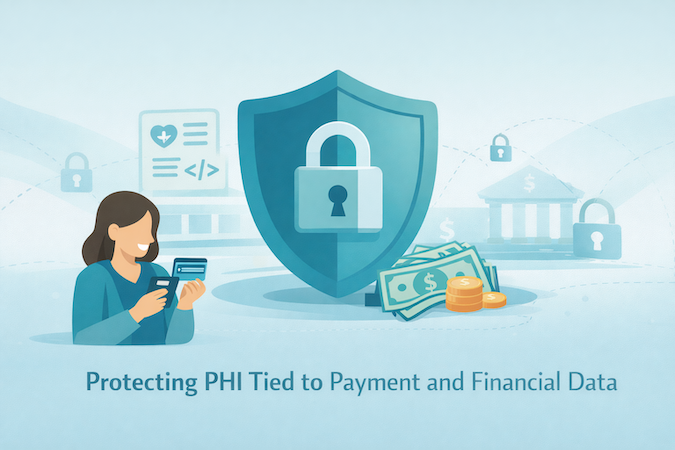
Problem B: Who Becomes a “HIPAA Vendor” the Moment PHI Leaks
The minute PHI enters a payment workflow, you may have expanded your HIPAA vendor chain to include:
- the processor,
- their dashboard/support tools,
- email/receipt delivery systems,
- analytics or logging tools attached to checkout,
- and any customer support ticketing system capturing payment issues.
The “HIPAA-compliant” part isn’t the processor’s marketing page. It’s your ability to say:
“Here is exactly what data we send, where it lives, who can access it, how it’s logged, and what contract covers it.”
That’s healthcare compliance in the only form that matters during an audit: specific, testable, and tied to data storage and access.
A Simple Definition You Can Actually Use
A payment setup is HIPAA-aligned when it meets these conditions:
- Data minimization: the payment system receives only what it needs (ideally no PHI, just amounts, tokens, and internal identifiers).
- Controlled surfaces: receipts, invoices, descriptors, refunds, and disputes are PHI-scrubbed by design (not by good intentions).
- Vendor accountability: if a vendor can “see” PHI, you confirm whether they offer a BAA and whether your use of their product is covered by it.
- Traceability: you can reconstruct who accessed what and when (audit trail + internal policies).
- Operational guardrails: staff can’t casually type clinical details into “notes” fields that get copied everywhere.
If that sounds like a threat model, good — because it is.
Why This Matters Now (even if you “only take payments”)
Healthcare payments aren’t just a checkout page anymore. They’re tied to recurring billing and subscriptions, portal-based patient communications, telehealth workflows, insurance + patient responsibility splits, and refunds/disputes that drag in context.
The more your workflow resembles a modern SaaS business, the more regulation and data protection risk concentrates in the “notes and messages” layer.
The punchline: your biggest HIPAA payment risk is rarely encryption. It’s workflow leakage—the casual operational layer that ends up stored, emailed, searchable forever, and painful to defend after the fact.
2. Why Standard Payment Processors Are Not Automatically HIPAA Compliant
A common mistake is assuming that “secure payments” equals “HIPAA-compliant payments.” They overlap, but they are not the same—HIPAA compliant credit card processing is about more than transaction security.
Most mainstream processors are built to handle financial transaction data safely. That is their job. HIPAA enters the picture when your payment workflow includes protected health information (PHI)—and in healthcare, PHI tends to creep into payment-related communication unless you design it out.
The Core Reason
A processor can run a card transaction without any clinical context. In real practice, teams often add context anyway—usually in the “helpful” fields that get copied, stored, emailed, and searched.
Common ways PHI shows up:
- Invoice descriptions that reference conditions, services, or care plans
- Free-text notes on payments, refunds, disputes, or chargebacks
- Portal messages that include clinical information and also contain payment links
- Email or SMS receipts that include visit details
- Support conversations that attach screenshots or patient identifiers
Once PHI appears in any of those places, the question changes from “Is my card data safe?” (think PCI DSS compliance) to “Which vendors can access PHI, and what agreements and controls cover that access?”
BAA Reality Check
HIPAA compliance is not something you bolt on with “we use encryption.” If a vendor is handling PHI as part of its services, you generally need a Business Associate Agreement (BAA) for that relationship. This is where many consumer-grade payment tools become a bad fit for healthcare workflows.
Not because they can’t move money, but because they may not be designed for (or contractually positioned for) PHI-bearing workflows like patient billing communications, invoice context, or dispute documentation—and that’s where patient data security gets tested.
Financial Transaction Data vs. Healthcare Workflow Data
Here’s the simplest mental model:
- Financial transaction data: amount, card token, authorization status, timestamps, basic payer info
- Healthcare workflow data: anything that links a person to care—diagnosis, treatment, appointment details, provider notes, clinical messages
Many teams start with a simple payment link and gradually add receipts, reminders, invoices, portal messaging, recurring billing, and internal notes. That’s when “payment processing” quietly turns into a PHI-handling workflow—and why a basic risk assessment is worth doing early.
Quick Sanity Check on the Terms People Love to Mash Together
- PHI vs. PII: PII identifies a person. PHI is anything that ties a person to care (diagnosis, visit type, treatment, even “therapy session” on a receipt). The danger zone is the linkage, not just the identifier.
- BAA vs. NDA: An NDA says “don’t disclose.” A BAA says “you’re handling PHI on my behalf” and spells out safeguards, permitted use, subcontractors, and breach reporting. An NDA doesn’t replace a BAA.
- PCI DSS vs. HIPAA: PCI protects card data. HIPAA protects PHI. You can be PCI-clean and still create HIPAA risk via receipts, notes, disputes, exports, and support tooling.
- Covered entities vs. business associates: Covered entities deliver/pay for care. Business associates are vendors that touch PHI for them—which is why BAAs exist in the first place.
The Practical Takeaway
The goal is not to find a mythical “HIPAA payment processor.” The goal is to design a payment workflow where:
- PHI is kept out of payment systems by default
- If PHI must be present, vendor coverage is explicit (including whether a BAA applies)
- Staff and systems have guardrails so clinical details don’t get typed into fields that spread everywhere
Key Requirements for HIPAA Compliant Payment Processing
Use this checklist to evaluate any “HIPAA compliant payment” claim, in the order that matters—especially when you’re choosing a HIPAA compliant payment gateway and the workflow wrapped around it.
A. Data Minimization and PHI Containment
This is the primary control. If you get this right, the rest gets easier.
Minimum requirements
- Keep all payment-facing text fields PHI-free by design (descriptors, receipts, disputes, notes).
- Use internal IDs instead of patient identifiers in the payment layer. Map IDs to patient records inside your HIPAA-controlled system.
- Store tokens, not card numbers. Let the processor handle card data storage and tokenization.
- Define “PHI red lines” for staff and systems: what must never be typed or pasted into payment tools.
Risk signals
- Staff can type free-text notes that get exported, emailed, or seen by vendor support.
- Receipts include visit names, provider names, clinic specialty, or anything that can reveal care context.
B. Vendor Accountability and BAA Handling
Minimum requirements
- Identify every vendor that can view, store, transmit, or support issues involving PHI in the payment workflow.
- Confirm whether each vendor will sign a Business Associate Agreement when required for your use case.
- Confirm that the BAA covers the exact product and workflow you are using, not a vague umbrella statement.
- Track subprocessors and where data is processed and stored, at least at a high level.
Risk signals
- “We are HIPAA compliant” marketing language with no clear BAA path.
- BAA is available only for certain products, tiers, or enterprise plans and you are not on them.
C. Security Controls That Matter in Payment Workflows
Baseline security still matters.
Minimum requirements
- data encryption in transit and at rest for any system that stores payment records and related metadata.
- Strong authentication with multi-factor authentication for admin access to payment dashboards and portals.
- Separation of duties: staff who reconcile payments do not need access to clinical notes, and clinicians do not need access to dispute tooling.
- Secure handling of receipts and notifications. Default to minimal content.
Risk signals
- Shared logins for payment dashboards.
- Payment exports emailed around as spreadsheets.
- Receipts and notifications include “helpful context” that is actually PHI.
D. Access Controls and Role-Based Permissioning
Minimum requirements
- Role-based access control for payment records, refunds, disputes, exports, and reporting.
- Least privilege by default, with explicit escalation paths.
- Session timeouts and device security expectations for staff machines.
Risk signals
- Every staff member can see full payer details, invoice history, and notes.
- Refund and dispute permissions are not controlled.
E. Audit Trails and Evidence You Can Produce
Minimum requirements
- Audit logs for access to payment records, exports, refunds, and edits to invoices or receipt templates.
- Traceability for who changed what and when, including settings changes.
- Retention policy for logs that matches your risk profile and operational needs.
Risk signals
- No record of who accessed payment history.
- No record of who edited invoice templates or receipt content.
F. Breach Response and Notification Readiness
Minimum requirements
- A documented incident response workflow that includes payment tooling, portals, and any receipt delivery systems.
- Vendor breach notification terms are understood and align with your obligations.
- A process for scoping exposure fast: what data, what users, what time window.
Risk signals
- You cannot quickly answer “what data was exposed” because metadata and logs are missing.
- Vendor notification timelines are vague.
G. PCI DSS Is Necessary, but Not Sufficient
PCI DSS (published by the PCI Security Standards Council (PCI SSC)) is required for card data, but you still need the PHI workflow controls above.
Minimum requirement
- PCI DSS compliance for card data handling, plus the HIPAA workflow controls above for everything around the transaction.
Quick Self-Test You Can Run in 60 Seconds
- If a patient asked for a receipt, would the receipt reveal anything about care?
- If a payer filed a chargeback, could your staff accidentally paste clinical context into the dispute portal?
- If you exported transactions for reconciliation, would any column contain patient identifiers or care context?
- If a vendor support rep asked for a screenshot, would your staff include PHI in it?
Any “yes” means your payment workflow is PHI-bearing and needs HIPAA governance (BAA + controls + logs) across the entire payment gateway + surrounding payment processing software surface.

Types of Healthcare Payment Workflows and HIPAA Risk
Below are the most common workflows and the PHI exposure points that typically appear in each one. Think of this as healthcare payment security HIPAA in the real world: the risk usually lives in the workflow surfaces around the transaction, not the transaction itself.
In-Person Point of Sale
What it looks like
A patient pays at the front desk using a terminal, kiosk, or a card-on-file flow.
Where PHI leaks
- The receipt includes visit type, provider name, specialty, or a service label that reveals care context.
- The terminal or POS system stores customer notes that staff use to remember details.
- Staff use the payment screen as a shortcut to document operational context that is actually health-related.
- Refund reasons and adjustments become narrative fields with sensitive context.
Safer default design
- Receipts are generic and contain only amounts, dates, and an internal reference number.
- No free-text fields in the payment tool, or a hard policy and UI guardrail that prevents PHI entry.
- Link payment records to patient records only through internal identifiers stored in your HIPAA-controlled system.
- Lock down terminals and treat card-present credit card processing as part of financial data security, not “front desk admin.”
Patient Portal Payments
What it looks like
Patients log into a patient portal, see balances, pay invoices, store payment methods, and receive messages.
Where PHI leaks
- Invoice line items reveal services, diagnoses, or therapy types.
- Portal messages mix billing and clinical communication in the same thread (now your patient billing thread is a clinical thread).
- Auto-generated reminders include visit or condition details.
- Analytics pixels or session recording tools capture page content that includes PHI—classic “silent” data breach territory.
Safer default design
- Separate clinical messaging from billing messaging, even if both are inside the portal.
- Invoice content is minimal and uses neutral labels where possible.
- Strict controls on third-party analytics, logging, and recordings on any page that might display PHI.
- Tokenized payments handled by the processor, with the portal storing only tokens and minimal metadata, behind a secure payment gateway.
Telehealth Payments
What it looks like
Payment occurs before, during, or after a virtual visit using links, pre-auth holds, or post-visit invoices.
Where PHI leaks
- Payment links are embedded in emails or texts that include visit details.
- Staff send payment links inside clinical communication channels with sensitive context.
- Disputes and refunds pull in visit notes, no-show reasons, and session details.
- Recorded support calls about billing contain PHI and end up in call recording systems.
Safer default design
- Payment links are sent in separate communications that contain no clinical details.
- Standard scripts for staff when discussing billing, including what not to say in writing.
- Dispute handling lives in a PHI-safe environment with restricted fields and templated responses; if you must transmit anything sensitive, use end-to-end encryption (not “attach a screenshot”).
Mobile App Payments
What it looks like
Patients pay in-app for memberships, sessions, digital payments, digital therapeutics, or add-on services.
Where PHI leaks
- In-app receipts or confirmation screens include program names that reveal conditions.
- Push notifications include sensitive context.
- Crash logs, analytics events, and error reports capture patient identifiers or screen content.
- Support chat inside the app mixes billing issues with health-related details.
Safer default design
- Push notifications are generic and do not reference care context.
- Analytics and crash reporting are configured to avoid capturing sensitive payloads.
- Billing support is separate from clinical support, with clear data boundaries.
Recurring Billing and Subscriptions
What it looks like
Patients are charged monthly for a therapy plan, remote monitoring, membership, or installment payments.
Where PHI leaks
- Subscription names appear on statements and receipts and can reveal care type.
- Failed payment notifications expose context when forwarded to family or employers.
- Staff add internal notes explaining pauses, discounts, or hardships that include sensitive details.
- Refunds and proration narratives include patient-specific health context.
Safer default design
- Neutral subscription descriptors.
- Failed payment flows that do not include visit type or condition.
- Hard rule that internal notes about health context live only in the HIPAA system, not the payment system.
Insurer-Side Billing and Patient Responsibility
What it looks like
Insurance billing is handled first, then the patient pays copays, deductibles, or remaining balances.
Where PHI leaks
- Explanation of benefits and statements include procedure codes and service descriptions that reveal care.
- Reconciliation exports combine claim details with payment details and get shared broadly across revenue cycle management teams.
- Collections and follow-up messages reference care context.
- Dispute flows require “proof” and staff attach documents or screenshots containing PHI.
Safer default design
- Keep claim details and payment processing separated by system boundaries and access roles—especially when claim context originates from electronic health records (EHR).
- When patient statements are needed, minimize detail and rely on internal references.
- Provide controlled document exchange processes for disputes that avoid email attachments and screenshots.
Where this usually goes wrong: teams treat medical billing artifacts as “not clinical,” even when they clearly link a person to care.
How to Choose a HIPAA Compliant Payment Processor
Choosing a payment provider is less about the brand and more about whether it fits your workflow without creating new PHI exposure. Most HIPAA payment processing solutions claims fall apart when you test them against your actual receipts, disputes, exports, and support flow.
Step 1. Start With a Hard Question
Will any part of your payment workflow carry PHI (now or later)?
- If your answer is “no,” a mainstream processor may be workable—as long as you enforce strict workflow boundaries and access controls.
- If your answer is “yes” or “not sure,” treat the payment vendor as part of your HIPAA vendor chain and verify whether a BAA is available for your specific use case. That’s especially true for covered entities and their business associates, where “we’re compliant” talk is meaningless without scope.
Step 2. Vendor Selection Checklist
You want clear answers to these questions. If a vendor cannot answer them in writing, that is the answer.
Contract and Scope
- Will you sign a BAA for this product and this workflow?
- Which subprocessors touch the data, and where is it processed/stored (high-level is fine)?
Workflow Safety Controls
- Can you configure receipts/invoices/descriptors to avoid sensitive content?
- Can free-text note fields be disabled, restricted, or monitored?
- Can you keep disputes/chargebacks/support from turning into a “paste PHI here” situation?
Security and Access
- MFA + role-based access for dashboards and exports
- Audit logs for access, exports, refunds, disputes, and settings changes
- If they sell “strong encryption,” ask what it means operationally—e.g., do they support point-to-point encryption (P2PE) in the parts of the flow where it actually matters?
Operational Reality
- Export options for reconciliation that don’t force you to mix finance data with care context
- A support process that does not require screenshots or uploads containing patient identifiers
Step 3. How to Compare Options (Fast)
Turn the checklist above into a simple scoring grid: BAA scope, receipt/descriptor control, note-field risk, auditability, RBAC/MFA, dispute/support safety, and integration fit with your existing healthcare software stack.
Step 4. Notes on Common Market Options
The market generally splits into two buckets:
Mainstream Processors
Square and Stax are typically evaluated for standard card processing and integration.
Healthcare-Focused Payment Vendors
Ivy Pay, HealthPay24, Rectangle Health, PaymentCloud, and Dharma Merchant Services are often positioned closer to healthcare workflows and may have stronger guardrails around receipts, portals, or support processes.
Treat those as hypotheses, not guarantees—ask for written confirmation on BAA availability and workflow scope, especially if you’re on a non-enterprise tier.
HIPAA Payment Vendor Comparison
Decision Rule
Pick the option that reduces PHI exposure and gives you provable access/change history for your exact workflow—then paper it with the right agreements.
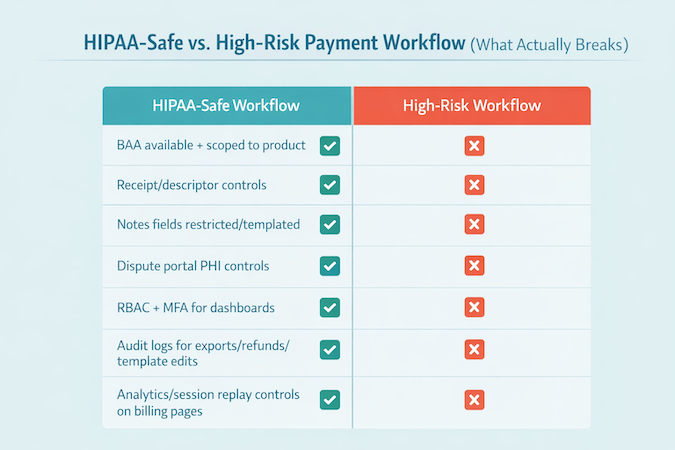
How to Implement HIPAA Compliant Payment Processing: Step-by-Step
Here’s a step-by-step implementation plan you can operationalize—built for secure payment processing for healthcare providers without turning your billing workflow into a PHI-sharing hobby.
Step 1) Inventory the Workflows You Actually Run
List every payment flow you support (including refunds, chargebacks, financial assistance, and staff-assisted payments). For each one, mark:
- where staff can enter free text
- where files/screenshots can be attached or requested
- where patients receive messages/receipts/notifications
Do this with the people who actually run billing day-to-day (front desk, finance, support)—not just whoever owns the technology stack.
Step 2) Choose Your Architecture Model Up Front
Pick one model and enforce it consistently:
- Model A (PHI-minimized): payment layer stores tokens, amounts, and internal references only.
- Model B (PHI-bearing): billing artifacts may include PHI; treat vendors as PHI-handling and govern accordingly (including BAA scope, access controls, logging, and breach terms).
Step 3) Select the Vendor and Document the Rationale
Use the checklist we outlined above to score vendors. Save:
- your decision notes (why this vendor fits your workflows)
- the assumed data boundaries (what PHI can/cannot enter the payment layer)
- the operational guardrails you’ll enforce (who can do what)
Step 4) Execute the Right Agreements Before Go-Live
- Ensure the BAA, if required, covers the exact product and workflow you are deploying.
- Confirm any subprocessors and data handling at a high level.
- Align breach notification expectations with your internal incident response plan.
Step 5) Implement Workflow Guardrails (don’t rely on “training” alone)
Hard-code the rules into the system where possible:
- Use hosted checkout/tokenization patterns so card data stays with the processor.
- Define exactly which fields your systems are allowed to send, store, and display—and which are prohibited.
- Prefer structured selections (dropdowns/templates) over free-text anywhere staff might “add context.”
Step 6) Lock Down Access Based on Operational Roles
Keep access narrow and intentional:
- MFA for all admin access to payment dashboards and portals.
- Role-based permissions for refunds, disputes, exports, and reporting.
- Restrict who can change invoice/receipt templates and notification settings.
Step 7) Turn on Logging You Can Actually Use
You need logs that make investigations and audits possible. At minimum, log:
- access to payment records
- exports
- refunds/disputes
- template and settings changes
Step 8) Train Staff With “Red Lines” and Real Scenarios
Training should be short and concrete for all healthcare providers and staff who touch billing:
- what must never be typed into payment tools
- what to do when a patient asks for “details on the receipt”
- how to handle disputes without pasting clinical context into portals or emails
- how to respond when vendor support asks for screenshots or examples
Step 9) Run a Pre–Go-Live Risk Review (tabletop tests)
Before launch, run quick tabletop tests for receipts, refunds, disputes, exports, and support interactions. Record pass/fail and fixes.
Step 10) Monitor and Re-Audit as Workflows Evolve
Most payment compliance drift happens after go-live:
- when new invoice formats are added
- when staff start using “notes” for convenience
- when portals and messages get merged into one thread
- when exports get shared more widely
Schedule periodic checks so the workflow stays within the boundaries you defined.
7. HIPAA Compliant Payment Processing: Cost Considerations
When people price medical payment processing HIPAA, they usually compare transaction rates and call it a day. That’s backward.
The real cost shows up in tier-gated BAAs, audit logging, and the integration work needed to keep PHI out of receipts, disputes, and exports—plus the internal time you’ll spend enforcing the workflow so it doesn’t drift post–go-live.
HIPAA-safe payments don’t usually fail as a dramatic “big breach.” They fail as a slow bleed: extra staff time, messy workarounds, and quiet trust erosion.
Setup and Onboarding Costs
Expect upfront costs in three buckets:
- Implementation and onboarding: configuration, workflow setup, and go-live support
- Integration work: connecting payments to your portal, billing system, scheduling, or practice management tools
- Process design: defining who can do what, what gets logged, and what’s prohibited in payment tools
Per-Transaction Fees (and why the cheapest rate can mislead)
Most processors charge a mix of:
- Percentage + fixed fee per transaction
- ACH fees (often cheaper than cards)
- Chargeback and dispute fees
- Optional add-ons (recurring billing, invoicing, payouts, reporting)
The cheapest rate can become the most expensive option if it forces manual workarounds.
Vendor “Compliance Premiums”
Some vendors price HIPAA-relevant capabilities indirectly:
- BAAs only on specific tiers or enterprise plans
- Extra fees for advanced access controls, audit logging, or dedicated support
- Higher minimums or onboarding requirements for healthcare workflows
Internal Compliance Maintenance Costs
Even with a strong vendor, you’ll pay internally for:
- Staff training and refreshers
- Policy upkeep and access reviews
- Periodic workflow testing for high-risk payment touchpoints
- Incident response readiness (tabletop drills and clear escalation paths)
Integration and Interoperability Costs
Integration is where budgets often get surprised:
- Mapping payments to patient accounts without creating new exposure points
- Reconciling payments with billing workflows and reporting needs
- Handling refunds, partial payments, and adjustments cleanly
- Supporting multiple channels (front desk, portal, mobile, telehealth)
When off-the-shelf connectors don’t match your workflows, budget for custom healthcare software development to keep payment events synced with your portal, scheduling, and billing systems without leaking PHI into the payment layer.
Cost of Non-Compliance
The real costs are rarely limited to penalties. More often, it’s:
- Remediation work (forensics, legal, notifications)
- Operational disruption (paused workflows, re-training, reconfiguration)
- Vendor churn and re-implementation
- Reputation damage that affects patient retention and referrals
Even before fines, the economics are brutal: IBM reports the healthcare industry has the highest average breach costs at $10.93 million per incident (IBM, Cost of a Data Breach). And the timeline problem makes cleanup harder: IBM notes healthcare breaches average 213 days before discovery.
A Practical Way to Budget
Instead of guessing, budget based on which operating model you’re running:
Model A budget (PHI-minimized)
Lower vendor overhead, higher investment in internal workflow discipline and guardrails.
Model B budget (PHI-bearing)
Higher vendor and compliance overhead, plus stronger requirements for contracts, access controls, and evidence.
The point is not to “buy compliance.” It’s to budget for the operating model your workflows actually require.
Common Mistakes and HIPAA Payment Violations to Avoid
Across the healthcare industry, these are the silent violations teams miss because they look like normal billing behavior.
Even if you’re using a HIPAA compliant payment platform, these mistakes still happen because the leakage comes from receipts, notes, exports, disputes, and support—not the checkout button.
10 Silent HIPAA Payment Violations
- Using medically descriptive invoice or product names
Anything that hints at diagnosis, specialty, or visit type belongs outside the payment layer. - Letting receipts reveal care context
Keep receipts generic, amounts and internal reference only. - Saving patient identifiers in the payment provider’s customer profile
Names, MRNs, DOBs, appointment details, treatment labels, do not park them in “Customer” metadata fields just because it is convenient. - Turning “notes” fields into a shadow medical record
Payment notes, refund reasons, dispute narratives, support tickets, these fields are not designed to be PHI containers. - Embedding payment links inside clinical messages
If a message contains care context, do not attach a payment request to it. Separate the threads. This is especially easy to mess up during telehealth app development, where payment requests and clinical follow-ups often live one click apart. - Allowing staff to paste screenshots into vendor support chats
Screenshots are an underrated PHI leak. Dashboards, portals, and exports often include identifiers even when you think they do not. - Over-sharing in chargebacks and disputes
Dispute portals train people to “explain what happened.” Your team should use templated, non-clinical language and avoid attachments that contain PHI. - Exporting payment and reconciliation data without “PHI hygiene”
The export itself might be fine, but the moment it is emailed, shared in chat, uploaded to accounting tools, or stored in shared drives, it becomes a high-risk artifact. - Instrumenting payment and portal flows with analytics or session replay
Tracking tools can capture form fields, page content, URLs, and event payloads. If any of those can include identifiers or care context, you have built a leak path. - Recording calls and chats that contain billing plus health context
Call recordings, transcripts, and chat logs often end up in systems that were never evaluated for PHI handling, access control, or retention.
Two Real-World Lessons
Enforcement Risk Is Usually About Basics
HHS OCR actions often hinge on risk management, access control, and evidence of controls, which is exactly where payment workflows tend to get sloppy.
OCR’s own enforcement rollup shows 152 HIPAA cases with settlements/CMPs totaling $144,878,972—and many of them boil down to basics like access control, risk management, and evidence of safeguards (HHS OCR, Enforcement Highlights).
A recent reminder: Montefiore Medical Center agreed to pay $4.75M plus a corrective action plan after an insider incident—another “boring controls” case where risk analysis and audit controls matter more than vendor marketing (HHS OCR, Montefiore resolution agreement).
Third-Party Disruptions Cascade Into Cash Flow
The Change Healthcare incident showed how quickly a third-party failure can disrupt billing and payment operations across the ecosystem, even for orgs that were not “the breached company.”
For context on blast radius: Change Healthcare told OCR that approximately 192.7 million individuals were impacted (HHS Change Healthcare incident FAQ, updated Aug 13, 2025).
A Practical Way to “Preempt” Violations
Run these three drills before go-live and quarterly after:
1. Receipt Drill
Generate receipts, invoices, refund confirmations, failed-payment notices. Look for care context and identifiers.
2. Dispute Drill
Simulate a chargeback. Watch what staff are tempted to type or upload, then replace that with templates and guardrails.
3. Export Drill
Export every report finance uses. Check columns, file naming, storage location, and who can access it.
EHR and Practice Management Integration
Integration is where HIPAA-safe payment design either stays clean or quietly collapses. The goal is simple: payments should reconcile to the right patient account and encounter without pushing PHI into the payment stack.
If you’re wiring payments into EHRs, scheduling, and patient ledgers, you’re effectively building HIPAA compliant billing software behaviors—even if you didn’t set out to.

The Clean Integration Principle
Treat the payment system as a financial rail, not a system of record for clinical context.
What you want in the payment layer:
- Amount, currency, timestamps
- Payment status (authorized, captured, refunded, failed)
- A neutral internal reference ID that your systems can map back to the patient and visit
What you do not want in the payment layer:
- Diagnosis, visit type, provider notes
- Anything that would make a bank statement, receipt, or dispute narrative reveal care context
Common Integration Patterns
Pattern 1: Payment Link Generated From Practice Management, Paid in Hosted Checkout
How it works:
- Practice management system calculates patient responsibility
- Your app or portal generates a payment request with an internal reference ID
- Patient pays via hosted checkout or tokenized flow
- Payment processor returns status via webhook
- Your system marks the invoice as paid and updates the ledger
Why it is safer
Hosted checkout and tokenization keep card data out of your environment, and the internal reference ID keeps PHI out of the processor.
Pattern 2: Patient Portal Billing Inside the Same Portal That Shows Care Content
This is common and risky because the portal itself often displays PHI.
Safer way to do it:
- Separate billing views and billing messages from clinical views and clinical messages
- Keep invoice descriptions generic
- Ensure any analytics, session replay, or logging on the billing pages cannot capture identifiers or care context
Pattern 3: Subscriptions and Recurring Billing Tied to Care Programs
Recurring billing is where descriptors and notifications become privacy risks. This becomes extra sensitive in mental health app development, where subscription labels, reminders, and failed-payment notices can reveal more than you intended with a single “helpful” descriptor.
Safer way to do it:
- Use neutral subscription names
- Store the “what this is for” context only in your HIPAA-controlled system
- Handle failed payment notices without care context
Where HL7 FHIR Actually Fits
FHIR is not a payment standard, but it matters because it is how many systems expose the context that finance workflows want.
Typical FHIR touchpoints in a billing workflow
- Patient identity and demographics for matching
- Appointment or Encounter references for tying payments to a visit
- Coverage and payer information for patient responsibility context
- Practitioner or Organization references for internal routing
The practical rule:
Use FHIR resources to drive internal mapping and workflow automation, but avoid sending FHIR-derived clinical context into the payment vendor payloads, receipts, or descriptors.
Integration Risk Hotspots to Design Around
These are the places integration projects accidentally create PHI exposure.
1. Shared Identifiers Across Systems
If you reuse patient names, MRNs, or visit labels in the payment platform to “make reconciliation easier,” you are trading convenience for risk.
2. Exports and Reconciliation Pipelines
Even when the processor payload is clean, teams often merge payment exports with visit or claims data and then distribute the combined file widely. Treat merged datasets like PHI.
3. Support and Exception Handling
When integration breaks, staff open tickets. Tickets attract screenshots, logs, and context. Build a support playbook that forbids PHI in third-party support channels unless contractually covered and explicitly required.
4. Over-Instrumentation
Portals that combine EHR context and payments often get overloaded with analytics. If any page can show PHI, treat tracking as a high-risk feature that requires careful configuration or removal.
What “Good” Looks Like
A good integration gives you:
- Accurate reconciliation without storing PHI in payment systems
- A clear mapping layer in your HIPAA-controlled environment
- Strong auditability for payment events and access
- Minimal sensitive content in all external artifacts: receipts, descriptors, messages, disputes
How Specode Can Help Build HIPAA Compliant Payment Processing Solutions
Specode helps you build a payment workflow that is designed around typical PHI leak points we discussed here, for example, invoices, receipts, portal messages, dispute notes, and exports.
Where Specode Fits in the Payment Stack
Specode does not ship payment integrations out of the box. Customers choose their payment provider. Specode AI then helps them implement the integration, including what configuration keys and values to add in Specode project settings.
Customers are responsible for selecting a vendor that will sign a BAA where needed, and at go-live our team reviews HIPAA guardrails with the customer. An optional pen test (at a startup-friendly price tag) is also available.
What You Actually Get Value From
- Workflow design that keeps PHI out of payment rails
Specode is most useful when you need custom billing experiences, not a generic checkout page. That includes:
- Patient portal payment flows that do not mix clinical messaging with billing
- Neutral invoice and receipt patterns that prevent accidental disclosure
- Subscription and recurring billing flows with safe descriptors and notifications
- Dispute and exception handling flows that prevent staff from pasting PHI into the wrong systems
- Integration planning without turning your processor into a PHI database
Specode AI can guide integration patterns that rely on internal reference IDs, tokenization, and clean event handling, so you can reconcile payments to the right patient and encounter without pushing clinical context into payment metadata.
- Guardrails at go-live
The highest-risk moment is launch, when templates, notifications, exports, and staff habits become real. The go-live review is where you sanity-check that your workflows match the policies you wrote.
- A security check you can budget for
If you want a deeper security validation step, the optional pen test gives you a pragmatic way to find obvious weaknesses before patients find them for you.
When Specode Is a Good Choice
- You need a custom portal or app workflow where off-the-shelf payment screens are not enough
- You are integrating payments with practice management or EHR workflows and want to keep PHI out of payment platforms
- You want implementation guidance that is grounded in your actual workflow design, not generic “HIPAA checklist” advice
If you want, the next step is simple: describe your payment workflows and where PHI could appear, pick your payment provider, and use Specode AI to map integration and guardrails before you build anything irreversible.
If you’re planning a HIPAA-safe payment workflow, don’t start by wiring up a processor and hoping receipts and portal messages behave. Start by mapping your workflow risks first.
Get started with Specode to prototype the flow that usually causes trouble (pick one: invoices, receipts, portal payment screens, recurring billing, refunds, disputes), and have the AI builder walk you through integration steps and the guardrails you'll need before go-live.
The goal isn’t “a checkout page.” It’s a workflow that stays PHI-minimized in the real world—receipts, messages, exports, disputes, and support included. That’s what HIPAA compliant payment processing for healthcare looks like when it’s actually operational.
Frequently asked questions
HIPAA compliant payment processing means your payment workflow is designed so PHI does not enter payment tools by default, and if PHI could be handled by any vendor, you have contracts and controls to govern it. In practice, this is about data minimization, PHI-scrubbed receipts/invoices/descriptors, controlled dispute handling, restricted access, and auditable logs—not just “secure checkout.”
You generally need a BAA if the processor (or any related tool in the flow) creates, receives, maintains, or transmits PHI on your behalf. If your workflow keeps PHI fully out of the payment layer—using tokens, internal reference IDs, and generic receipts—you may avoid needing a BAA for the processor. The key is your actual data exposure, not the vendor category.
It depends on whether PayPal will sign a BAA for your specific product and workflow, and whether your payment flow can reliably keep PHI out of PayPal surfaces (receipts, notes, disputes, support interactions). If you can’t contractually cover PHI exposure and you can’t guarantee PHI won’t be entered “accidentally” by staff or patients, it’s risky for healthcare payments.
PCI DSS is about protecting cardholder data (card numbers, authentication data) and securing payment environments. HIPAA is about protecting PHI across the entire healthcare workflow. You can be PCI-compliant and still violate HIPAA if receipts, invoices, descriptors, dispute narratives, portal messages, analytics, or support tickets include PHI. PCI secures the transaction; HIPAA governs the care-linked context around it.
The biggest risk is ungoverned PHI exposure: a receipt reveals care context, a dispute portal gets clinical details pasted in, or support requests trigger screenshots/logs containing identifiers. That can expand your “vendor chain” without contracts or controls, complicating breach response and compliance posture. Even without a dramatic breach, it often causes operational cleanup, policy rewrites, vendor switching, and trust damage.
Tokenization replaces sensitive card data with a non-sensitive token that your systems can store and use for future charges. This reduces PCI scope and limits what your environment holds. For HIPAA, tokenization helps because it enables a clean separation: the payment layer can operate on tokens and internal IDs, while PHI remains in your HIPAA-controlled system. It’s not magic—PHI can still leak via notes, receipts, and disputes.
Yes—if the workflow is designed to keep PHI out of payment communications and tools. Avoid embedding payment links inside clinical messages, keep receipts generic, and use hosted checkout/tokenization so card data stays with the processor. Disputes and refunds are common failure points: use templated, non-clinical language and restrict who can access/export payment records. If PHI can reach a vendor, confirm BAA coverage.
HIPAA doesn’t “approve” payment methods; it governs whether PHI is protected in the workflow. Cards, ACH, HSA/FSA cards, and digital wallets can all be used safely if you minimize PHI exposure, control receipts/notifications, restrict access, and maintain auditability. The compliance risk usually comes from what you attach to the payment (descriptors, invoice text, portal messages, dispute notes), not whether it’s Visa or ACH.