Denial Management App Development: How to Build an AI-Powered Revenue-Recovery App

A denial lands, and the claim is only the beginning. Someone has to interpret the response, find the right evidence, watch the deadline, and choose the next action. They keep following the case until the outcome is clear. That work pulls staff away from new claims, delays cash, and increases write-off risk.
If your team is managing that in spreadsheets and inboxes, denial management app development should start with the recovery operation, not a shiny AI feature. You need one case record, a prioritized worklist, source and transaction context, clear ownership, and a reliable path from adverse result to recorded outcome.
This guide gives you an app-first framework for designing that denial management workflow. We'll connect transaction and source-system data, prioritize work, and add supervised AI where it earns its place. We'll measure outcomes, make the build-versus-buy call, scope the MVP, and assign compliance ownership. The denial figures you'll see later come from different populations and definitions, so we'll keep each one attached to what it actually measures. That grounds the product in the work your team has to move.
How do I build a denial management app for my practice or billing company?
If you're deciding how to build a denial management app, start with the recovery workflow: where cases enter, who owns them, which deadlines matter, and how outcomes are recorded. Then connect transaction and source-system data, build a prioritized staff worklist, and add supervised drafting and follow-up with source context and reviewer control. Validate one MVP with its users and the owners responsible for privacy, security, compliance, and change. The app coordinates accountable work while your team chooses the right correction, resubmission, reopening, or appeal.
- Separate prevention from recovery. Eligibility, authorization, documentation, coding, and valid submission belong upstream. Once an adverse result arrives, the recovery app takes over the case and keeps the feedback path open, so the current queue moves without losing what it teaches the upstream team.
- Design the staff workflow before adding AI. Map intake, ownership, deadlines, next-action rules, escalation, evidence, and outcome states first. Then you can judge where triage or drafting will genuinely reduce work; automating a vague process just gives the confusion more speed.
- Use transaction data without flattening its meaning. Connect 837 and 835 transactions with acknowledgments, status feeds, code context, and records of origin. Pull EHR documentation only when the case needs it, because the source remains part of the meaning.
- Keep accountable people and controls in the loop. Show the rationale, let reviewers override it, and validate performance against your own case mix. Clinical and medical-necessity arguments still need qualified review.
Why denials create a material revenue-recovery problem
Start with the burden on your team. In revenue cycle management (RCM), claim denials and denied claims consume staff time, delay cash, and raise net patient revenue write-off risk. Recovered claim revenue differs from reimbursable-service workflows such as a chronic care management app that generates revenue.
Remove this placeholder after inserting the embed.
Compare each row as a distinct measure because its population, denominator, stage, method, and year differ.
Denial prevention and denial management solve different problems
When you scope the product, ask one question first: has the claim been adjudicated yet?
If the answer is no, you're working on denial prevention. If an adverse result has already arrived, you're working on recovery. This sounds like semantics until it changes the queue, roles, and next actions you need to design. For this article, we'll use that as a working product distinction, separate from any federal definition.
Here is the practical split:
Connect the workflows through a feedback loop while keeping their operating queues distinct. When recovery work surfaces the same reason repeatedly, send the case evidence back to the people responsible for:
- eligibility,
- authorization,
- documentation,
- coding,
- or submission.
They can test an upstream change while the recovery team keeps current cases moving. That is the practical job of analytics here: inform the next upstream change without relabeling today's recovery work.
What the denial-management app needs to do
If you're sketching screens, don't start with an AI appeal writer. Start with the handoff your team deals with: an adverse response arrives, someone works out what it means, the right person takes ownership, and the case moves until the result is recorded.
A useful medical billing denial management app is primarily a staff tool. It can still be a patient and staff app, with appropriate documents or status exposed to patients, while billing and review roles own the recovery worklist. Keep it beside broader billing and practice operations, orchestrating recovery across the billing system, EHR, clearinghouse, and payer portal rather than replacing them. For that adjacent layer, see our medical practice management app.
If you build your own denial management app, make the journey boringly explicit:
- Bring in the case. Import the submitted claim, adverse response, and any available acknowledgment or status history from the billing system, practice-management system, or clearinghouse.
- Build one case record. Keep claim and service-line context, payer details, response codes, history, and links back to records of origin. A CARC is not automatically a denial code; interpret it with its group code, RARC context, payer rules, contract, deadline, and history.
- Prioritize and assign it. Give the case an owner, status, deadline, and visible next action.
- Choose the actual route. Keep correction, claim resubmission, reopening, follow-up, appeal, and write-off as separate actions. Each needs a role, rationale, evidence, and timestamp. Payer and program rules decide which route is permitted.
- Work and follow up. Collect documentation, record communications, surface exceptions, and keep the next handoff obvious.
- Close the loop. Record the final outcome and retain the audit trail behind it.
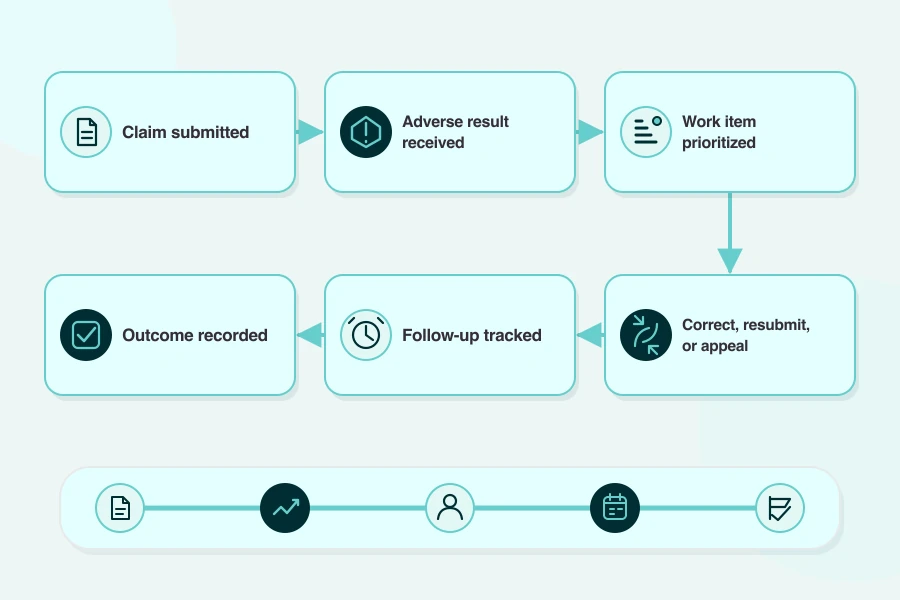
The first dashboard can be modest. The case model cannot. At minimum, keep:
- Intake: import source and original identifiers.
- State: normalized case, assignment, status, and next action.
- Decision context: payer rule or deadline, documentation, communication, and exception.
- Trace: rationale, evidence, timestamps, audit history, and outcome.
Teams sometimes use hard denials versus soft denials as an operating shorthand. Treat the label as configurable shorthand, never as universal code-set truth or an automatic next-action rule.
The data backbone: 837, 835, clearinghouses, and EHR/PM systems
The source is part of the meaning. Flatten everything into one generic denial record, and you lose the difference between a rejected file and an adjudicated result.
A claims denial management app does not need to own every source. It needs to preserve each input's meaning and link back to the original record.
That is the EHR and PM integration boundary. See the EHR integration guide for the adjacent workflow.
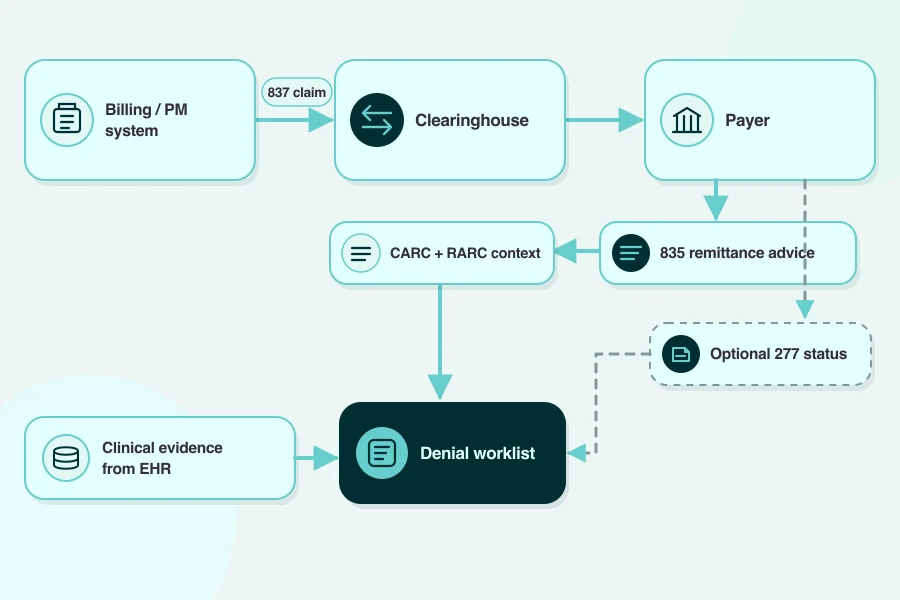
FHIR matters only if your product team wants an application-friendly model or API.
HL7 FHIR ClaimResponse represents adjudication results. ExplanationOfBenefit can combine claim and adjudication data for exchange, reporting, or analytics.
The catch: both are Trial Use in R5. A payer may offer an R4 API or no provider-facing FHIR claims interface. FHIR does not replace adopted X12 837 and 835 transactions.
Prioritize the worklist by value, probability, and deadline
Once the cases are in one place, what should we work first?
Whether you're designing a healthcare revenue recovery app or an accounts receivable recovery app, staff should see why each case moved up the queue. Use days in accounts receivable (A/R days) as context alongside the recorded deadline and available evidence.
For worklist prioritization, start with a simple frame:
Priority suggestion = f(recoverable amount, evidence completeness, response type, case age, deadline, expected effort, locally validated overturn probability)
Treat these as configurable inputs and revisit their influence as the case mix changes.
Staff should see the source values and rationale beside each suggestion, plus an override that captures the reason. Retain assignment and action history too.
When response type contributes to the score, use a CARC as one input. Carry its context into the review: group code, claim or line, payer policy, contract, deadline, and history.
That value-versus-effort tradeoff is worth modeling. Premier's claims-year 2023 survey covered 280 hospitals in 23 states and was acute-bed weighted. It estimated an average administrative cost of $57.23 per denied claim; 68.6% were ultimately overturned and paid. Put expected effort beside recoverable amount so the team can compare the work required with the value available.
Treat overturn probability as an estimate you calibrate over time. The goal is a signal the team can trust in its own case mix.
Start with local case history. Review performance by payer and service line. Repeat the review for each denial reason and team. Compare the result across time periods.
If AI produces the ranking, keep an accountable reviewer in the path and monitor errors and drift.
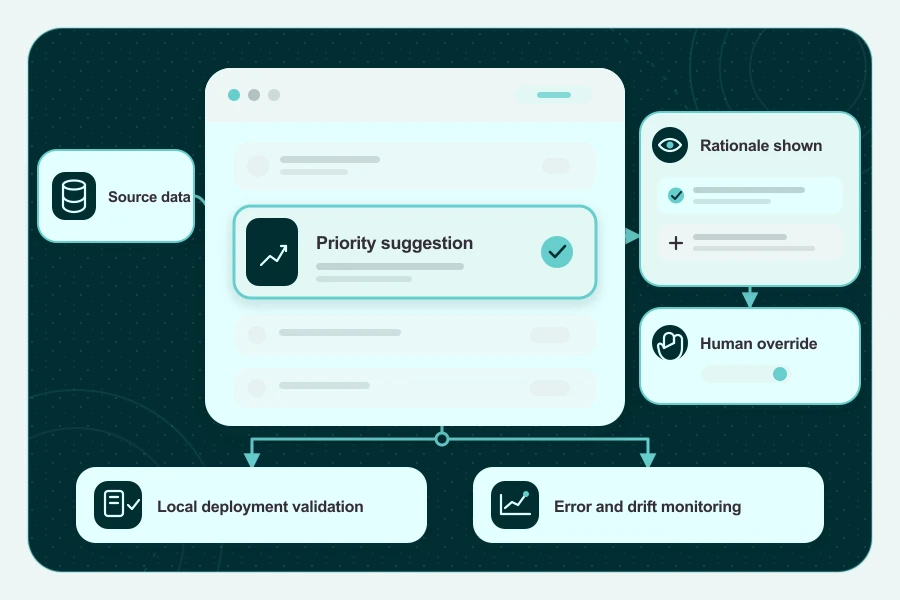
Reserve write-off decisions for the accountable reviewer, with the reason captured in the case history.
Automate appeal preparation without removing human review
What can the model handle, and what stays with your reviewer?
Start with preparation. An AI denial management app can support claim appeal automation by assembling the case and drafting the work product while a named reviewer owns release.
When medical necessity is disputed, your reviewer needs the patient record and coverage criteria to clear the clinical argument. That review is the safety control in your workflow; the specific CMS licensed-reviewer rule applies to specified Medicare review contractors.
Before release, the reviewer verifies:
- patient and claim facts,
- payer policy,
- coverage criteria,
- citations,
- attachments,
- deadline,
- submission channel,
- and final text.
A human-in-the-loop release step gives those checks a named owner and leaves the approval in the case history.
The voluntary, cross-sector NIST AI Risk Management Framework helps your team map controls for agentic AI. The interface should expose source data and rationale and allow override. Local validation, error and drift monitoring, and a named owner keep the model tied to your deployment.
In a small 2026 peer-reviewed appeal-drafting pilot, four radiologists reviewed 12 letters for one simulated renal-ablation scenario and found useful drafts alongside hallucinated content and fabricated references. With no live submission, payer response, or overturn outcome in the study, the useful takeaway for your product is a careful review step before release.
Use denial analytics to prevent repeat loss
Your dashboard is useful only when everyone knows what each number counts.
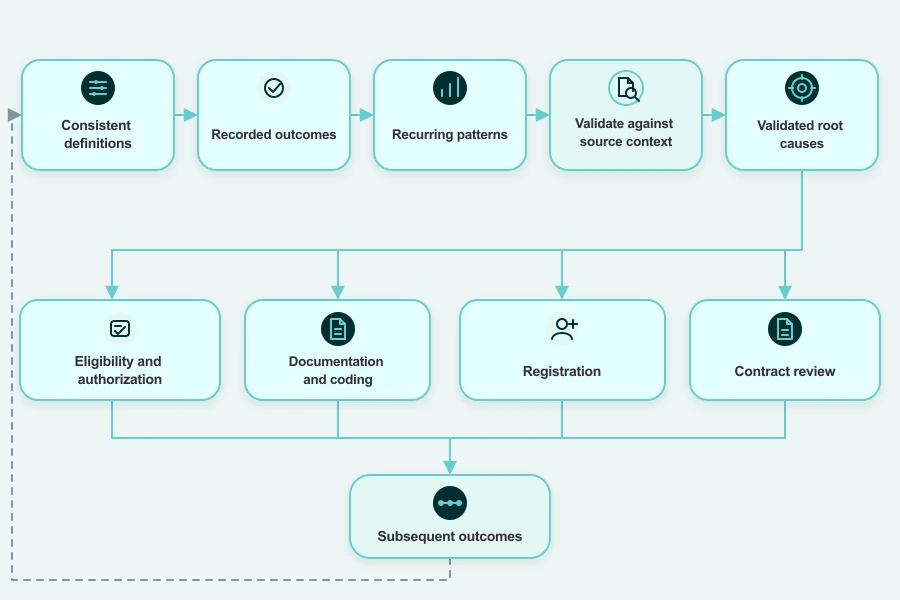
Before you build charts for a custom RCM app, define the metric dictionary. Otherwise, different outcomes slide into one catch-all denial rate.
Give clean claim rate and first-pass resolution rate their own local definitions beside these KPIs. MGMA, HFMA, and Experian State of Claims can add context; your case mix sets the local baseline.
For underpayment detection, keep the recorded payment difference with its adjustment context.
Check recurring patterns against source records and payer or contract context during root cause analysis. Once one holds up, send the finding to:
- eligibility or authorization,
- documentation or coding,
- registration or contract review.
Measure subsequent outcomes with the same definitions and decide what to test next.
Build vs buy: a focused app or an enterprise RCM suite
Start with what your recovery team needs to control. That turns build vs buy into an app-design decision: where can you accept configuration limits, and where do you need custom behavior?
Compare a focused revenue cycle management app, a configured module, and a managed service against the same requirements.
Before you choose, name who owns day-to-day changes and what happens when an integration fails or you need to leave. Those answers expose the operating model you are actually buying.
Use the checklist for denial management software and broader revenue cycle management software. Examples to investigate include Waystar, Optum and Change Healthcare, FinThrive, R1 RCM, Inovalon, and athenahealth. Run each through the table.
If the workflow needs custom behavior, treat custom healthcare software development as a product and operating commitment.
If Specode is on your shortlist, the practical ownership point is simple:
With Specode, you retain rights to your data, content, code, and application. You can export the code and application and continue development in-house.
For any route, test full code ownership against what your team can actually take and run. That includes the code, data, dependencies, infrastructure, export path, contract rights, and transition support.
Scope the MVP before estimating cost or schedule
Put the pricing spreadsheet away for a moment. Before anyone estimates app development cost, draw one recovery case from intake to closure.
How can I recover denied claims without a large enterprise RCM implementation? Start with one complete recovery lane for a named team and payer scope. Let the case enter, move through staff action and review, and finish with a recorded outcome.
When you build a denial management system, make the MVP boundary concrete:
That same complete-lane rule keeps denial management for small practices from turning into a polished demo with nowhere for the work to go.
Estimate each cost driver separately:
- Product: discovery; configuration or build.
- Data: integration; migration; data cleanup.
- Release: validation; security; deployment; training.
- Operations: support; maintenance; model monitoring; change control; incident response; exit.
If the app sits inside a broader service launch, use launch a virtual clinic as adjacent operating context while the denial-app estimate stays tied to this scope.
Design the compliance layer around PHI and operational ownership
"Be HIPAA compliant" is not a useful engineering ticket. Draw the data flow instead: what enters, why, who can see it, where it goes, and what evidence remains.
Identifiable claim and payment information will generally be PHI when a covered entity or its business associate holds or transmits it. Start with the actual data, entity, and context; properly de-identified, synthetic, or aggregate information may be treated differently.
Use HHS business-associate guidance to map the roles. A denial-app vendor that handles PHI for a covered provider will generally be a business associate, and PHI-handling subcontractors belong in the downstream chain. Provider-to-payer payment exchange alone does not create that relationship. Once the roles are clear, use the business associate agreement (BAA) to document obligations across the chain.
The agreement covers one layer. The HIPAA Security Rule summary calls for risk-based safeguards and continuing review, so signing the BAA still leaves control design and ownership to settle.
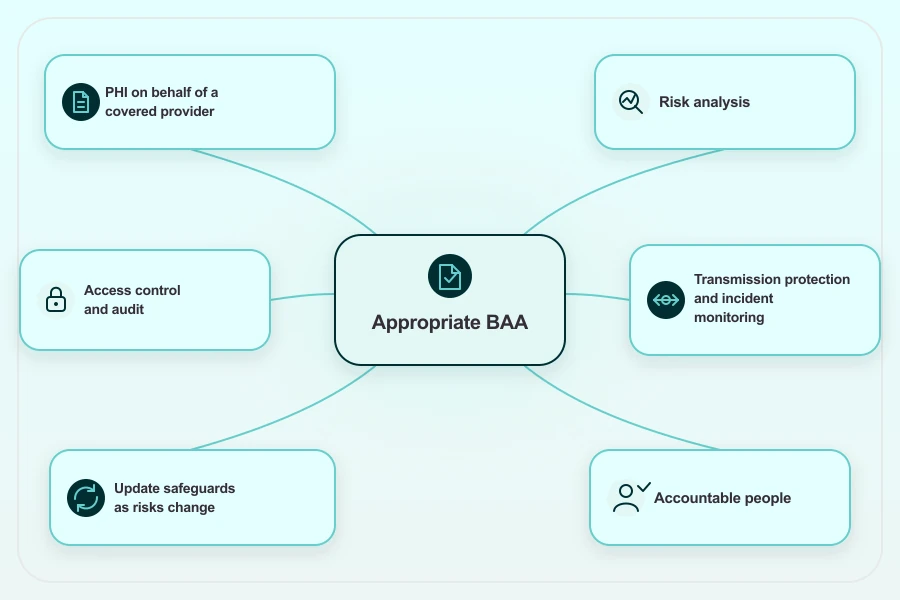
Now the build team has something usable: every control has an owner, evidence, and a reason to revisit it.
Keep PHI out of unapproved consumer AI endpoints. For any external AI service, follow the actual data handling and contracts. If the model ranks or recommends, expose source data and rationale and allow an override. Validate locally, monitor errors and drift, and keep an accountable person in the decision path.
How Specode can help
You know how the recovery operation should run. Now turn that operating knowledge into a product your team can see and shape together. With Specode as your healthcare AI app builder, the important product decisions stay in your hands:
- Give Specode's HIPAA Agent a seat beside your privacy, security, and compliance owners.
- Start with app requirements in plain English, using the language your revenue-cycle team already speaks.
- Shape the UI and workflows around the real job: queues, review points, handoffs, and outcomes.
- Define the data model and permissions together, so case context and role boundaries have a home from day one.
- Define the integrations you actually need and shape the result as a responsive web application.
Bring your payer mix, transaction feeds, reason and action taxonomy, users and permissions, and worklist logic. Add the review boundaries, integrations, metrics, validation plan, operating model, and the security and compliance owners who will help test it. Your product, clinical, legal, privacy, security, validation, and operating owners stay involved as the team refines the application.
Ready to build a denial management app around the way your recovery team actually works?
Frequently asked questions
Denial management is the post-adjudication recovery workflow: interpret the adverse result, assign the case, correct it, gather documentation, resubmit or appeal, follow up, and record the outcome. Prevention handles the upstream work before adjudication.
Denial prevention happens before adjudication; denial management starts after an adverse result. From there, payer rules determine whether your team should correct the claim, resubmit it, reopen the case, or file an appeal.
There's no useful universal price without a scoped workflow. Estimate the first complete release around data sources, integrations, user roles, security, validation, deployment, and ongoing ownership, then price optional automation once that core workflow works.
Buy when a current, hands-on review shows the product fits your workflow, integrations, exports, contracts, support, and exit plan. Build when the workflow is genuinely different and you can own governance, validation, security, maintenance, and change.
No, not for a production system you expect to operate responsibly. Non-developers can own the workflow, requirements, roles, and acceptance criteria. Named technical specialists still need to own integration, migration, security validation, deployment, maintenance, and incident response.