How to Build a Healthcare App on Top of Canvas Medical

You picked Canvas Medical because you didn't want to build an EHR. Good call. But Canvas is the clinical back office, and your patients will never see it. They'll see your app: the intake flow, the booking screen, the care team chat.
This guide shows how to build a healthcare app on top of Canvas: what Canvas already gives you, what you still need to build, how the Canvas FHIR API connects the two, and how to stay HIPAA-compliant across both.
Canvas ships an ONC-certified EMR, a FHIR API, an SDK and revenue cycle management in one platform, so the hard clinical parts are already done. It gives you a working EHR to customize, not a blank FHIR server to build on: scheduling, charting, billing, messaging and a patient portal come with the subscription, and your job is the layer on top.
Most founders building that layer don't have an engineering team to spare. Specode is an AI-powered healthcare application builder that turns plain-English requirements into a working app, and it is the complement to Canvas in this guide, never a replacement. FHIR and OAuth are explained once, in plain language, and then used freely.
How do I build a patient app on top of Canvas without an engineering team?
Canvas stays the system of record for charting, scheduling and billing. You build the patient and staff experience as an app that reads and writes Canvas data through the Canvas FHIR API, which speaks FHIR R4 over OAuth 2.0. A backend holds credentials so tokens never ship in a patient-facing app. HIPAA splits three ways: Canvas's BAA covers Canvas, your hosting needs its own BAA, your app and its vendors are on you, and Specode builds that layer from plain-language requirements.
- Canvas keeps the clinical record, and your app keeps the experience. Charting, scheduling, billing and the clinician schedule stay where they are, and every booking, form and message your app owns has to write back to the chart through the API.
- Most founders need two of the three ways to extend Canvas. Use it out of the box for the clinical work, then build the patient and staff experience as an external app. SDK plugins and Canvas Studio are for teams changing how clinicians chart.
- Plan for a per-customer, OAuth-secured connection, and get the scopes right on day one. Your app talks to your own instance, with its own base URL and authorization server, and access tokens expire 10 hours after creation, so reuse them. With client credentials, scopes are optional, so omitting them issues a token with your application's configured allowed scopes: keep credentials on a backend and request the narrowest set.
- HIPAA splits across three layers, and a HIPAA-ready stack is not compliance. Canvas's BAA covers Canvas, your hosting needs its own BAA, and your app plus every vendor that touches PHI is yours to cover. Clinical, legal and security owners remain necessary.
- Specode adds the app layer without a full engineering team. It builds from plain-language requirements using structured healthcare playbooks, builds the EHR connection case by case once you provide API access, and customers keep the rights in the code and applications they generate.
What building on top of Canvas actually means
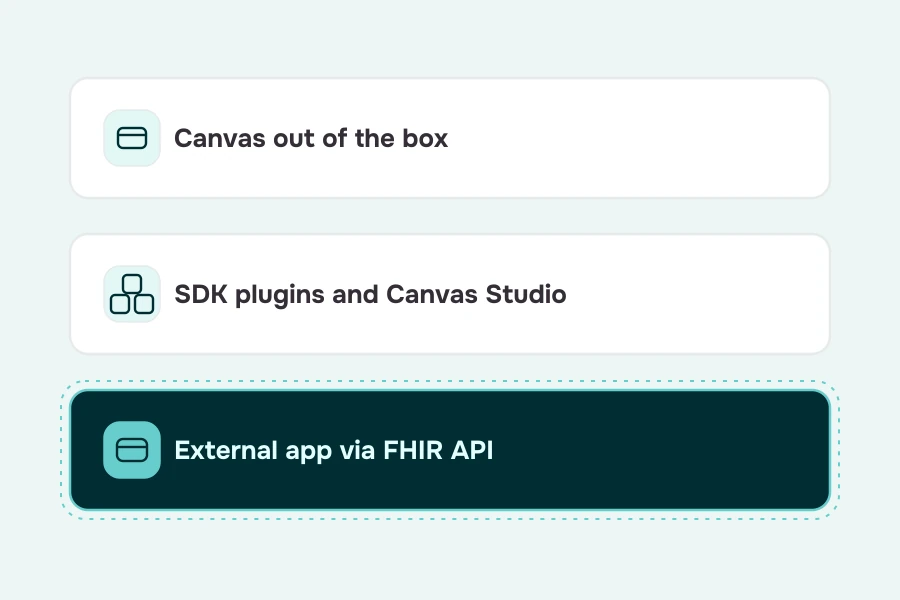
Canvas is the system of record for clinical data, charting, scheduling and billing. Your app is the experience layer patients and staff use. The two talk through the Canvas FHIR API, so every appointment booked or form submitted in your app lands in the Canvas chart.
The Canvas EMR covers charting, scheduling and billing out of the box. That part of the stack stays exactly where it is. Canvas is your EHR, not a healthcare app builder: the patient-facing layer is still yours to build. What Canvas ships in one platform, from the ONC certification of the EMR to the FHIR API, is the clinical backbone; HIT Consultant's Canvas platform profile dates that description back to 2022, and Canvas's developer-access page still lists the ONC certification today.
Canvas gives you a working EHR to customize, not a blank FHIR server to build on. Scheduling, charting, billing, messaging and a patient portal are already there, which is exactly why an external app layer is a fast path: the hard clinical parts exist, so your build starts at the patient experience instead of at the data model.
Everything your app adds has to write back to the chart through the API. Branding, intake, booking, messaging: whatever the patient sees, the chart stays the single source of truth, and that constraint is what makes the app layer a product decision rather than a clinical one.
Three ways to extend Canvas (and which one you need)
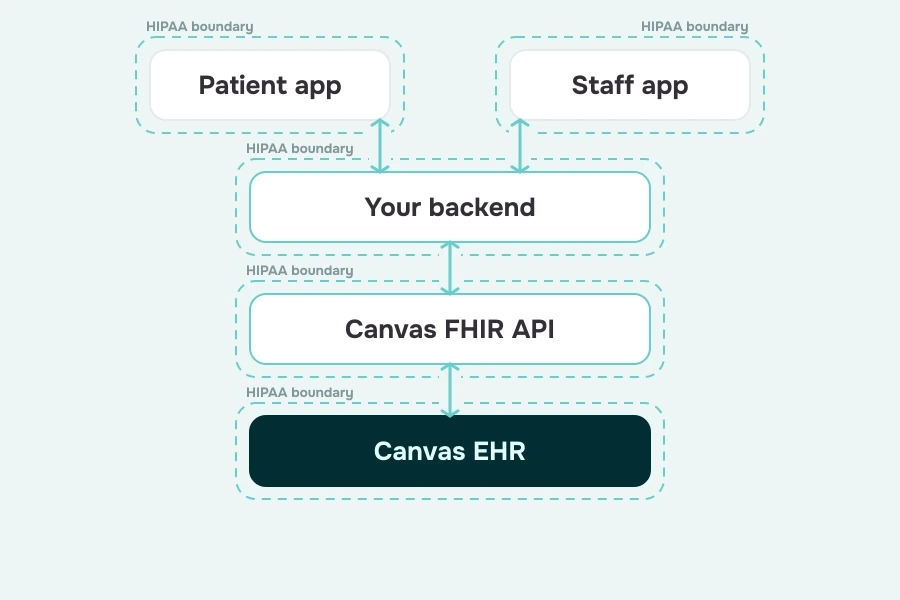
There are three ways to extend Canvas, and they solve different problems. You can use Canvas out of the box, customize inside it with SDK plugins and Canvas Studio, or build an external app on the FHIR API. Most founders need the first one plus the third one; the middle path is for teams changing how clinicians chart.
Row one is Canvas out of the box: the pre-built components of a working practice, charting, scheduling, a patient portal and standard configuration. It gets a practice running fast, and it tops out where your branding and custom flows begin.
Row two changes what clinicians see. The Canvas Medical SDK runs plugins inside Canvas's own infrastructure, and the Canvas SDK vs FHIR API comparison describes those plugins as running inside the EHR server container. Canvas Studio, launched in May 2026, adds natural-language workflow building: clinics customize workflows inside the EHR without writing Python.
Honest scope: Studio changes workflows inside the EHR; it does not build the patient-facing product your patients use. Simplify's coverage of the Canvas Studio launch is the source for the May 2026 date, and Canvas has said it plans to move the FHIR API itself into a set of SDK plugins over time, in the Canvas SDK and FHIR API discussion, which makes release notes worth watching.
Row three is where this guide lives: an external app that reads and writes Canvas data through the FHIR API. You own hosting, security and HIPAA for that layer; in exchange you own the experience. So the decision is fast: most founders need row one plus row three; row two is for teams changing how clinicians chart, and nothing stops you from adding it later.
What you can build on top of Canvas
Each of these starts from data that already lives in your Canvas chart, which is what makes the build tractable.
Branded patient app
Onboarding, profile, visit history and care plan surfaces, reading Patient, Encounter, Appointment, Condition and CarePlan data from the chart. This is the patient app your care model competes on.
Digital intake and onboarding
Patient onboarding with digital intake forms that write to the patient record before the first visit, using Questionnaire and QuestionnaireResponse. See our guide to building patient intake forms.
Appointment booking
Real provider availability read from Practitioner, Schedule and Slot, with the booking written straight into the Canvas schedule as an Appointment. Specode's guide to appointment scheduling covers the flow.
Care team messaging and async check-ins
Secure messaging between patients and the care team, plus telehealth visits where the model needs them. A telehealth app sits naturally on top of the same patient data.
Remote patient monitoring
Device readings written back as Observation resources. One caveat from Canvas's docs: observation writes flow through your backend with staff or system scopes, not through patient-scoped tokens. Build it as a remote patient monitoring app that patients open once a day, not once a visit.
Staff and ops dashboards
Intake review, outreach lists and care coordination in a provider dashboard that reads and writes Canvas data for staff.
AI features
Symptom intake assistants, visit prep summaries and patient-friendly after-visit explanations. Clinical recommendations raise FDA questions, so treat anything that steers care as a device decision and read the FDA clinical decision support guidance before you ship it.
Have a care model in mind? Describe it to Specode and see which of these flows the AI assembles on top of your Canvas instance.
How the Canvas Medical API works (the founder's version)
Canvas exposes a FHIR R4 API secured by OAuth 2.0, and each customer gets an isolated instance with its own base URL and authorization server. Your app connects to your instance, not to a shared endpoint.
The Canvas Medical FHIR API supports 41 resources, 21 of them writable, and conforms to the US Core Implementation Guide STU 6.1.0 where US Core profiles apply. The Canvas Medical API speaks the same R4 dialect as every certified EHR, which is what keeps your app portable.
Sandbox first
In a development or sandbox environment the Canvas FHIR API is available with no additional provisioning beyond OAuth client credentials. You request a token at your instance's /auth/token/ endpoint and build against test data before any real patient data exists. The full walkthrough lives in the Canvas quickstart.
Two flows, one decision
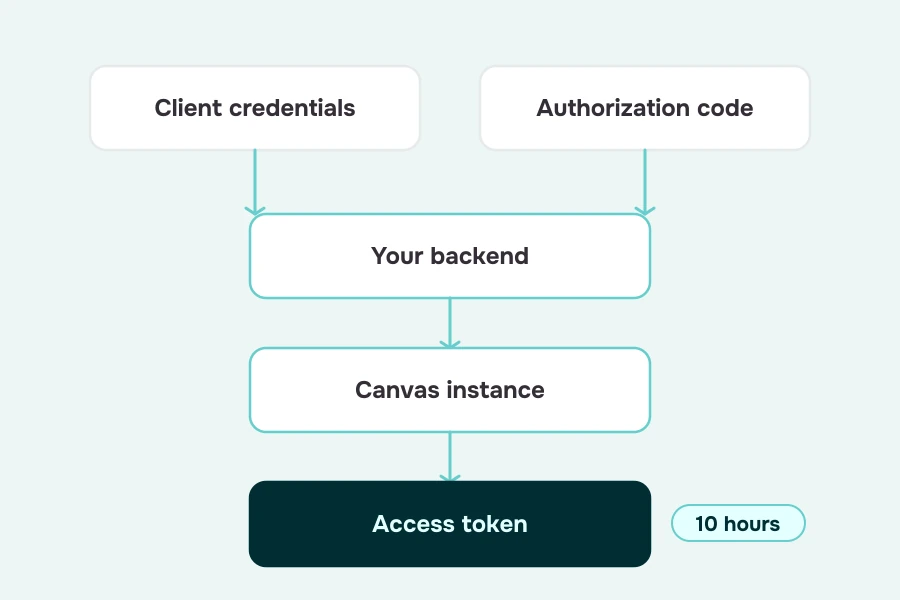
Canvas supports most OAuth flows and documents two main ones. Client credentials is machine-to-machine access for your backend. Authorization code is for an app acting on behalf of a logged-in user, staff or patient, and staff requests carry a base64 launch parameter with patient context while authorization codes last about 60 seconds. Registering an app means a name, a confidential client type, a grant type and a redirect URI for each surface. Both flows are in the Canvas authentication docs.
Patient-directed access
A patient authorizes your app through the SMART on FHIR authorization-code flow and gets a token scoped to that patient. The practice must have its patient portal enabled and the patient needs a portal login. Canvas also supports patient-scoped tokens requested with client credentials plus a patient parameter and explicit patient/ scopes. Both paths are covered on the Canvas developer access docs page.
Tokens
An access token expires 10 hours after creation, so reuse it instead of re-requesting. Authorization-code refresh tokens are non-expiring but single-use: store the newest one after every refresh.
Scopes
Canvas implements SMART on FHIR scopes across user/, patient/ and system/ contexts, and scopes are where you control access. With client credentials, scopes are optional: if omitted, the token is issued with the application's configured allowed scopes. With authorization code, scopes are required.
The standards underneath
R4 conformance, the ONC 170.315(g)(10) standardized API certification covering patient and population services, a machine-readable Service Base URL directory, and bulk export through Group/{id}/$export with system-level read scopes. The Canvas Service Base URLs directory lists every endpoint.
Embedded launch
A SMART app can also be launched from inside a patient's chart, combining the FHIR API with an SDK application. Keep it in mind for staff tools that belong next to the chart. See the Canvas SMART app guide for the setup.
The quickstart describes that task in plain language: a POST request to the instance's /Patient endpoint with a bearer token and a JSON body of the patient's name, gender, active flag and birth date creates the record in the sandbox.
Builder Alert: With client credentials, scopes are optional, and omitting them issues a token with your OAuth application's configured allowed scopes, which may be broader than you need. Never ship those credentials in a mobile app. Keep them on a backend, request the narrowest scopes, and have the app call your backend.
Step-by-step: how to build a healthcare app on top of Canvas Medical
The build is nine steps: decide what stays in Canvas, work sandbox-first, map screens to FHIR resources, register the app, put a backend in front of Canvas, generate the app in Specode, test end to end, close the HIPAA gaps, and go live with a small cohort. Every step below ends with what it means for your build.
- Decide what stays in Canvas. Charting, e-prescribing, billing and the clinician schedule stay where they are. List the patient and staff moments your app owns, and draw the line in writing before you build. The shorter that list, the faster you ship.
- Get a Canvas sandbox and load test patients and practitioners. Development environments expose the FHIR API with OAuth client credentials only, so you build against test data before any real patient data exists.
- Map every app screen to the FHIR resources it reads and writes. The table below is the map for the seven screens that matter, built from Canvas's resource documentation.
- Register your app in Canvas and choose the OAuth flow for each surface. Client credentials for the backend, authorization code for logged-in staff or patients, and a redirect URI for each web surface.
- Put a backend between your app and Canvas. Your backend proxy holds the credentials, caches tokens and logs access, and the app calls it instead of calling Canvas directly.
- Generate the app in Specode. Describe the screens and workflows in plain English, and the AI builds from structured healthcare playbooks for patterns like patient intake, scheduling, provider search and multi-factor authentication. The EHR integration itself is built case by case for your specific system once you provide API access, with the Specode team available for advanced work. Keep real patient data out of building and testing. Then customize screens and logic until the flow feels like your care model.
- Test end to end against the sandbox. Book an appointment in the app and confirm it appears in the Canvas schedule. If a write lands in the chart, the connection works.
- Close the HIPAA gaps. Sign the BAAs, add audit logs, and keep PHI out of notifications and analytics. The HIPAA section below is the checklist.
- Point the app at your production Canvas instance and go live with a small patient cohort. Before production, a member of the Specode team reviews the app for security and HIPAA readiness. Start small, watch the queue, and expand from there.
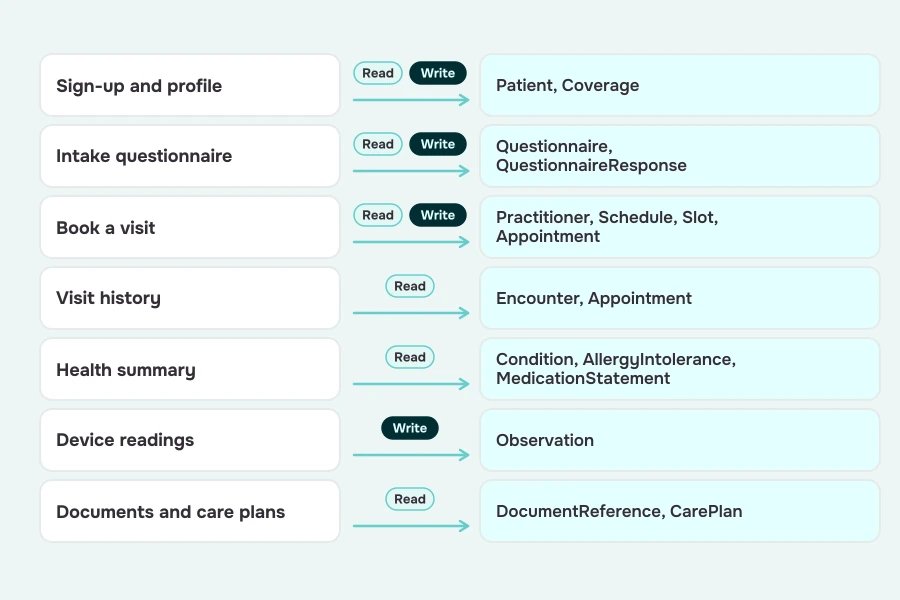
Two notes on that map. Coverage is listed read-only for staff user/ tokens in Canvas's scopes documentation, while patient/ scopes list it writable, so verify against your instance before relying on Coverage writes. Observation writes are available under user/ or system/ scopes, not patient/ scopes, so device readings go through your backend.
Every row is verifiable on Canvas's resource pages: Questionnaire is read-only while QuestionnaireResponse is writable, Practitioner, Schedule, Slot and Appointment split read from write, Encounter and CarePlan are read-only, and Condition, AllergyIntolerance and MedicationStatement power the health summary.
Want this map filled in for your app? Specode can scaffold the screens and the case-by-case EHR connection for it.
HIPAA when you build on Canvas: who covers what
Canvas's BAA covers data inside Canvas. The business associate agreement (BAA) you sign covers the Canvas EHR itself; everything outside it, your app, your backend, your hosting and every vendor that touches PHI, is your responsibility and needs its own BAAs. Think of it as three contracts: one with Canvas, one with your hosting provider, and one with every vendor that sees PHI. Each covers its own layer; none of them covers your app.
Canvas's side of the boundary is documented: Canvas says it encrypts data in transit and at rest and runs annual penetration testing, and the Canvas security page is the dated source for both.
Builder Alert: The most common leak point is not the Canvas connection. It is an analytics or crash-reporting SDK capturing screen content or form fields, and many of those SDKs offer no BAA. Audit every third-party SDK in the app before go-live.
Specode's side of the split: Specode builds on a HIPAA-ready stack, production hosting runs on the customer's own Convex account under Convex's standard business associate agreement, which the customer signs, and on the Custom plan Specode signs a BAA with the customer.
A member of the Specode team reviews the app for security and HIPAA readiness before production, and the founder still owns the BAAs, the policies and the risk assessment. HIPAA-ready is not HIPAA compliant, and the minimum necessary rule still decides what data your app asks for
The split matters because the Canvas connection is rarely where apps fail; the failures live in the layers you own. If you want the app layer itself to start on a HIPAA-ready foundation, our guide to choosing a HIPAA compliant app builder walks through what to check.
Custom app vs. the Canvas patient portal
Canvas ships a patient portal, so the first question is whether your patient engagement model fits inside it.
The portal costs you nothing to build because Canvas ships it. The custom app costs build effort and buys you the experience your model depends on. The test is whether the portal expresses your care model or just hosts your records: if patients experience your program through intake flows, check-ins and structured plans, the portal is the waiting room, not the product.
Most teams land on a middle path: start with the portal for standard visits, and add the custom app for the flows the portal cannot express. That keeps launch simple, and remote patient monitoring pushes most teams across the line by itself: a reading that lands in the chart every day is a product moment the portal was not built to own.
Cost and timeline
Cost and time to launch both depend on scope, and scope depends on which of three paths you take: an agency build, an in-house team, or Specode on Canvas.
The Canvas Medical EHR itself is a subscription on top of whatever you spend on the app layer. Canvas sells a Builder plan and a custom Enterprise tier, it does not publish pricing on its own site, and a third-party Canvas pricing directory lists a Builder price you should confirm directly with Canvas before you model anything.
Specode's plans are published. As of September 2026, Pro is $1,000 a month flat, billed month to month, with
- 2,200 credits,
- unlimited draft projects,
- one published project,
- production deployment.
Custom starts at $5,000 a month with unlimited published projects, managed services and coding, and dedicated team support. Publishing to production requires Pro or higher. See the Specode pricing page.
Now compare ownership, not sticker price. An agency build means paying for every change after launch. An in-house team means salaries and onboarding against what is mostly a one-time build. Specode on Canvas means a monthly subscription plus your own hosting and any third-party HIPAA-tier services, with you retaining rights in your data, content, code and applications, and exporting them during the subscription and for 60 days after termination. What changes is who absorbs the maintenance, and how fast you can change direction when the care model does.
The MVP consequence is the same on every path: reuse Canvas for everything clinical and build only the patient and staff flows your model needs. That is what keeps your time to launch short, and your MVP honest.
Common mistakes when building on Canvas
Five mistakes show up again and again on Canvas builds, and each one is cheap to prevent and expensive to fix after go-live.
- Rebuilding what Canvas already does. Scheduling engines and billing already exist in Canvas, and a rebuilt copy is a second system of record you now have to maintain.
- Calling the FHIR API directly from the mobile app. Credentials belong on a backend; ship them in the app and you have shipped the keys.
- Using unscoped client-credentials tokens in production. Omitting scopes issues a token with the application's configured allowed scopes, and broader access than the workflow needs is a breach waiting for one careless misclick.
- Testing only in the sandbox, then discovering production OAuth setup late. Development environments need only client credentials; production demands the full OAuth flow, so stand it up early.
- Sending PHI in push notifications or analytics events. If the message or the SDK has no BAA, that PHI has left your boundary.
Both Builder Alerts above are the mistakes that cause the most rework, so read them twice before you request your first production token.
How Specode helps you build on Canvas
Specode is an AI-powered healthcare application builder that accepts plain-English app requirements and lets you define the app's UI, workflows, data model, permissions and integrations. That is the strongest fact to start with, because it is the one that changes your build plan.
The playbooks
A new app starts from a blank template, and for common healthcare patterns such as patient intake, scheduling, provider search and multi-factor authentication, the AI follows structured playbooks built on healthcare workflows.
Intake becomes your digital intake forms, scheduling becomes your booking flow, and multi-factor authentication becomes the login your patients use.
The Canvas connection
EHR systems are not among Specode's pre-configured integrations; integrations are built case by case for the specific system, scoped to what the application's workflow needs. You get a connection sized to your screens rather than a generic connector.
Once you provide access to the external system's APIs, the AI can build the integration, and for advanced integrations the Specode team or your own team can get involved. Read the EHR integration guide for the full map.
Code ownership
You retain rights in your data, content, code and applications, and you can export your code and applications during the subscription term and for 60 days after termination.
Delivery
Specode does not produce native mobile apps today. Applications are responsive web apps that work on phones and tablets, with PWA support available, so your patient app opens on a phone without a separate native build.
Compliance
Specode builds on a HIPAA-ready stack, real patient data stays out of building, testing and previews on every plan, and before production a member of the Specode team reviews the app for security and HIPAA readiness. HIPAA-ready is not HIPAA compliant, and BAAs with Canvas and your hosting provider are still required.
As an AI app builder for healthcare, Specode's job in this guide is the layer Canvas does not build. The next section is where that turns into your next step.
Build the patient experience on Specode
Canvas solved the EHR. The product your patients experience is still yours to build. Describe the app you want on top of Canvas in plain English, and Specode builds the patient and staff experience while Canvas stays the clinical system of record for charting, scheduling and billing.
Let Canvas own clinical data and workflows, put your differentiation in the app layer, and connect the two through a well-scoped, HIPAA-covered Canvas Medical integration. You keep the clinical backbone you already have, and you ship the experience your care model competes on.
You can book a demo, or create a Specode account and start describing it today. Canvas owns the chart. The app layer owns the experience your patients actually remember, and that layer is yours to build.
Frequently asked questions
Yes. Your app is an external application that reads and writes Canvas data through the Canvas FHIR API, so every booking and form lands in the chart. Canvas stays the clinical system of record.
Yes. Canvas exposes a FHIR R4 API secured by OAuth 2.0, with an isolated instance, base URL and authorization server for each customer, so your app connects to your instance, not a shared endpoint.
The OAuth flows, backend and scopes are technical work, but Specode's AI builds the app and the case-by-case EHR integration once you provide API access, with the team available for advanced work; you still own the decisions.
The portal fits standard visits and low branding needs. Build a custom app instead when your model needs remote patient monitoring, structured programs, multi-step onboarding, or brand as a differentiator.
SDK plugins are Python programs that run inside Canvas to change clinician workflows. The FHIR API serves external apps that read and write Canvas data, which is the path for patient-facing builds.
Canvas Studio, launched in May 2026, customizes workflows inside the EHR with natural language. It does not replace a custom app; it changes what clinicians see, not what patients experience.
No. Canvas's BAA covers Canvas. Your app, backend, hosting and any vendor that touches PHI need their own BAAs, and a HIPAA-ready stack is still not the same as compliance.
Specode's Pro plan is $1,000 a month and Custom starts at $5,000 a month, verified September 2026. Canvas plan terms come directly from Canvas, and your hosting and PHI vendors bill separately.
No fixed figure applies. Scope, testing and compliance review drive the timeline, the FHIR integration is the bounded part of it, and a Specode team member reviews the app before production.