
Best Knack Alternatives for Healthcare in 2026

Updated October 2026
The search for Knack alternatives starts when a spreadsheet grows up, gets a login screen and starts taking itself seriously. In healthcare, the moment your "quick tracker" becomes a workflow people rely on, you inherit the boring responsibilities: access control, audit evidence, offline reliability and integrations.
That's usually when teams start comparing Knack competitors: Caspio, Quickbase, Airtable, AppSheet, Power Apps, Zoho Creator and Clappia. The fear is waking up 6 months later with an app the clinic runs on and only 1 person who knows how to maintain it.
What are the best Knack alternatives for healthcare?
Knack competitors include Caspio, Quickbase, Airtable, AppSheet, Power Apps, Zoho Creator and Clappia.
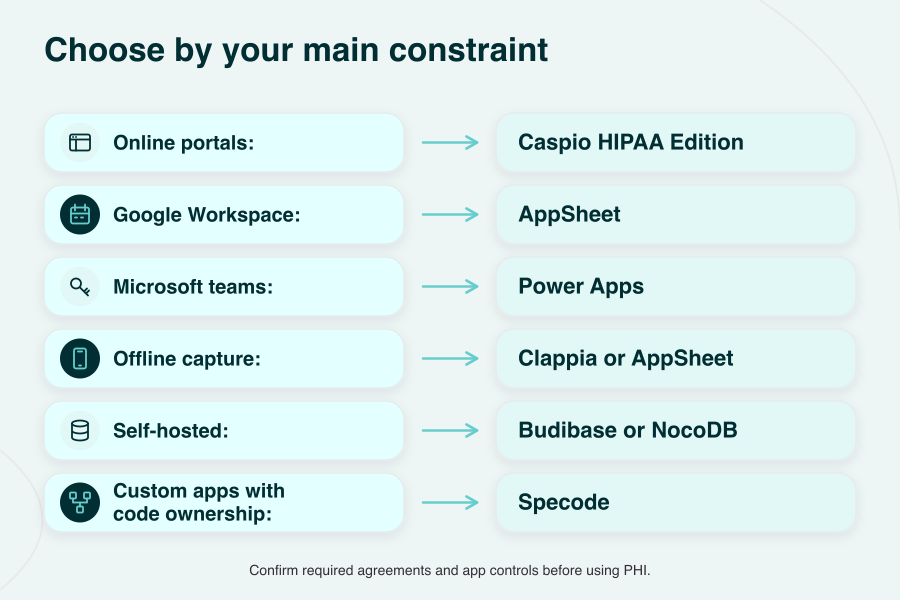
- Web portals with a BAA: Caspio HIPAA Edition.
- Google Workspace teams: AppSheet.
- Microsoft shops: Power Apps.
- Offline field capture: Clappia or AppSheet, after testing device storage and sync.
- Self-hosted: Budibase or NocoDB, with security operations owned by your team.
- Healthcare-first custom app with code ownership: Specode.
Key takeaways:
- Test permissions before signing. Reproduce a restricted user's workflow and inspect its logs.
- Validate offline capture on real devices. Include a conflicting edit during reconnection.
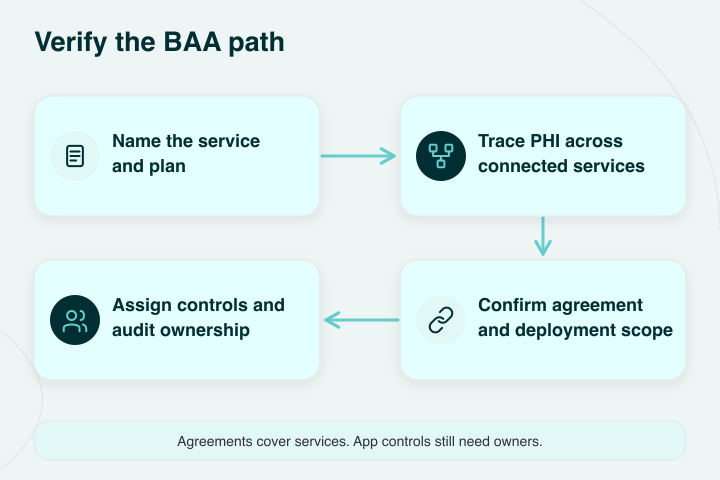
- A BAA covers only part of the work. App configuration and ongoing governance still need owners.
What is Knack and how it's used in healthcare
Knack software is a no-code database app builder that turns spreadsheets into browser-based web apps. This online database builder allows users to create forms and control access without maintaining the underlying platform. Healthcare teams use it for intake, portals and operational tracking, with separate standard and healthcare pricing.
Knack previously used knackhq.com for hosted apps. Searches for a KnackHQ alternative or KnackHQ competitors generally lead to the same comparison of alternatives to Knack.
For no-code healthcare projects, decide how far the initial tracker will grow. A referral-status board and a patient portal can share a database while needing very different access rules.
How much does Knack cost?
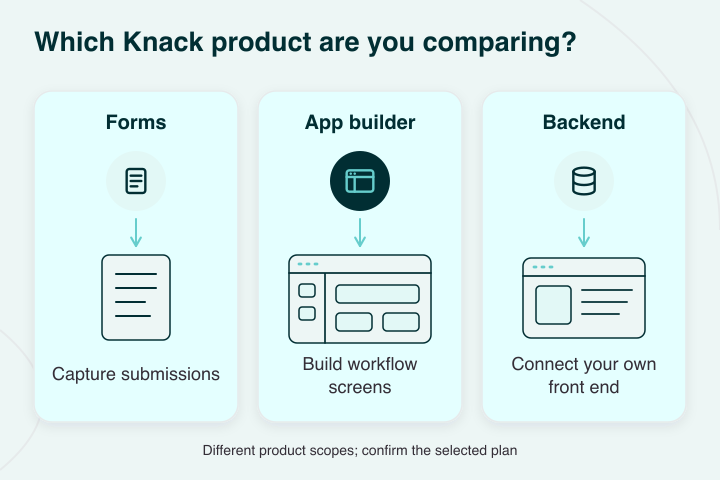
Knack pricing starts at $59/month for standard Starter on monthly billing, with Pro at $130 and Corporate from $300. HIPAA Forms starts at $159/month; HIPAA Starter starts at $499/month for the full app builder.
Forms is the narrower form-capture product, so review our "is Google Forms HIPAA compliant?" guide when comparing intake tools.
Knack Health: what changed in 2026
Knack announced Knack Health in March 2026, with HIPAA plans that include a BAA. It provides SOC 2 Type II reports for due diligence and an Epic FHIR connection.
Knack announced HIPAA-covered AI app building in April. Its August MCP release connects AI tools to a Knack backend, adding a separate option for teams comparing backend-only vs. full-platform HIPAA.
Customers still own workflow logic and integration mapping, along with governance of the app they build.
Why healthcare organizations look for Knack alternatives
Teams look for Knack alternatives when the operating burden outgrows the original project. The first app may work well; the difficulty is maintaining it as more departments depend on it.
Building without coding gets you through the initial workflow. Your next platform decision needs to account for the people who'll inherit it:
- Ownership changes: The original builder moves on, leaving undocumented permissions and business rules. Name a maintainer who can explain both.
- Procurement catches up: Confirm that the purchased service and contract cover the data you'll put into it. Evaluate the finished app as part of that review.
- Integrations become dependencies: An EHR connection needs an owner for failed messages and changed mappings. A daily manual export can become a staffing problem.
- More teams need different access: Front-desk staff and external partners may require different views of the same record. Model those boundaries before widening access.
A HIPAA compliant app builder comparison helps you assess the controls around the app. The low-code editor is only one part of the maintenance commitment.
Knack limitations for healthcare teams
Knack gates record-history retention and SSO by plan; its session controls also need configuration. Evaluate Knack competitors against your actual access requirements, including what the app must record when someone uses PHI. The Knack Health overview explains the product scopes.
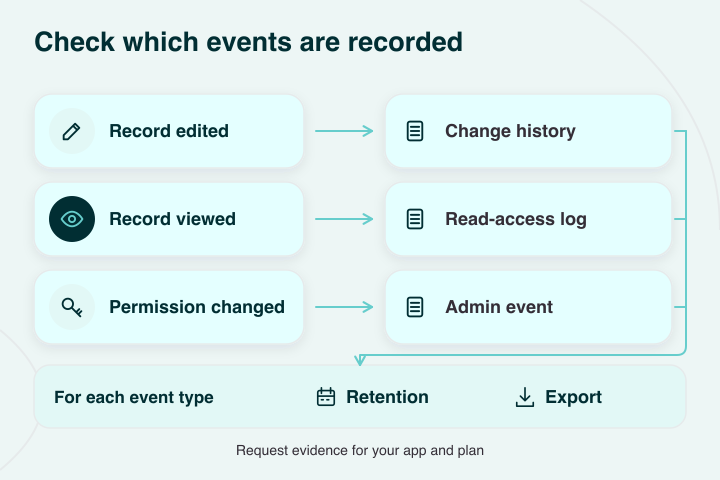
Record history has a defined scope. Standard Pro, Corporate and Enterprise list 1, 2 and 3 months of record audit logs respectively; HIPAA plans retain 7 years of record history. Confirm read-access logging separately, using the events your security review requires.
Standard SAML and OAuth SSO requires Corporate or above, or Pro with an add-on. HIPAA Starter supports Google SSO; SAML is on eligible higher HIPAA tiers.
Check your identity provider against that tier before purchasing. Our guide to secure authentication in healthcare apps covers the wider authentication design.
HIPAA Live Apps default to a 15-minute inactivity logout, and that setting is configurable. Your team's session policy still needs to be applied and tested.
When you create custom pathways for several roles, exception handling and handoffs add maintenance work. Exports and notification services also extend the data boundary beyond the app's screens.
Knack can prove a workflow early. Once other teams depend on it as a system, assign owners for access reviews and changes before adding another department.
Criteria for choosing a Knack alternative in healthcare
Compare Knack database alternatives against the workflow you'll actually operate. The healthcare app builder you choose should pass a security review and a restricted-user test before you judge its editor.

HIPAA and compliance requirements
Get the business associate agreement (BAA) for the exact service and plan handling protected health information (PHI). Check the contractual scope of connected services too. Our HIPAA compliance in no-code and low-code app development guide covers this shared responsibility.
Handling PHI and privacy controls
Enforce role-based access control at the record and field boundaries your app needs. Test a restricted account against search results and exports; check permissions at the data layer as well as the screen.
EHR/EMR integrations (HL7/FHIR)
Integration is where prototypes go to die. An EHR integration needs supported endpoints and an owner for mapping failures. Agree who maintains the FHIR HL7 mappings and validates the exchanged data when either system changes.
AI capabilities and data automation
Define which data the AI can touch and who approves its output. Test whether an automated record change respects the same permissions as a staff member's change.
Offline support for medical facilities
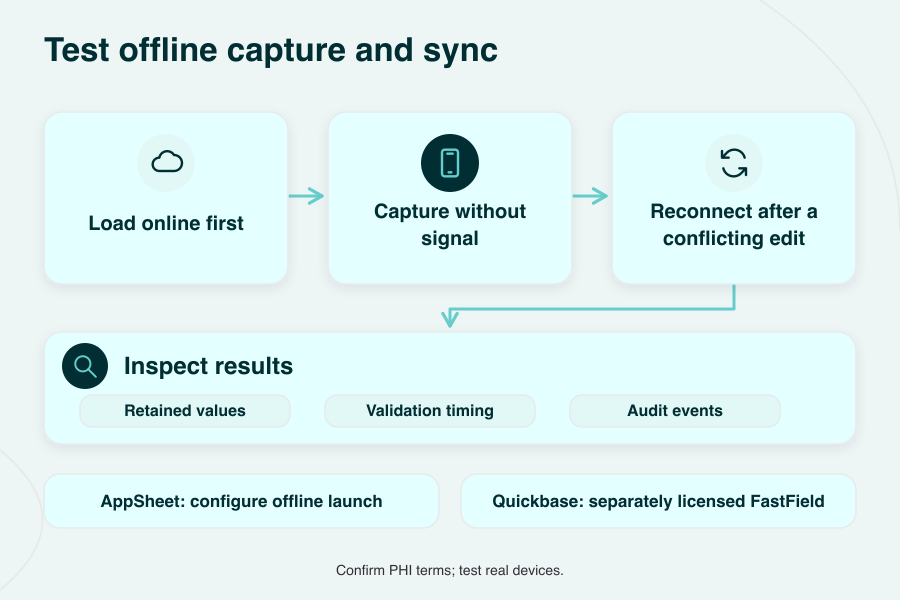
Prove on-device capture with the network disabled. Check which validations still run, then reconnect after 2 users edit the same record. Include device loss and stored-data protection in that test.
Deployment models (cloud/private/hybrid)
Match deployment to your security team's hosting rules. HIPAA doesn't impose blanket US-only hosting; location-related risks and contractual restrictions still need review. Check private-cloud requirements before shortlisting cloud-only products.
Governance, access control & audits
Ask for exportable audit logs and their retention policy. Separate record edits from read-access events and administrator actions, then verify who can change permissions or delete evidence. Put responsibility for reviewing those logs into the operating plan.
Top Knack alternatives for healthcare in 2026
These Knack alternatives for healthcare include Specode for custom apps with code ownership, Caspio for online portals, and Clappia or AppSheet for field capture.
If you're asking "How do I quickly launch a health app?", start with a small workflow you can test. If Blaze is on your shortlist, our Blaze vs Specode breakdown covers that comparison.
Specode
Specode fits custom healthcare web apps with code ownership; production needs Convex's signed hosting BAA in your own account. You can export and modify the generated code. Publishing uses your own GitHub repository, so assign someone to own ongoing changes and access reviews.
Best fit: clinicians or provider teams building around their own workflows. Our healthcare app builder comparison covers the wider AI-builder set.
Watch-outs: BetterAuth is built in, with custom OAuth integrations including Google sign-in. RBAC and audit logging need per-app implementation; the HIPAA scan flags missing logs so they can be added. Use synthetic data in the builder and previews, and arrange the required agreements for other PHI-handling services.
Starting price: Pro starts at $1,000/month for production, billed monthly, plus Convex Professional at $25/developer/month and usage beyond included resources. Required third-party HIPAA plans cost extra.
Clappia
Clappia's native apps support offline field data capture; it advertises a healthcare BAA, with the eligible plan and scope needing confirmation.
Best fit: home-health documentation and consent capture with photos or signatures. India is the default data center; relocation needs at least 10 Professional or Enterprise licenses. Budget for that minimum if you need another hosting region.
Watch-outs: load apps online before fieldwork, including existing submissions you'll edit. Submission-status changes and lookups into other Clappia apps need connectivity. Enterprise is required for SAML/OIDC SSO.
Activity logs track app/submission changes; confirm read-event coverage and retention for your workflow.
Starting price: confirm the HIPAA quote. General software Starter is $6/user/month billed annually, or $8 monthly; that price doesn't establish BAA eligibility.
AppSheet
AppSheet fits Google Workspace teams building mobile checklists under a signed Google BAA and the required app configuration.
Best fit: rounding apps and mobile workflows that need local data during outages.
Watch-outs: configure Core-or-higher security filters to limit device data, and protect the underlying source. Core also includes on-device encryption. Offline launch needs configuration and an initial online load; test delayed sync before deploying.
Starting price: Core is $10/user/month, included with most paid Workspace plans; Enterprise Plus is $20. Core's security controls and the signed BAA are separate requirements. Cloud database/API connectors and custom OIDC require Enterprise Plus; regional storage selection does too.
Team-audit export to BigQuery also requires Enterprise Plus; app audit logs exist on all plans.
Quickbase
Quickbase handles operations apps; BAA coverage requires Business or Enterprise on an annual or multi-year term.
Best fit: back-office workflows linked to field forms. Compare Quickbase alternatives against the combined cost of Quickbase and FastField. Business includes SAML SSO and retains audit logs for 1 year.
Watch-outs: offline capture uses separately licensed FastField. Quickbase's own mobile offline mode ended in January 2025. Existing FastField users also need disabling there during offboarding; confirm its controls separately before collecting PHI.
Starting price: Business starts at $55/user/month annually, plus an unpublished platform minimum. Separately, FastField Pro is $36/seat/month annually and includes HIPAA.
Airtable
Airtable fits staff-facing admin workflows; PHI requires Enterprise Scale and an executed Health Information Exhibit containing its BAA.
Best fit: intake coordination and staffing with reliable connectivity. For contract details, read "is Airtable HIPAA compliant?".
Enterprise Scale retains audit events for 180 days. Its regional hosting covers some data at rest, so verify which records and service metadata stay within your required region.
Watch-outs: offline access isn't supported. Its health-information requirements prohibit patient portals and require additional terms for AI use with PHI. External Sync integrations import data without writing changes back to the source.
Starting price: Enterprise Scale is a custom quote through sales.
Zoho Creator
Zoho Creator fits teams running workflows in Zoho's cloud or customer-managed infrastructure; request a BAA and confirm the covered services and deployment.
Best fit: workflows in Zoho's cloud or customer-managed hybrid/on-premises infrastructure. Hybrid still uses cloud development and metadata, so include that boundary in your hosting review.
Record-change history lasts 1 year; print/export logs last 3 months. Export the evidence you need to retain beyond those windows.
Watch-outs: mark health fields as ePHI and enable encryption separately. Offline mobile forms can't use integration fields or pre-submit workflows; required-field and duplicate checks wait for sync.
Starting price: Standard is $8/user/month annually, or $12 monthly. SAML SSO is an add-on below Enterprise; confirm the BAA's scope before budgeting.
Caspio
Caspio's HIPAA Edition includes a signed BAA and suits online portals with structured data collection.
Best fit: patient-facing portals with large audiences. When comparing Caspio alternatives, check how per-user fees affect the total. Its hosted model suits browser workflows; EHR integrations still need API/webhook mapping.
Watch-outs: confirm SAML inclusion, active audit-log retention and the HIPAA hosting region in writing. Its data-access audit trail covers reads and changes. Offline capture needs a separate solution.
Starting price: HIPAA Edition starts at $800/month on a 1-year term, with unlimited app users. Confirm the included features in your selected HIPAA quote.
Power Apps
Power Apps fits Microsoft-based teams; Microsoft's BAA covers it by default for eligible healthcare customers.
Best fit: networks already using Microsoft identity and governance tools. Your IT team can apply connector data policies and Microsoft identity controls.
Watch-outs: built-in mobile offline uses Dataverse; other designs need custom local caching. Configure Dataverse auditing and retention, and test sync with conflicting edits. Define the tables and columns to audit before treating its logs as PHI-access evidence.
Starting price: Premium is $20/user/month paid yearly; pay-as-you-go is $10/active user/app/month. Multiple apps can create multiple app-user charges.
Ninox
Ninox fits teams seeking German cloud hosting or continuing with Classic installed apps; we couldn't verify a public HIPAA/BAA offering.
Best fit: teams seeking German cloud hosting or continuing with Classic installed apps.
Watch-outs: the new platform is browser-based; offline installed apps and private/on-premises hosting belong to Classic. Classic Enterprise supports SAML/OIDC in licensed private/on-premises configurations. Confirm the version and contractual PHI coverage before choosing it.
Record-change history needs a separate access-log coverage check before you rely on it for a PHI audit.
Starting price: confirm contract and price with Ninox; no public HIPAA plan verified.
Budibase
Budibase fits self-hosted internal tools; its standard Cloud terms exclude HIPAA-regulated use.
Best fit: IT teams that can own hosting and ongoing security operations.
The self-hosted location is yours to select. Optional AI features and licensing/authentication can still make outbound calls, so review the configuration before promising that data stays inside your network.
Watch-outs: self-hosting leaves app controls and governance with you. OIDC SSO is free when self-hosted; enforced SSO is paid. Offline record capture isn't documented.
Starting price: $0 for self-hosted software; Enterprise is quote-only and required for audit logs. Add hosting and operations to the budget.
NocoDB
NocoDB fits admin teams putting an app interface over an existing PostgreSQL or MySQL database; a vendor BAA wasn't verified. Self-hosted HIPAA compliance remains customer-managed.
Best fit: admin teams with an existing PostgreSQL or MySQL system.
Watch-outs: enterprise SSO and workspace audit logs are paid; Business supports SAML/OIDC. Offline record capture wasn't verified; NocoDocs' offline document editing is a separate capability.
Starting price: $0 to self-host; Business SSO starts at $24/editor/month annually, and Scale audit logs at $45/editor/month annually. Confirm seat minimums, plus audit-event coverage and retention for your PHI workflow.
We didn't verify a public BAA offering for Noloco. Tadabase has a BAA on eligible Enterprise plans; its online-portal focus overlaps Knack and Caspio, so we've left it out.
Comparison table: Knack vs top healthcare alternatives
Knack and Caspio provide managed database apps; Specode produces custom apps with code ownership, and Budibase or NocoDB let your team manage the hosting.
Compare data residency and log coverage: record history tracks changes, while access logs can show who read data. Ask for a sample log export and its retention period. Check the SSO SAML configuration or OpenID Connect support against your identity provider and selected plan.
| Platform | Deployment | HIPAA / BAA path | Audit logs | App authentication / SSO | Data residency |
|---|---|---|---|---|---|
| Knack (baseline) | AWS cloud; private options on higher HIPAA tiers | Knack Health plans include BAA | 7-year record history on HIPAA plans | Google on Starter; SAML on eligible higher HIPAA tiers | US for HIPAA |
| Specode | Your own Convex production account | Sign Convex hosting BAA in your account; other PHI services need appropriate agreements | Per-app; HIPAA scan flags missing logs | Built-in BetterAuth; custom OAuth integrations, including Google sign-in | US |
| Clappia | AWS cloud; on-premises deployment on Enterprise | BAA advertised; confirm eligible plan and scope | App changes, submission edits and exports | Enterprise: SAML, OIDC, Microsoft identity | India default; other AWS regions by request with 10+ Professional/Enterprise licenses |
| AppSheet | Google cloud | Signed Google BAA required | App audit logs; Enterprise Plus for team-log export to BigQuery | Google/Microsoft; Enterprise Plus for Okta/custom OIDC | Global default; Enterprise Plus for EU/Asia Pacific app data; connected sources separate |
| Quickbase | Vendor cloud | Business/Enterprise, annual or multi-year | All plans; retention varies | SAML 2.0, Business+ | US or EU instance |
| Airtable | Cloud SaaS | Enterprise Scale + Health Information Exhibit/BAA | Enterprise Scale audit events; searchable for 180 days | SAML, Business and Enterprise Scale | US default; some data at rest in EU/Australia on Enterprise Scale |
| Zoho Creator | Cloud; hybrid/on-premises options | Request BAA; confirm covered services/deployment | Record changes: 1 year; print/export logs: 3 months | SAML included on Enterprise; add-on below it | Regional centers; sign-up region determines location |
| Caspio | AWS cloud, HIPAA environment | HIPAA Edition includes BAA | Reads and changes; confirm retention | SAML 2.0; confirm selected HIPAA tier | Confirm HIPAA-region options |
| Power Apps | Microsoft cloud | Microsoft BAA by default for eligible customers | Dataverse; configure scope/retention | Microsoft Entra ID | Selected environment region |
| Ninox | New cloud; Classic private/on-premises | Public HIPAA/BAA offer not verified; confirm contract in writing | Record-change history; verify access-log coverage | Classic Enterprise: SAML/OIDC; confirm new platform | New cloud: Germany; Classic hosting options |
| Budibase | Self-hosted or Cloud | Standard Cloud excludes HIPAA use; self-host controls customer-managed | Enterprise; confirm event coverage and retention | Free self-hosted OIDC; enforced SSO paid | Self-hosted: your choice; Cloud: Ireland |
| NocoDB | Self-hosted or Cloud | Vendor BAA not verified; self-host controls customer-managed | Workspace events: Scale+; confirm scope/retention | SAML/OIDC, Business+ | Self-hosted: your choice |
Starting prices and HIPAA conditions
Published options include Knack Health Forms at $159/month for form capture and Caspio HIPAA Edition at $800/month on a 1-year term for online apps. AppSheet Core is a security-feature plan; free self-hosted software still needs paid controls where listed, hosting and ongoing operations.
Quotes must cover your actual PHI workflow.
| Platform | Relevant starting price | Billing and HIPAA conditions |
|---|---|---|
| Knack Health | Forms $159/mo; full builder Starter $499/mo | BAA included; flat pricing, no app-user fee; confirm contract term |
| Specode | Pro $1,000/mo + Convex Professional $25/developer/mo | Monthly Specode billing; separate hosting/usage charges; sign Convex BAA |
| Clappia | BAA-eligible plan and price: confirm with vendor | Public pricing doesn't identify the BAA tier |
| AppSheet | Core $10/user/mo | Included in most paid Workspace plans; monthly/annual billing; signed BAA required |
| Quickbase | Business from $55/user/mo | Annual; unpublished platform minimum; FastField separate (Pro $36/seat/mo annually includes HIPAA) |
| Airtable | Enterprise Scale: custom quote | Confirm the Health Information Exhibit/BAA with sales |
| Zoho Creator | Standard software $8/user/mo annually; $12 monthly | Request BAA; confirm covered services/deployment and any required add-ons |
| Caspio | HIPAA Edition from $800/mo | 1-year term; no per-user fees; confirm SAML inclusion |
| Power Apps | Premium $20/user/mo | Paid yearly; Microsoft BAA for eligible customers |
| Ninox | No public HIPAA contract/price verified | Confirm contract, deployment and price with Ninox |
| Budibase | $0 self-hosted software; Enterprise quote for audit logs | Hosting/operations extra; standard Cloud excludes HIPAA use |
| NocoDB | $0 self-hosted; Scale audit logs $45/editor/mo annually | Scale $54/editor monthly; Business SSO $24/editor/mo billed annually or $30/editor/mo monthly; customer-managed controls |
Knack vs. Caspio
For Knack vs Caspio, Knack suits configurable database workflows; Caspio suits online portals and structured data capture. Check the selected plan's audit events and contract conditions before choosing.
| Criterion | Knack | Caspio |
|---|---|---|
| BAA plan and price | Forms $159/mo; full builder Starter $499/mo; BAA included | HIPAA Edition $800/mo; BAA included; 1-year term |
| Offline | No native offline access | Online web apps; separate offline solution |
| SSO | Google on Starter; SAML on eligible higher HIPAA tiers | SAML 2.0; confirm selected HIPAA tier |
| Audit retention | 7-year record-change history | Data-access audit; confirm active-log retention |
| Data residency | US HIPAA hosting | Confirm HIPAA-region options |
| Best fit | Configurable database apps and workflows | Online portals and structured data capture |
Caspio's terms describe a separate 6-year transaction-log archive after a HIPAA account closes. Ask for its active-log retention commitment and compare the actual events captured by each system.
Healthcare use cases for Knack alternatives
Healthcare workflows for Knack database competitors include intake and scheduling, clinical handoffs, inventory tracking, compliance reporting and billing queues. Start small enough to maintain with the people available for code development.

Patient intake and scheduling
Track whether intake packets are complete and route missing information to the person who can resolve it. Measure dropped referrals or duplicate entry before adding another reminder automation.
Clinical internal tools
For internal tools, pick a handoff staff can explain clearly:
- a rounding checklist
- an internal consult queue
- a care coordination escalation
- a triage protocol
Name who handles exceptions when the usual route fails.
Inventory and asset tracking
Device loans and crash cart checks need different screens from a patient registry. Test the workflow where staff use it, including basement storage or other areas with poor connectivity.
Compliance and reporting dashboards
Work backward from the evidence someone will request:
- a completed training attestation
- an incident report with its change history
Check that the underlying records can be exported before spending time on the dashboard.
Billing and insurance workflows
Prior authorization and denial queues need a clear next owner. Model the exception paths, including requests returned for missing information, before expanding the automation.
Use the medical app development guide to plan app development around those responsibilities. A named owner should be able to explain what each workflow does when it stalls.
Free & open source Knack alternatives
Budibase is a GPLv3 option for self-hosted internal tools; NocoDB is a fair-code alternative with commercial-use restrictions. If you're comparing free open source Knack alternatives, check the license terms alongside the operating budget.
Budibase
Budibase uses GPLv3, with separately licensed paid features. As a self-hosted code platform, it lets you choose infrastructure; your team owns patching and backups. Review outbound integrations before setting a PHI boundary.
NocoDB
NocoDB's Sustainable Use License is fair-code, with commercial-use restrictions. Check its terms if your organization requires OSI-approved open source. Self-hosting gives you location control and ongoing operational work.
Use the telehealth app development guide to plan beyond the database, including the services your app will depend on.
Offline Knack alternatives for medical facilities
For alternatives to Knack that support disconnected capture, start with Clappia or AppSheet; Quickbase uses the separately licensed FastField app. Test offline sync on the devices staff will carry, so business apps reconnect predictably.
Strong offline-capable options
- Clappia and AppSheet: load both online before disconnected use. AppSheet needs offline launch configured; Clappia's status changes and cross-app lookups wait for connectivity.
- Quickbase via FastField: use the separately priced FastField mobile app for disconnected forms. Quickbase retired its own mobile offline mode in January 2025.
Zoho Creator's mobile apps support offline work, but forms with integration fields or pre-submit workflows won't open offline; required-field and duplicate checks wait for sync. Power Apps' built-in mobile offline-first uses Dataverse; other designs need custom caching.
Ninox Classic installed apps support offline work. Its new browser platform is a separate offering. NocoDocs supports offline document editing; database-record capture needs separate verification.
Stage one conflict: capture a record without service while a colleague changes it online, reconnect, then check which values and validations survive. An installable PWA label alone doesn't answer that question.
How to choose the right Knack alternative for healthcare
Turn your Knack review into a short acceptance test before buying a plan. Use the same workflow on each shortlisted platform.
- Map the next 18 months: list expected user roles and the reports your team must produce. Assign an owner for changes.
- Set the PHI boundary: keep only the data the workflow needs. Test RBAC using the most restricted account, including exports and shared links.
- Price the integration work: identify the EHR endpoints and who maintains mappings when fields change. Include separate connectors or services in the quote.
- Test reconnection: edit the same record online and offline, then sync. Record the conflict outcome.
- Choose the ownership model: decide who will maintain the app if requirements outgrow the builder. Our custom healthcare software development guide covers the option of owning the application outright.
How Specode compares to Knack
Knack Health provides a managed database app; Specode's AI app builder creates custom healthcare web apps whose generated code you own and can export. Knack's dedicated HIPAA plans include a BAA; the Knack Health overview above covers its plans and EHR developments.
In Specode, BetterAuth is built in, and you can add custom OAuth integrations such as Google sign-in. Audit logging is implemented per app; the HIPAA scan flags missing logs so they can be added.
To assess Specode as a Knack alternative, get started with Specode and scope one workflow. Check its role boundaries and audit coverage before expanding it, with clear responsibility for ongoing app governance. Compare subscriptions and HIPAA conditions in the pricing table.
How we verified this comparison
We checked official vendor pricing, security pages, documentation and terms in October 2026. Specode details use current product documentation and team confirmation.
Prices are USD list prices with billing periods stated; quote-only contracts and separately priced services remain identified. Our recommendations reflect documented constraints, without hands-on benchmarks or private audit reports, and software entry prices alone don't establish a PHI-ready deployment.
Originally published September 18, 2026.
Frequently asked questions
Choose by constraint: Specode for custom apps and code ownership, Clappia or AppSheet for offline capture, and Caspio HIPAA Edition for online portals.
Who are Knack's main competitors?
Caspio, Quickbase, Airtable, AppSheet, Power Apps, Zoho Creator and Clappia are core competitors. For healthcare, filter the list by BAA coverage and required controls.
Knack is no-code database software for building browser-based apps around structured data, including forms and workflow screens.
Does Knack cost money?
Knack has paid plans; see Knack pricing for standard subscriptions and the separate healthcare options.
Knack Health's dedicated HIPAA plans include a signed BAA. Standard plans don't cover PHI, and your app's configuration and operating controls still matter.
Caspio, Quickbase, Airtable, AppSheet, Power Apps and Zoho Creator have documented BAA paths. Confirm Clappia's plan; Specode uses your Convex BAA and applicable third-party agreements.
Budibase is open source; NocoDB is free to self-host under a fair-code license. Both require an operating budget, with paid audit features.
APIs and middleware can connect supported EHR endpoints. Microsoft's Premium FHIRlink connector is one option; mappings and access permissions still need implementation.
Knack is cloud-hosted, with private infrastructure on selected HIPAA tiers. It publishes no on-premises or self-hosted option.
Capabilities vary by plan. Record-change history, admin events and PHI-access logs cover different activity; check role permissions, event coverage, exports and retention.
Compare subscriptions, contractual HIPAA conditions and extra services in the pricing table, including quote-only plans and self-hosted operating costs.


