How to Launch a Symptom Tracker App with Specode's AI Builder

Symptom tracker app development matters when patient complaints start slipping through the cracks between visits. Clinicians do not need another wellness diary dressed up as innovation. They need structured symptom data they can review quickly, trust reasonably, and use to make better care decisions without adding friction to the day.
That is the real challenge: building a tool patients will actually use and clinicians will not immediately resent. Done well, a symptom tracker can support earlier intervention, better follow-up, and more continuity between appointments instead of becoming one more abandoned feature in a crowded health app.
Quick Question: How do you launch a symptom tracker app without spending months on custom development?
Quick Answer: Use Specode to turn a symptom-tracking idea into a working healthcare web app by describing workflows in plain English, previewing them early, and refining them before launch. For teams building in regulated healthcare, the real advantage is not just speed, but getting a HIPAA-oriented foundation, integration flexibility, and full code ownership from the start.
Key Takeaways
- A symptom tracker app becomes valuable when it turns messy patient self-reporting into structured data that supports real care workflows, not just nicer journaling.
- Specode helps teams move faster by letting them build healthcare web apps through AI-guided conversation, preview workflows early, and iterate before committing to heavier development.
- The strongest Specode pitch is practical: HIPAA-minded foundations, integration flexibility, and 100% code ownership, so teams can launch faster without trapping themselves in a black box.
What Is a Symptom Tracker App?
An AI symptom tracker app is a mobile health app that lets people record changes in how they feel over time and turns that input into something more useful than a scattered symptom journal.
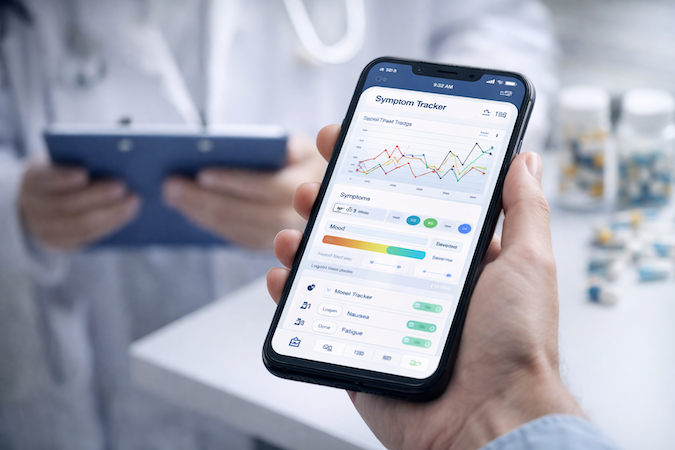
At its simplest, it supports pain tracking, mood tracking, medication notes, and daily check-ins. At its best, it becomes part of patient self-reporting and remote patient monitoring, helping healthcare providers spot patterns between visits instead of relying on memory and vague “it got worse last week” updates. In other words, it is not just a diary with better UX.
It is a structured layer of health monitoring that can support chronic care, post-op recovery, and behavioral health workflows.
Key Features of a Symptom Tracker App
A good AI-powered symptom tracker does two things well: it makes logging effortless, and it makes the data useful. The core features below are what separate a real product from a dressed-up symptom diary.
This is also where telehealth app development starts to overlap with symptom tracking. Once data can support review, triage, or follow-up, the app begins to function less like a diary and more like real health tracking software inside a broader digital care experience.
Benefits of Building with Specode’s AI Builder
Faster Path to a Usable Product
If you want to create a symptom tracker app, Specode removes a lot of the usual technical drag. A clinician, founder, or operator can describe the product in plain English and have the AI app builder generate a working healthcare web app that adapts well to mobile screens.
That makes early onboarding, peer review, and feedback much easier before a team commits to a longer build cycle.
Built Around Healthcare Best Practices
That speed would be meaningless if the result were reckless. Specode is shaped around HIPAA-minded health app development, which matters when patient data, user experience, and HIPAA compliance all need to be considered early rather than patched in later.
Flexible Enough for Advanced Features
The other major advantage is flexibility. Users can ask AI to implement highly specific features, including LLM-powered functionality, HIPAA-protected messaging, telehealth workflows, and other integrations.
The platform handles much of the integration work and guides users through the setup, giving teams a faster route to a more tailored web and mobile health app experiences.
How to Build a Symptom Tracker App Without Getting Lost in the Build
1. Start With the Workflow, Not the Feature Wishlist
The fastest way to derail symptom tracking app development is to begin with a pile of “nice-to-haves.” Start with the actual care flow: what patients report, what clinicians review, and what should happen next.
For most teams, that means defining the core clinical workflows, the right user roles, and the minimum patient engagement loop before touching polish.
2. Build by Conversation
Specode’s angle is simple: instead of dragging blocks around like it’s arts and crafts for grown-ups, you describe what you want in plain English and the platform assembles a healthcare web app around it.
Its AI Builder is designed to generate live screens, data structures, and permissions from prompts, which is why it fits teams exploring a faster path than traditional custom healthcare software development.
Example: Building One Workflow at a Time
Build one workflow end to end, then reuse that logic across the rest of the product. Specode is built around that kind of stepwise assembly: describe the workflow in plain English, generate a live preview, refine it, and only then move to the next scope.
If the workflow is “schedule a doctor appointment,” the steps look like this:
Step 1: Set Up the Core Records First
Start by defining the main user types in simple terms: patients, providers, admins, and the information each of them needs.
Step 2: Define Access Rules
Decide what each role can see and edit in the app. Patients should not wander into admin territory like a toddler with a hotel keycard.
Step 3: Describe the Workflow Logic
Spell out what each person can do. For example: providers set availability, patients can only book open slots, and admins can manage both sides when something breaks.
Step 4: Shape the User-Facing Screens
Once the logic is in place, describe how scheduling should look and feel inside the app so the user experience matches the workflow instead of fighting it.
Step 5: Add Integrations Where They Actually Matter
If the team already uses another scheduling tool or needs outside systems, treat that as part of the workflow design, not an afterthought. Specode’s messaging around healthcare builds consistently emphasizes integration readiness alongside previews and iterative workflow assembly.
Step 6: Test the Workflow End to End
Run through the full sequence repeatedly: create accounts, set availability, book visits, reschedule, cancel, and confirm nothing weird happens in the handoff. That matters in any healthcare app development company context, but especially in products handling real patient data and care operations.

That structure also gives you a nice repeatable rail for other workflows: symptom logging, provider review, messaging, intake, follow-up, telehealth, and so on.
3. Preview Early, Then Refine the Real Stuff
The practical win is speed to feedback. Teams can spin up a shareable preview, review user experience, and iterate on things like symptom inputs, dashboards, or reporting before committing to a longer build. Specode also emphasizes reusable healthcare foundations and integration paths, which matters if your roadmap eventually includes a broader digital health platform rather than a standalone tracker.
Tech Stack & AI Capabilities
If you are figuring out how to build a symptom tracker app, the practical question is not just what features the app should have, but how flexible the underlying stack will be once the product grows up and starts asking for more than forms and buttons.
Flexible App Foundation
Specode generates healthcare web apps in React, which gives teams a more adaptable base for app launch, future iteration, and custom expansion. Customers can keep the code, continue development in-house, and host it in their own environment if needed. That matters for products expected to evolve into broader patient-facing tools, including patient portals or more specialized care workflows.
AI Capabilities Through Integrations
Specode can help implement AI-driven functionality through external services, not invent it out of nowhere. That may include health data analytics, data visualization, wearable integration, or LLM-powered symptom summaries and journaling support.
In that sense, a no-code app builder can still support fairly sophisticated product ideas when the right integrations are added.
Important Compliance Boundary
This is also where the line between functionality and responsibility becomes very real. If a team connects outside AI providers, it still needs to think through data security, vendor compliance, and whether those services are appropriate for healthcare use.
That is especially relevant for teams thinking beyond symptom logging into areas adjacent to mental health app development, where privacy expectations get very serious very fast.
Compliance & Data Security
When you build a symptom tracking app for US healthcare, the question is not whether security and compliance matter. It is whether your build path gives you a solid starting point without boxing you into a toy product.
Specode’s HIPAA posture is worth looking at in two layers:
- Platform-level security out of the box: end-to-end encryption, secure authentication infrastructure, protected data storage through Convex, and regular security updates.
- Application-level safeguards you configure: role-based access controls, audit logging, and custom data retention policies.
- AI guided by healthcare best practices: Specode AI helps implement these safeguards in ways that fit real healthcare workflows instead of leaving teams to improvise.
- HIPAA-friendly production path: for Pro-plan production deployments, the backend hosting BAA is included, so teams do not need to negotiate a separate hosting BAA.
- No ongoing access to deployed patient data: after deployment, Specode does not store or access patient data.
- Extra validation when needed: teams can request an optional in-house penetration test for procurement or enterprise security review.
- Go-live verification: before a Specode-built app goes live, the Specode team performs an end-to-end verification to help ensure the app is HIPAA compliant.
For a product used in chronic disease management, that matters because even a lightweight tracker can quickly expand into real-time alerts, provider-facing workflows for doctors, and more actionable health insights.
The point is not that Specode magically removes all responsibility. The point is that it gives teams a more credible, healthcare-oriented foundation than starting from scratch and hoping compliance appears later like a guilty conscience.
Monetization Strategies
A health symptom tracking app can support several monetization paths, depending on who the product is really for:
- B2B licensing for hospitals and clinics: charge per organization, per provider group, or per location.
- B2C subscriptions: monthly or annual plans for patients who want deeper tracking, reports, reminders, or premium features.
- White-label licensing: let healthcare brands, digital health startups, or employers rebrand the product as their own.
- Clinical trials and research licensing: offer the app to research teams that need structured symptom capture and longitudinal reporting.
- Employer or payer programs: position it as part of wellness, chronic care, or remote monitoring initiatives.
- Companion app model: use it to strengthen a broader care platform, not as the main revenue source itself.
The right model depends on whether your product is selling convenience, clinical workflow value, or data capture at scale.
Symptom Tracker App Development Cost
The cost of a health symptom tracking application usually swings on four things: feature scope, compliance needs, AI integrations, and how much custom engineering you want to buy upfront.
Specode's current pricing starts at Pro at $1,000/month for production deployment, hosting setup, and publishing support, with a Custom plan available for larger teams. For current pricing details, visit the Specode pricing page.
A practical comparison looks like this:
Specode compresses the path to a testable product, while custom development buys maximum control at a much higher starting cost. Even Specode’s own guidance treats the builder fee as only part of the picture, because HIPAA-grade third-party services and integrations can still add meaningful cost once you go live.
Who Actually Benefits From a Symptom Tracker App?
The short answer: more groups than most founders expect. Symptom monitoring app development is not just for patients who want nicer logging screens.
Patients with Chronic Conditions
People managing diabetes, migraines, autoimmune issues, GI disorders, mental health symptoms, or post-treatment recovery can use these apps to track patterns they would otherwise forget. Better visibility can support stronger health outcomes over time.
Healthcare Providers
Clinicians and care teams get more structured patient-reported data between visits, which can make follow-up and treatment adjustments less dependent on vague memory and rushed conversations.
Pharma and Digital Therapeutics Companies
Symptom tracking can support adherence programs, patient support initiatives, and real-world evidence collection around treatment response.
Research Institutions and Clinical Teams
These apps can help gather longitudinal symptom data in a more consistent format, especially when interoperability with other systems becomes part of the workflow.
Health Startups
For early-stage teams, a symptom tracker can be the wedge product that grows into a broader care platform later.
How Specode Can Help with Creating a Symptom Tracking App
Specode is for teams that want to move now, not after three demos, two procurement calls, and one existential crisis about vendor lock-in. The platform’s core pitch is straightforward: describe the app in plain English, generate a working healthcare app fast, and keep full ownership of the code from day one.

Why teams go this route:
- Start building immediately with AI instead of waiting for a sales cycle to end.
- Faster path to a usable product with previews and iteration built into the workflow.
- HIPAA-oriented foundation for healthcare use cases, rather than a generic builder pretending regulated workflows are a minor detail.
- Flexible integrations and custom logic for real healthcare products, not just pretty intake forms.
- 100% code ownership so you can export the code, keep developing in-house, and avoid platform lock-in.
Specode’s AlgoRX case study is the kind of proof point buyers like to see: the company says AlgoRX reached 7-figure ARR within 6 months and achieved a 12x ROI using the platform.
Get started with Specode, begin building, and see how far you get before custom development is even necessary. That is the real appeal of a symptom tracker app builder.
Frequently asked questions
A symptom tracker app lets users log symptoms, severity, triggers, and changes over time. The app organizes that data into patterns, reports, or workflows that patients and care teams can review.
Yes. Specode lets non-technical users describe the app in plain English and build a healthcare web app with AI, previews, and guided iteration.
Use a platform built for HIPAA-minded development, implement app-level safeguards like RBAC and audit logs, and choose compliant third-party vendors and hosting where needed.
Yes. Specode AI can guide the implementation of EHR and wearable integrations and help structure the app around those workflows.
A relatively simple app can go live within a month, especially if it does not require too many custom features, integrations, or complex workflows.
Teams can add features like symptom summarization, journaling support, trend detection, alerts, and other AI-assisted workflows through external integrations.