Using Drapcode to Launch a Healthcare App: What Works, What Breaks, and When to Switch

If DrapCode feels like a cheat code for shipping a healthcare app, it’s because it is—right up until you touch real PHI and the “speed” bill shows up as compliance work. The trap is thinking you’re buying a $50/month builder, when you’re actually buying a regulated platform posture: contracts, tiers, evidence, auditability, and answers to uncomfortable questions like “who viewed what… six weeks ago?”
That’s where teams hit two cliffs fast: the BAA gate (your pricing tier decides whether PHI is even allowed) and the audit-log window (short retention turns investigations into interpretive dance).
Yes, code export is a real escape hatch—but exporting code is not “graduation,” it’s adopting a full-time maintenance tax. So the real decision isn’t “can DrapCode build it?” It’s “can your team operate it like healthcare software?”
Top takeaways
- “HIPAA-ready platform” ≠ “HIPAA-compliant app.” You still own RBAC correctness, PHI boundaries, vendor/plugin exposure, and workflow behavior—misconfigurations fail like breaches, not like UI bugs.
- Design your evidence layer on Day 1. Assume you must export/retain logs long-term (and verify whether read/view events exist), and get crisp about RTO/RPO before procurement does it for you—usually with the word “no.”
- Pick the tool that minimizes “compliance plumbing” without boxing you in. Specode’s edge is starting from healthcare-native building blocks and moving fast via its AI Builder (iterate by conversation, preview changes, then drop to code when you need full control)—so you spend more time on your differentiator and less time reinventing the boring-but-fatal parts.
The 60-Second Verdict (DrapCode for Healthcare — Yes, but…)
Yes, DrapCode can work as a healthcare app builder, but only if you treat it like a regulated platform purchase, not a “$50/mo prototype tool.” Two things bite teams fast: the compliance gate (BAA is tier-gated) and the audit-log cliff (default retention is 30 days unless you engineer an export from day one).

Use DrapCode if…
- You’re building a workflow app where you can keep production PHI out of the system until procurement clears the right tier (i.e., develop with synthetic data, then flip to PHI only after the BAA is executed).
Examples:- internal scheduling/intake workflow
- referral tracking
- clinic ops dashboard
- You can commit—early—to a “logs leave the platform” design (webhook/API stream into your own immutable storage) instead of assuming the vendor will retain what auditors ask for.
Examples:- patient portal (records + messages)
- RPM / symptom tracker (patient submissions + clinician review)
- You want a real exit hatch (code export) as insurance against vendor risk—knowing it’s an escape pod, not a comfy daily commute.
Examples:- you’ll pitch hospitals eventually, but you’re starting with a single clinic MVP
Avoid DrapCode if…
- You need auditability beyond 30 days and you’re not willing to build/operate the export + retention pipeline immediately.
Examples (not a great fit):- patient portal with chart access
- clinical documentation workflows
- anything where access investigations are a real possibility
- Your budget assumes “we’ll start cheap with real patient data and upgrade later.” That’s how you accidentally turn your MVP into a compliance incident.
Examples (not a great fit):- “we’ll just onboard two patients for the pilot”
- “we’ll just onboard two patients for the pilot”
- You require end-user authentication controls (e.g., patient/clinician MFA) to be turnkey.
Examples (not a great fit):- patient-facing access for sensitive programs where MFA will be demanded early
Check These Before You Build
- BAA + plan fit: confirm the exact tier you’re buying includes the BAA and the features you’re relying on (don’t accept “HIPAA-ready” vibes).
- Audit logs: confirm retention, export mechanism, and whether logs capture what you’ll be asked for (not just “changes happened”).
- End-user auth: confirm how patient/clinician login, session rules, and MFA work in practice (and what requires external providers/contracts).
What DrapCode Actually Is
DrapCode is a visual web app builder that aims to sit in the middle ground between “pure no-code” and “pro-code” tools. It lets teams assemble a working app by combining a UI builder with backend logic and data handling, then deploy it as a real web application—not just a clickable prototype.
DrapCode targets the “Pro-Code” segment where regulated teams care about governance and ownership, not just speed.
What makes it different (and unusually attractive in healthcare) is the code export “eject button”: you can leave with a Node.js/HTML codebase if procurement, risk, or vendor strategy changes. You should understand that this is not a smooth “graduation path” though as you lose the visual builder and inherit full maintenance responsibility.
Why healthcare teams like it: it sells the dream combo—ship fast, but with a platform posture that procurement and investors can take seriously (clearer controls, clearer ownership story, fewer “black box” vibes).
“HIPAA Platform” vs “HIPAA App”
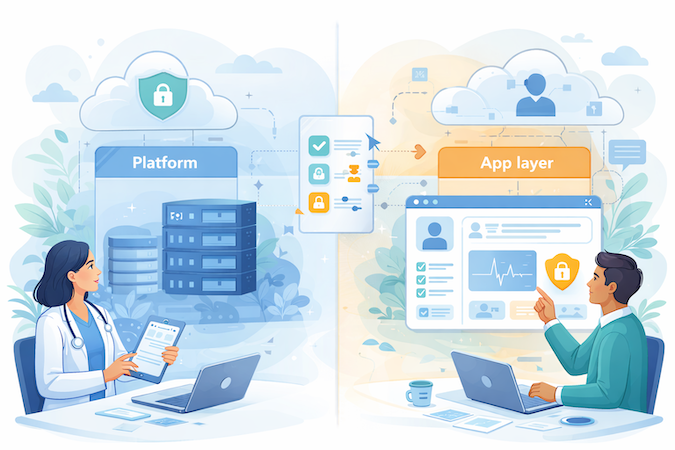
Calling DrapCode “HIPAA-ready” only means the platform may offer compliant building blocks. It doesn’t mean your app is compliant once you drag-and-drop a few screens. In healthcare, the platform can help you clear the infrastructure bar—but you still own the behavior of the product.
What DrapCode Can Realistically Cover
- Baseline security posture of the hosted environment (the “where it runs” layer).
- Core access-control primitives (accounts, permissions features, admin controls) you can configure.
- Operational assurances your buyers will ask about (vendor policies, sub-processors list, change management posture).
What You Still Own
- Role design & least privilege: define who can see what (patient vs clinician vs care coordinator vs billing vs support).
- Workflow boundaries: what actions each role can take (e.g., “schedule visit” ≠ “view clinical notes” ≠ “export data”).
- Data modeling choices: where PHI lives, which fields are sensitive, and what gets cached or displayed in UI and emails.
- Integration touchpoints: what data you send to third parties (even “harmless” tools like analytics, chat widgets, form plugins).
- Logging decisions: which events you record, how you review access, and what you consider “abnormal” for your workflow.
- Plugin / sub-processor risk: every add-on is another vendor to vet, another contract to align, another surface for accidental PHI leakage.
RBAC warning: misconfigured permissions don’t fail gracefully—they fail like a breach: one clinic staffer viewing the wrong patient chart, a contractor seeing therapy notes, or an “admin” role quietly becoming “see everything.” Treat RBAC as a clinical safety control, not a UI convenience toggle.
Related: HIPAA compliance in no/low-code app development
The Compliance Gate: BAA and Tiers
Here’s the unsexy truth: DrapCode isn’t “HIPAA or not HIPAA.” It’s “which plan are you on?” The Launch and Growth tiers are not the place to run an app that touches PHI. In DrapCode’s own positioning, compliance starts at the Scale tier, with Enterprise as the higher-assurance option.
Translation: no Scale-or-higher, no PHI.
Why this matters operationally is the moment every healthcare product hits sooner than expected: the “prototype vs PHI” moment. You start with “just a demo,” then a pilot site says, “Can we try it with two real patients next week?” If your build is sitting on a non-compliant tier, that’s not “an upgrade task.” That’s a full stop.
How to Prototype Safely (without PHI)
- Use synthetic patient data only (generated names, fake MRNs, fake PDFs). If it looks real, you’re doing it wrong.
- Design workflows, not records: build scheduling, forms, tasks, permissions, and clinician views using dummy objects (“Patient A”, “Visit #12”).
- Keep real communications out: route emails/SMS to test inboxes and dummy numbers; don’t send “appointment reminders” to humans yet.
- Test with “de-identified” rules you can defend: no names, no DOB, no addresses, no phone/email, no photos, no free-text that a clinician might accidentally paste into.
- Treat the upgrade as a gate, not a checkbox: run procurement in parallel so the first real-patient pilot doesn’t become a compliance fire drill.
Hosting and Isolation: Dedicated vs Single-Tenant
In healthcare, “hosting” isn’t a DevOps nerd hobby — it’s how buyers decide your breach blast-radius and whether your app gets killed in procurement. There are three models you’ll run into:
- Shared (multi-tenant): your app lives on shared infrastructure alongside other customers. Cheapest, fastest to start… and the hardest to defend in a hospital security review.
- Dedicated resources: you’re still on the vendor’s platform, but your compute is carved out for you (fewer “noisy neighbor” surprises, clearer isolation story).
- Single-tenant: the vendor runs an instance exclusively for your org — the posture large health systems often prefer because “separation” is easier to reason about than “trust our logical boundaries.”
3 Procurement Questions Hospitals Will Ask
- “Is our database shared with other customers, or logically separated inside a shared cluster?”
- “What’s actually dedicated — compute, storage, network, or just ‘bigger limits’?”
- “If we need single-tenant, is it a true isolated instance — and which cloud/region does it run in?”
Our Rule of Thumb
- Dedicated resources are fine for internal workflow apps: care coordination dashboards, referral tracking, intake + scheduling, ops/admin tooling.
- Single-tenant is worth it when you’re selling into hospitals as a system-wide workflow, handling high-sensitivity programs, or your buyer’s InfoSec team has a hard “no shared tenancy” line in the sand.
Security Controls That Matter in Healthcare
Roles and Least Privilege
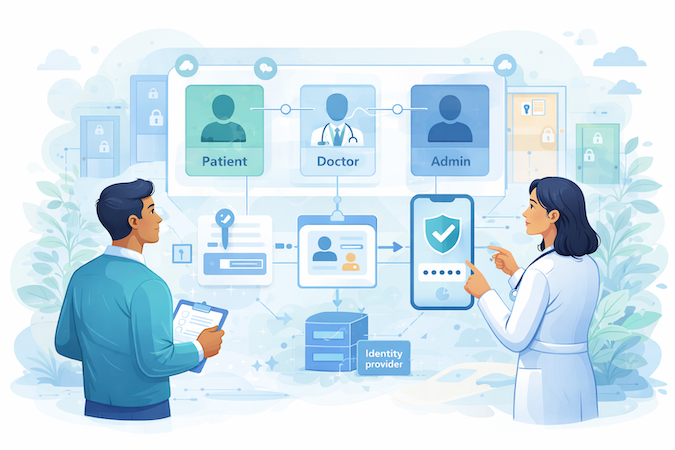
DrapCode gives you native role-based access control so you can define roles (patient/clinician/staff/admin) and restrict access at the page/data level.
What healthcare teams typically still need is the boring part: a permission model that matches real workflows. That means “front desk can schedule” without “front desk can open therapy notes,” and “support can troubleshoot” without “support can see everything.”
If you don’t write down a role → permissions matrix, RBAC becomes vibes-based—and vibes don’t pass a security questionnaire.
SSO: Hospital Reality
DrapCode supports SSO on higher plans, so a hospital can plug it into their identity provider instead of handing out yet another username/password.
What you’ll still need: mapping SSO groups/claims to app roles, handling provisioning/deprovisioning cleanly (someone leaves the org, access dies now), and keeping a controlled “break-glass” admin path for emergencies (because SSO outages are a thing).
MFA/2FA
DrapCode has 2FA for the Builder—good. That protects the “keys to the kingdom” (your app definition + environment) from compromised developer credentials.
But builder 2FA ≠ patient/clinician 2FA. Whether you get a ready-made end-user 2FA component isn’t clearly guaranteed; be prepared to wire in an external auth/MFA provider if your buyer expects it.
Don’t-Shoot-Yourself Checklist
- Create real test accounts per role (and at least one “annoying power user” role).
- Walk every PHI-adjacent screen as the least-privileged role: no accidental visibility, no “disabled button but data still loads.”
- Try obvious privilege jumps: change URL params, guess record IDs, open “edit” routes directly.
- Test cross-tenant/clinic boundaries (Clinic A user must never see Clinic B patients).
- Verify “admin convenience” features (search, exports, bulk actions) don’t silently become PHI firehoses.
- Disable a user and confirm access is truly dead (sessions, cached pages, and back buttons included).
The Audit Log Cliff and the Fix You Must Design on Day 1
A 30-day audit log window is fine for debugging. It’s a problem for healthcare. Real-world issues don’t show up on a neat schedule: a clinic reports “someone saw my chart” six weeks later, a payer disputes access months after the fact, or your own team discovers a permission bug after a release cycle or two.
With only 30 days of history, you’re stuck doing the least satisfying kind of compliance work: shrug-based forensics.
What You Must Implement: “Logs Leave the Platform”
Treat the platform’s built-in audit log as a short-term buffer, not your system of record. Day 1 architecture should include a simple idea:
- Capture events (auth events, permission/role changes, record create/update/delete, exports/downloads, admin actions).
- Stream or pull them out on a schedule (near-real-time if possible; daily at minimum).
- Store them immutably in your own controlled environment (append-only storage with restricted access).
- Make them queryable for investigations (basic filters: user, patient/record ID, action, timestamp, IP/device).
- Retain for years, not days—whatever your buyers’ security policy requires.
This isn’t “extra.” It’s your evidence layer.
The Uncomfortable Question: Do You Log Read Events?
One item you must explicitly verify with DrapCode: whether audit logs include view/read access to PHI (e.g., “User X opened Patient Y’s chart”), or mainly track changes/admin actions.
If “reads” aren’t logged, many healthcare buyers will consider your audit posture incomplete—because breaches are often about access, not edits. Verify this before you go live with PHI.
Minimum Audit Posture Checklist
- Log login/logout, failed logins, and password/SSO changes
- Log role/permission changes and admin actions
- Log data access (including reads) and exports/downloads
- Include who/what/when/where (user, role, record, timestamp, IP/device)
- Logs are exportable, append-only, and access to logs is restricted
- You can answer: “Who accessed this patient, and why?” without guessing
Backups and Disaster Recovery
RTO is how long you can be down before patients/workflows are harmed (time to recover). RPO is how much data you can lose and still operate safely (data loss window).
The risk with “undefined” RTO/RPO is that you can’t answer the only question buyers actually care about: “If this goes sideways at 2am, what exactly happens to care?” For an admin tool, “back tomorrow” is annoying. For a clinical workflow, it can become unsafe fast—missed triage notes, duplicate orders, lost consent forms, or an on-call clinician flying blind.
There’s also a very practical gotcha: automated backups every 6 hours implies you could lose up to ~6 hours of data in a corruption event—fine for some apps, unacceptable for others.
Quick Mapping
OK with default backups (tolerates hours of loss / longer downtime):
- Internal ops dashboards, referral tracking, back-office scheduling, retrospective reporting
Negotiate Enterprise or add safeguards (needs tighter recovery guarantees):
- Anything used in active clinical decisioning, time-sensitive care coordination, high-frequency monitoring, or “this is the source of truth” documentation flows
If you can’t state your target RTO/RPO in one sentence each, procurement will do it for you—usually with the word “no.”
Integrations — “FHIR Support” Is Not an EHR Integration Plan
When a platform says “FHIR integration,” it usually means it can talk to a FHIR server over APIs—push and pull FHIR resources (Patient, Appointment, Observation, etc.). What teams assume it means is: “Cool, we’re basically integrated with hospital EHRs.” That leap is where projects go to die.
DrapCode’s “FHIR support” is best thought of as connectors to FHIR servers, including options like Infor FHIR, Kodjin, HAPI FHIR, FHIRBase, and Firely. The value is speed: you can stand up workflows that read/write standardized resources without hand-rolling the plumbing. The missing part is everything hospitals actually care about.
Integration Work You Still Own
- Auth & scopes: how your app authenticates, which scopes it requests, and how you rotate/revoke access safely.
- Resource mapping: your internal fields rarely match FHIR cleanly (and “close enough” becomes clinical risk fast).
- Patient matching: “John Smith” is not an identifier strategy—expect MRNs, cross-org identity, duplicates, merges.
- Workflow reality: writing an Observation is easy; fitting into ordering/review/sign-off workflows is not.
- Failure handling: retries, idempotency, backoff, and “what happens when the EHR is down mid-visit?”
- Reconciliation: detecting drift (what you think happened vs what actually landed) and repairing it without manual heroics.
When Middleware Shows Up
The moment you need to bridge FHIR + older formats + routing rules + monitoring, you’ll likely introduce middleware (an interface engine / integration layer) to translate, queue, throttle, and observe traffic—especially if any HL7 v2 shows up or if multiple downstream systems are involved.
Vendor Lock-In vs Code Export
Code export is business-continuity insurance, not a growth strategy. You don’t pay for it because you want to leave—you pay for it because, in healthcare, someone eventually asks: “What happens if we can’t use your vendor anymore?”

3 Benefits
- Negotiation leverage: you’re less likely to get trapped in “renew at any price or rewrite the product.”
- Buyer confidence: enterprise customers are calmer when there’s a credible path to self-host or re-platform if policy changes.
- IP ownership clarity: your app doesn’t live exclusively inside a proprietary runtime—there’s a tangible codebase you can take with you.
3 Costs: the Maintenance Tax
- You inherit a real stack: hosting, deployments, monitoring, patching, CI/CD, secrets management—the whole adult buffet.
- You lose platform conveniences: the visual builder stops being your operating system; changes now happen in code and release cycles.
- You need engineers immediately: not “someday.” Post-export, you’re running a software product the normal way—on purpose.
When Export Is Worth Paying For
Pay for export when you have a realistic chance of enterprise procurement requirements changing, when your roadmap includes hospital deals that may demand more control, or when you already know you’ll eventually own the stack—you just want to delay that pain until you have traction. Otherwise, export is a comforting checkbox that turns into an expensive hobby the moment you actually use it.
The “Ask DrapCode Before You Sign” Checklist
Here are the questions you should ask DrapCode before you put PHI anywhere near it—because ‘HIPAA-ready’ isn’t a spec.
Logging
- Do audit logs include “read/view” events (who opened a patient record, not just edits)?
Why it matters: most real incidents are access-based, and you’ll be asked to prove who viewed what. - If reads are supported: what’s the exact event schema + coverage (UI views, API reads, exports, admin search)?
Why it matters: partial “read logging” creates false confidence during investigations.
Contract / BAA
- What are the indemnification and liability caps in the BAA?
Why it matters: a BAA can exist and still leave you holding the bag financially. - What breach-notification timelines and remedies are contractually committed?
Why it matters: “we’ll notify you” isn’t the same as an enforceable SLA.
DR
- What are the committed RTO and RPO numbers (by tier)?Why it matters: “DR site” is marketing until downtime + data loss are defined.
- How often is the DR setup tested, and do customers get evidence?Why it matters: untested DR is just expensive optimism.
Auth
- Is end-user (patient/clinician) 2FA/MFA native, or do we integrate a third-party provider?
Why it matters: changes cost, timeline, and your vendor/BAA surface area. - If third-party: who owns the integration and support path during auth outages?
Why it matters: auth failure = clinic downtime, not a “support ticket.”
De-identification
- “Text anonymization”: is it Safe Harbor-style removal, Expert Determination, or something else?
Why it matters: weak anonymization can still leak PHI through free text. - Can you validate/inspect outputs and configure rules (identifiers, edge cases, languages)?
Why it matters: de-identification that can’t be audited is hard to defend.
DrapCode Alternatives for Healthcare
If DrapCode feels like “speed now, compliance engineering later,” here are the alternatives healthcare founders usually evaluate—ordered by how cleanly they handle PHI apps without turning your MVP into a legal/ops side quest.
Quick “Who Should Pick What”
Specode — pick this when you need to ship a PHI-touching MVP on a healthcare foundation, want code ownership from day one, and need a HIPAA-ready posture with a BAA available.
Knack — pick it for workflow-heavy internal tools and simple portals where a database-first model fits.
Caspio — pick it when enterprise governance shows up early and you want a more “compliance-edition” platform posture.
Bubble + Xano — pick it when UX speed is the priority and you can keep PHI boundaries disciplined across frontend/backend.
Lovable — pick it for prototype velocity without committing to PHI.
Replit — pick it if you have engineers and want total freedom, but don’t expect a BAA-hosted production story out of the box.
Most healthcare founders don’t need “the fanciest builder.” They need:
- (1) a platform that will actually sign the right paperwork for PHI,
- (2) enough speed to reach pilots, and
- (3) an escape hatch that doesn’t turn into a rewrite panic at the first enterprise deal.
If You Insist on DrapCode: Minimum Safe Architecture for PHI Apps
If you’re going to run PHI on DrapCode, don’t “build first, harden later.” You want a baseline that survives real buyers, real incidents, and real human mistakes. Use this as the minimum bar.
PHI Boundaries and Environments
- Separate environments: dev/staging stays synthetic; production is the only place PHI is allowed (and access is tightly limited).
- Paperwork before PHI: don’t ingest PHI until the right contractual/compliance setup is executed and your buyer would sign off on it.
- PHI boundary map: write a one-page “where PHI flows” diagram (screens, DB tables, files, emails/SMS, exports).
Identity and Access (RBAC done like you mean it)
- Role matrix + least privilege: define roles and permitted actions in a table. Start stingy; add access only when a workflow proves it needs it.
- Role testing as a release gate: every release includes a “least-privileged walk-through” + privilege-jump attempts (direct routes, exports, URL guessing).
Auditability and Evidence
- Logs leave the platform: implement an export pipeline to your own append-only store with multi-year retention + investigation filters (user, record, action, time, IP/device).
- Explicit “read-event” decision: confirm whether read/view events are captured; if not, document the gap and your mitigation (or don’t ship PHI).
Extensions and Third Parties
- Plugin governance: approve an allowlist, ban “random widgets,” review what data each plugin can touch, and keep a removal plan.
Resilience and Recovery
- Backup expectations in writing: define target RTO/RPO, confirm what the platform guarantees, and plan for the real data-loss window.
- Support + incident plan: pre-write escalation, evidence collection, customer notification, and how you operate during downtime.
Secrets and Data Lifecycle
- Key custody threat model: decide who controls encryption keys/secrets, who can rotate them, and what happens if an admin account is compromised.
- Data lifecycle controls: implement patient-data export and deletion workflows you can execute under pressure.
Where Specode is the better Choice to Launch Health App (vs Drapcode)
If you’re building a PHI-touching app, the “builder” decision stops being about speed and becomes about how much invisible compliance work you’re volunteering to own.

Why DrapCode Becomes Work (once you touch real PHI)
- Compliance isn’t “on” by default. You end up designing gates, guardrails, and evidence for buyers instead of shipping product.
- You become your own platform team. Durable auditability, tighter recovery expectations, and enterprise-grade identity behavior turn into ongoing engineering chores.
- The risk surface grows sideways. Plugins and “quick fixes” become governance tasks—each one adds review, contracts, and failure modes you now own.
Why Specode is a Better Default for Healthcare V1s
Healthcare Foundation First
You start with reusable HIPAA-minded building blocks—scheduling, basic EMR patterns, telehealth, auth, dashboards (patient/provider/admin), and other common modules—so you’re not rebuilding healthcare basics from scratch.
Speed Without Drag-and-Drop Theater
You can iterate by describing changes to the AI assistant (remove/modify modules, adjust flows), then drop to code when needed—so you move fast without betting the company on a visual runtime.
Fast Integrations When APIs Exist
For most third-party services, if there’s an API and you can bring the right keys (and a BAA when required), Specode can wire it up quickly through the AI Builder and project settings—without turning it into a custom dev saga.
Code Ownership and Support Options
You own the code from day one, so you can extend with your team or ours (there’s a hands-on tier where the Specode team actively helps build). That makes “advanced” work—like deeper EHR integrations—possible without a platform escape-room moment.
A Quick Specode vs DrapCode Reality Check
If you’re choosing between “build fast” options, this is the shortest comparison that actually maps to what procurement and pilots care about.
Notably, neither choice removes the need for sane role design and testing. The difference is whether you’re mostly shipping your product—or spending your first six months building the compliance plumbing around your tooling.
What This Looks Like in The Real World
- AlgoRX: built a patient-first medication storefront (eligibility, provider automation, ePharma routing, payments, messaging) and reports 12× ROI plus rapid revenue milestones after launch.
- DyadSync: shipped a platform for anesthesiology case coverage—credentialed roles, smart scheduling, messaging, Stripe payments, admin controls—replacing the usual texts/spreadsheets chaos.
Specode still isn’t magic: you’ll still make product decisions, validate workflows, and test roles like you mean it. When you go beyond “API integrations” into heavier lifts (EHR connectivity, complex data mapping, orchestration across systems), you’ll lean on either your engineers or the Specode team—because at that point you’re building real healthcare software, not assembling a landing page with delusions of grandeur.
Frequently asked questions
DrapCode can be part of a HIPAA-ready setup, but your app isn’t “HIPAA compliant” by default just because it runs on a platform. In practice, it depends on the plan you’re on, whether a BAA is in place, and how you design roles, data flows, logging, and vendor access. Treat it as a shared-responsibility situation, not a checkbox.
The practical answer from this guide is: don’t plan for PHI until you’re on Scale or higher. Launch and Growth are not where you should run PHI-touching workflows. If you’re unsure, confirm plan language in writing before any real data shows up.
Not by themselves. A 30-day retention window is a real operational problem in healthcare, because investigations and buyer questions rarely happen on a 30-day timeline. The safe pattern is to export logs into your own long-retention store and verify whether read/view events are captured.
Yes, you can build portal-style experiences, but the hard part is the access model, not the pages. You’ll need tight role definitions, least-privilege defaults, and realistic role testing so portal convenience features don’t turn into accidental overexposure. Also confirm how end-user auth and MFA are handled for patients.
SSO is positioned as available on higher plans, which matters for hospital deployments. DrapCode supports 2FA for the Builder, but builder 2FA is not the same thing as patient/clinician 2FA. If your buyers expect end-user MFA, verify whether it’s native or requires an external provider.
FHIR support usually means “we can talk to a FHIR server,” not “we’re integrated with Epic.” Even with FHIR, you still own auth/scopes, mapping, patient matching, workflow fit, and failure handling. Plan for an integration layer once you move beyond a single clean FHIR endpoint.
If you want a healthcare-friendly compliance posture with speed, start with Specode for PHI-touching MVPs where you want a healthcare foundation and code ownership from day one. Then consider Knack and Caspio for workflow-heavy apps, Bubble+Xano for fast UX plus a real backend (with stricter architecture discipline), and code-first environments like Replit for teams that want full ownership early. The right choice depends on whether you’re shipping an internal workflow tool, a patient-facing product, or something enterprise-bound.
Switch when your roadmap starts demanding more than “build fast”: durable auditability, clearer ownership, faster integrations via APIs, and a healthcare foundation you don’t have to reinvent. Specode is also a fit when you want code ownership from day one and the option to build with your team or with Specode hands-on support. If you’re already spending more time engineering compliance plumbing than shipping your differentiator, that’s usually the tell.