Best EHR for Therapists in 2026: Top Platforms Compared

Updated October 2026
Choosing the best EHR for therapists starts with the work between appointments: finishing a note, answering a client message, and getting the visit billed. The useful comparison is how much work remains after the session, including the corrections an AI draft needs.
TherapyNotes and SimplePractice sell AI documentation separately. Upheal has EHR plans with AI notes included, while My Best Practice's AI workflow requires its telehealth add-on.
For mental health EHR systems, practice type sets the shortlist. A prescriber needs a different demonstration from a therapist running private-pay sessions. Group visits bring another set of documentation and billing questions.
Published vendor details were checked in October 2026. The comparison covers 12 ready-made products, followed by a separate custom-build option for teams whose requirements extend beyond their chosen EHR.
Which EHR should therapists compare in 2026?
Compare TherapyNotes and SimplePractice for established practice workflows, and include Upheal and My Best Practice when AI documentation is a priority. For group care or prescribing, check the exact plan's session support, eRx coverage and add-on costs before selecting a product.
Jump to the platform comparison for starting shortlists by practice need.
Key Takeaways:
- Price the working configuration: Include AI notes and any prescribing or video charges.
- Demonstrate the difficult visit: Group appointments need their own documentation and billing checks.
- Review AI drafts: Check recording, retention and clinician approval controls.
- Separate buying from building: A custom application requires its own implementation and production setup.
What is an EHR for mental health professionals?
An EHR for mental health holds the clinical record across visits. It gives you a place to document histories, treatment plans and the clinical notes you'll need at the next appointment.
The ASTP/ONC Health IT Playbook, updated in 2025, describes EHR functions that include recording, retrieving and sharing patient information. Practice management covers the operational side, including scheduling and billing. A product can combine both.
For mental health professionals, evaluate how those functions work together during an actual visit. Open a chart, complete the required documentation and follow the information into the next staff member's task. Count the handoffs that still need a separate message or spreadsheet.
Keep the clinical record usable across visits
Mental health EHR software should support the way you review a client's history and document ongoing care. Test the records your practice needs:
- clinical histories and previous assessments
- current treatment goals and treatment plans
- progress notes and attachments
- medication management information for prescribing workflows.
Check how an authorized clinician finds older information without disturbing the current note. Then ask the vendor to demonstrate what happens when a note needs an amendment.
A sample export gives you another test of usability. Someone outside the demo should be able to locate the current treatment plan and a relevant prior note.
Keep protected note types distinct
HIPAA gives special protection to psychotherapy notes maintained separately from the medical record. Ordinary progress notes and summaries of symptoms or treatment plans have a different status, as HHS explains in its psychotherapy-note guidance.
Ask the vendor to show how separately maintained notes are stored and who can open them. Check the export and disclosure workflow as well as the chart screen.
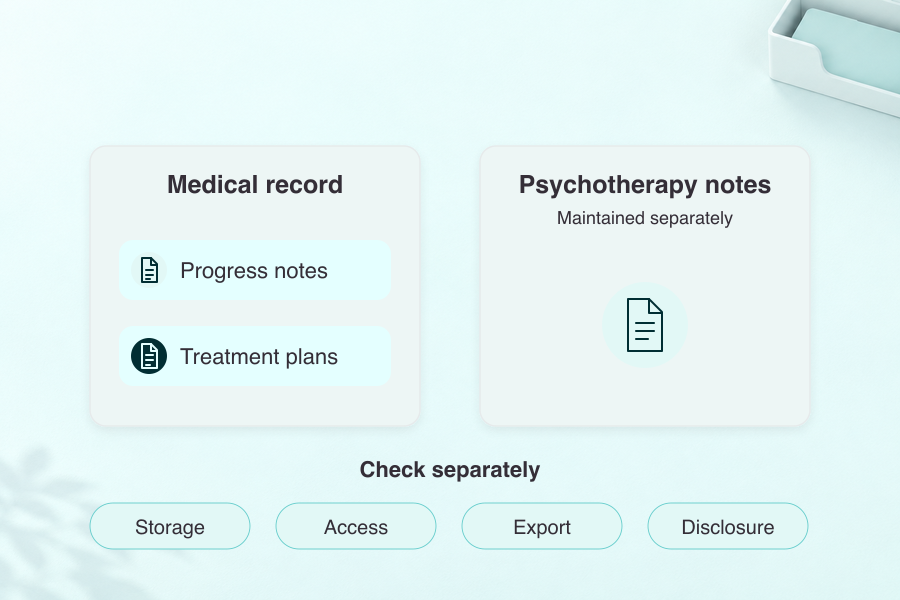
For substance use records, establish whether 42 CFR Part 2 applies to your practice and the records it receives. Its scope includes federally assisted SUD programs and certain recipients of their records.
HHS's final-rule fact sheet, updated in 2026, sets the compliance date at February 16, 2026, and expressly says record segregation or segmentation isn't required. Demonstrate the applicable consent and disclosure controls with the vendor.
Check access beyond the clinician's screen
Put patient records and the portal on the same evaluation list. Test what a client can submit, what staff review, and where an approved document becomes part of the record.
That handoff also matters in patient management platform development. Whether you buy EHR software or build a surrounding portal, specify the information each role needs and the actions each role can take.
Key features of mental health EHR systems
Start your comparison of mental health EHR systems with a working visit. Have staff run their documentation and billing tasks in the therapy EHR software you're evaluating.
Clinical documentation needs a review step
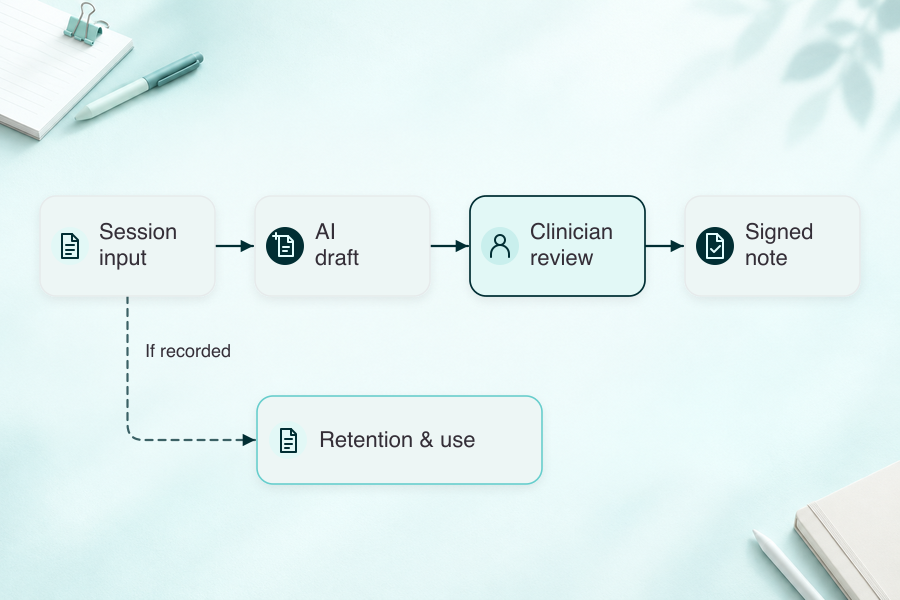
Try customizable templates with your actual note formats, including DAP notes. Check how therapy notes connect with treatment plans and how a clinician reviews a draft before signing.
For mental health EHR software with AI assistance, ask what gets recorded and retained. Require a clear clinician approval step before AI text enters the signed record. NIST's 2024 generative AI risk profile identifies confidently false output as a risk.
Appointment scheduling should match your visit types
Demonstrate:
- recurring appointments and provider availability
- group enrollment and attendance
- reminders and rescheduling
- the handoff to documentation.
Include a cancellation and a changed appointment in the test.
Billing integration needs a complete demonstration
Insurance billing covers eligibility checks and claim submission, with rejection handling and payment posting completing the workflow. Billing integration is useful when your biller can follow that path from the completed note.
During the demo, trace one rejected claim back to the correction the staff member makes. The selected plan and any clearinghouse dependency belong in the quote.
Patient communication needs clear ownership
A form sent through the patient portal and a question sent through secure messaging both create follow-up work. The demo should show who receives each item and how that person marks it complete.
For secure authentication in healthcare apps, evaluate access permissions alongside the login experience. Confirm the business-associate agreements for services handling PHI.
If your practice prescribes, verify e-prescribing and EPCS (electronic prescribing of controlled substances) separately. The feature and pricing tables show why clinical documentation, appointment scheduling and therapy practice management need a plan-specific check.
Benefits of using EHR in mental health practice
Judge EHR for mental health practices against the work your staff does today. A behavioral health EHR earns its place when you can measure a useful change against that baseline.
Measure the work staff can stop repeating
Two practical starting measures are:
- time to finish a reviewed note, including corrections
- staff actions needed to correct a claim and post its payment.
Those measures give workflow automation a concrete job. Use the pilot to see which repeated action the new process removes.
Make treatment outcomes available for review
The treatment outcomes you collect need to be available during the next clinical discussion. That means evaluating how clinicians retrieve previous results alongside the current record.
Patient engagement also includes what happens after a client submits a questionnaire. Follow that response to the clinician responsible for reviewing it.
Put data security into the evaluation
Your mental health practice still owns its risk analysis and access management. Evaluate data security alongside HIPAA compliance and the vendor's controls, including permissions and incident-response procedures.
Your selected system also needs the applicable consent workflow. Where 42 CFR Part 2 applies, ask staff to demonstrate an authorized disclosure and explain how they would handle a request outside that permission.
Best EHR for therapists: platforms compared
The best EHR for therapists depends on your documentation and billing workflow. These published details were checked in October 2026. When comparing products, price the subscription and the add-ons separately, then test the workflows you actually use.
Use these starting routes to choose your first demos from the published capabilities below:
- Core solo-practice work: Start with TherapyNotes and SimplePractice, then price the AI option alongside the clinical and billing workflow.
- AI documentation: Compare Upheal and My Best Practice. Upheal includes AI notes in its EHR plans; My Best Practice's AI Notes requires its paid telehealth module.
- Regular group visits: Include TherapyNotes or Valant. Participant documentation and attendance-based billing deserve their own demonstration alongside group video.
- Prescribing: Include ICANotes+ or TherapyAppointment, keeping the prescriber plan and EPCS charges visible in the comparison.
- Agency reporting: Bring a required state report to a Credible demonstration and identify the services covered by its quote.
The tables retain the plan limits and fees behind these starting points.
Subscription and AI costs
Prices below are standard USD monthly rates unless another unit is stated. Quotes and plan conditions matter, particularly for mental health clinics with several provider types.
| System | Published base price | AI notes / ambient documentation | Main pricing condition |
|---|---|---|---|
| TherapyNotes | Solo $69; groups $79 first clinician + $50/additional clinician | TherapyFuel: $40/clinician | AI excludes group therapy |
| SimplePractice | Starter $49; Essential $79; Plus $99 | Note Taker: $35/clinician | Additional clinician seats cost extra |
| ICANotes+ | Full-time nonprescriber $75/user; full-time prescriber $213/user | AI Scribe: $49/user | Prescriber activation $99; initial 3-month commitment |
| Valant | Request quote | AI Notes Assist: request quote | Specify license types and modules |
| TheraNest by Ensora Health | Per therapist: Essentials $29; Advanced $59; Premier $89 | Ensai Session Assistant: $35/provider | CPT license adds $19.50/therapist/year |
| Kipu EMR | Request quote | Kipu Intelligence: request quote | Confirm clinical and billing contract scope |
| CounSol.com | Standard $69.95 for first counselor | Not verified; ask vendor | Additional counselors and higher plans cost extra |
| TherapyAppointment | Solo $10, $39 or $59 | AI Notes: $0.59/chart note | Solo progression: up to 10, 11-39, then 40+ sessions |
| Qualifacts Credible | Request quote | Qualifacts iQ: request quote | Separate EHR, AI and optional services |
| Carepatron | Free; Plus $31/user; Advanced $39/user | AI Scribe included; plan limits apply | Confirm plan usage limits |
| Upheal | Solo EHR $1/session or EHR Pro $99/month | Included in EHR; separate AI Notes $39/month | Group-practice subscriptions are per seat; claims cost extra |
| My Best Practice | First professional $39; each additional $19 | AI Notes: $2/note or $60/professional | AI requires paid telehealth; confirm billing-plan charges |
Telehealth, groups and prescribing
Group appointments, group video and AI-generated group notes need separate checks. For private practice group therapy, demonstrate each step using the same session.
| System | Telehealth and groups | e-prescribing / EPCS | Practical fit or limitation |
|---|---|---|---|
| TherapyNotes | Basic 2-person video free; premium $15/clinician, up to 16 participants | $65/prescriber/month; EPCS after enrollment | Participant-specific group notes; AI group notes excluded |
| SimplePractice | Individual video on all plans; groups on Plus or Essential's $20/month add-on | $49/clinician/month + one-time $89/clinician setup; EPCS supported | Analytics and reports require Essential or Plus |
| ICANotes+ | $20/user/month video add-on; group rosters and notes | ScriptSure in prescribing plan; EPCS onboarding required | Plus prices quoted here; Classic needs separate evaluation |
| Valant | Up to 30 video participants; group enrollment and attendance | DrFirst with EPCS/PDMP; confirm fees | Clinical outcomes and documentation reporting |
| TheraNest | Individual/group video: Essentials $12/therapist/month; higher plans include it | $45/therapist/month + $135/practice setup; EPCS/PDMP | Appointment, clinical and billing reports |
| Kipu EMR | Zoom individual/groups; published $0.02/participant-minute, confirm rate | eRx available; confirm EPCS scope/fees | Demonstrate charge transfer to the billing system |
| CounSol.com | Video requires Premium/Premium Plus; office, phone and chat groups; no group video | Non-EPCS $60/user/month; EPCS $70/user/month | Insurance requires a suitable plan and clearinghouse |
| TherapyAppointment | $15/provider/month video; $5/provider/month Zoom option requires your own healthcare license; group charting | EPCS $65/prescriber/month + $110 setup | Claims add $0.15 each, paid to Office Ally |
| Qualifacts Credible | Telehealth available; iQ group notes; confirm group-video scope | EPCS/PDMP available; confirm fees | Agency workflows and state reporting |
| Carepatron | Basic video on Free; group video, scheduling and notes on Plus/Advanced | US DoseSpot/EPCS add-on: $39/user/month on paid plans | Review AI drafts before signing |
| Upheal | EHR video included; group sessions/notes remain roadmap items | E-prescribing remains on the roadmap | Group-practice seats don't establish group-session support |
| My Best Practice | $20/professional/month; group video up to 16 participants | E-Scripts $99/prescribing professional/month | Confirm insurance-billing plan before calculating total cost |

1. TherapyNotes: check the group charting
TherapyNotes supports participant-specific group notes. Its TherapyFuel AI excludes group therapy, so a group-documentation requirement needs a separate evaluation.
2. SimplePractice: choose the tier around your caseload
Analytics sit in Essential and Plus. Group video is available on Plus or through Essential's paid add-on, so your visit mix can change the tier you need.
3. ICANotes+: specify the product version
The prescriber and nonprescriber plans have different base prices. Evaluate ICANotes+ and ICANotes Classic separately; this comparison's figures refer to Plus.
4. Valant: bring your enrollment rules
Valant's group enrollment and attendance-based charges make the billing rules part of the fit decision. Its quote needs to cover the relevant license types and modules.
5. TheraNest: separate the AI options
Recorded-session drafts use Ensai Session Assistant. Basic notes enhancement has a different scope, so name the AI service you want in the quote.
6. Kipu EMR: follow a charge into billing
Specify which steps sit in the EMR and which sit in the billing system. The Kipu quote needs to identify the contract scope for that handoff.
7. CounSol.com: check how your groups meet
CounSol.com's portal covers booking and payments. Its published video plans exclude group video, so practices running video groups need an alternative for those sessions.
8. TherapyAppointment: calculate the extras
Per-note AI charges and claims transactions can change the bill as activity grows. Use your expected volumes with TherapyAppointment's base and video charges.
9. Qualifacts Credible: demonstrate agency reporting
Behavioral health providers evaluating Credible need to account for their state-reporting requirements. Bring one required report to the demonstration and identify the services covered by the quote.
10. Carepatron: test the note format
Carepatron's AI-generated SOAP notes need to match your documentation format. Plan usage limits and group-video availability belong in the same comparison.
11. Upheal: distinguish seats from sessions
Upheal's EHR subscriptions include AI notes. Group sessions and notes remain roadmap items, as does e-prescribing; group-practice administration is a separate capability.
12. My Best Practice: include the recording dependency
Its AI Notes charges sit alongside a required telehealth module. The first professional and additional professionals have different prices; confirm the applicable insurance-billing plan separately.
To find the best EHR for mental health private practice, compare reporting tools using a report you already need, then check the costs attached to your preferred workflow.
When a custom build earns its place
Specode suits teams building an application around an existing EHR or a workflow they need to define themselves. You describe the application, then review its plan, design and implementation. Group workflows and reporting need specification and validation.
Pro costs $1,000/month for iteration and production deployment; third-party services cost extra. Choose this route when the workflow justifies the implementation work. If you need an established clinical and billing product for your practice, start with the buyer list above.
How to choose the right EHR for your mental health practice
Choose an EHR for therapists against the visits and administrative work your practice actually handles. Write the requirements before booking demos, so each vendor answers the same questions.
Use the same sample visit in each demonstration. Have the clinician and biller record the tasks they can complete without assistance.
Start with the work that changes your shortlist
Map your intake forms through the completed note and billing task. Include the staff role responsible for each handoff.
For a mental health EHR shortlist, identify the requirements that would rule a product out:
- your note formats and review process
- group practice workflows, including shared appointments
- prescribing and medication management needs
- external information exchanges you depend on.
Evaluate an EHR for mental health using these requirements before comparing optional extras. Keep a written record of which plan or module meets each one.
Demonstrate the requirements in the right plan
For each product on your EHR systems for mental health shortlist, name the mental health EHR plan that covers the required work.
Ask a clinician to complete progress notes and update treatment plans during the demo. For measurement-based care, check how PHQ-9 and GAD-7 results can be collected and reviewed over time.
Then follow a group appointment through attendance and client-specific billing. Check teletherapy integration with the same visit type; group-practice seats alone don't establish group-session support.
Ask for the exchange you need
For interoperability, name the receiving system and the information the practice needs to exchange. Ask which FHIR or HL7 interfaces are available and what their implementation costs cover.
Have the vendor demonstrate the relevant direction of exchange. Record any work the practice or another supplier must complete before it can operate.
Put support and cost into the decision
Get the support hours and escalation commitments in writing. Ask whether your selected plan includes training and which services need a separate agreement.
Use the same configuration when comparing prices. Include AI documentation and the expected claims volume, as well as any eRx or telehealth charges.
If a required workflow needs a separate application, define that boundary before starting mental health app development. Specify what stays in the chosen EHR and what the surrounding application must exchange with it.
Implementation best practices for mental health EHR
Implementing electronic health records for therapists needs a project plan tied to the chosen product and the practice's existing records. Agree on acceptance criteria before setting the go-live date.
ASTP/ONC's Health IT Playbook separates planning, implementation and ongoing workflow work. Use those activities to build a schedule with your vendor.
Make ownership visible before configuration
Name who approves the clinical workflow and who signs off on billing. Assign someone to manage the vendor's outstanding tasks.
Keep the initial scope written down:
- workflows required for the first release
- tasks deferred until the initial rollout is stable.
That list gives the practice a clear basis for reviewing a change request.
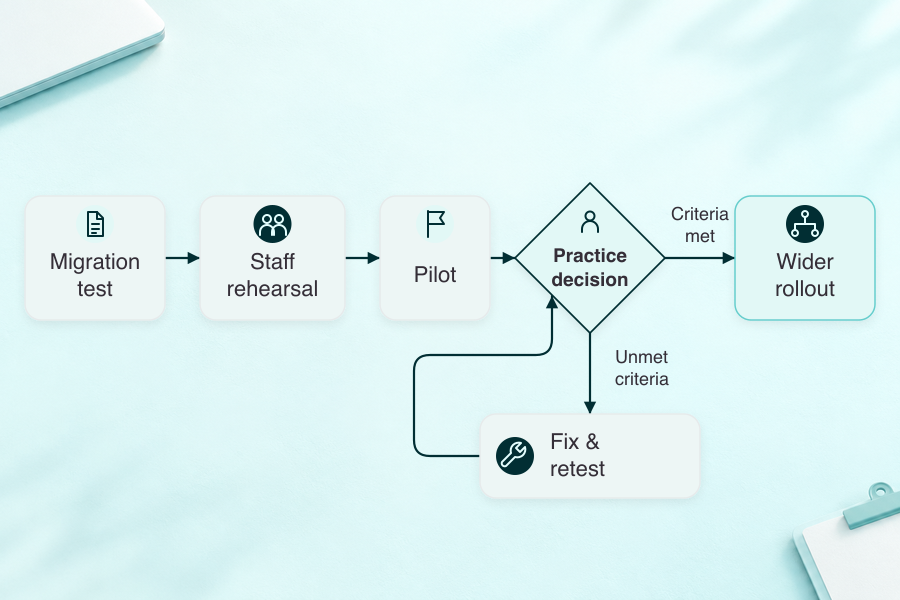
Each milestone approver needs evidence for the decision. The migration result and staff exercise show what the team has completed and where more work remains.
Train each role on its own tasks
Clinicians and administrative staff need different rehearsals:
- documentation for counseling services or psychiatric care
- booking and client management tasks.
Let each staff member complete their own exercise. The points where they need help become specific follow-up training work.
Validate the migration scope
Agree which records will move and how staff will access the legacy system. Include representative records in the migration test.
Check:
- required fields and treatment plans
- attachments and their placement
- access permissions after transfer.
Reconcile the results before approving the full move. Keep a defined route for returning to the agreed prior process if the cutover fails.
Test the whole appointment
Run scheduling through documentation and billing with the staff who perform those tasks. Include an exception, such as a canceled visit or a rejected claim.
When the rollout includes telehealth platform development, run a session through the same checks. Check where the session record goes and which action becomes available to the clinician afterward.
Keep the initial rollout controlled
Choose a pilot that matches your staffing and the risks you need to test. Use explicit go/no-go criteria for:
- access to the required records
- completed documentation
- correct billing handoffs
- support response.
In any Specode builder or preview environment, use synthetic data only. Real patient information belongs in a separately prepared production deployment.
Review the work after go-live
Use the patient intake process as a starting point for reviewing handoffs after launch. Record unresolved tasks and assign an owner to each.
Continue collecting staff feedback while the practice settles into the new process. Use measured problems to decide which change should come next.
Common challenges and solutions
Use the difficult parts of the workflow to evaluate an EHR for mental health. A routine visit is a useful starting point, but the practice also needs to know how the system handles exceptions.
When comparing a behavioral health EHR, include the staff member responsible for resolving each exception.
Keep your evaluation notes after selection. They give the implementation team a record of what the vendor demonstrated and what still needs work.
User adoption starts with routine work
For psychotherapy documentation, watch the point where a clinician pauses or asks for help. An amendment is a useful exception to include.
Then have a future trainer explain the same task back to the team. The missing instructions become training work with a named owner.
Integration gaps need an end-to-end test
Name the suppliers responsible for the exchange and the workflow that receives the data. Record each supplier's responsibilities before accepting the connection.
Keep a record of:
- the source and destination
- the direction of exchange
- the staff action that starts it
- the information returned to the record.
Repeat the test when the relevant configuration changes.
Limit workflow disruption during cutover
During cutover, a blocked clinical task needs an owner who can decide whether appointments continue under the agreed prior process.
Set the return criteria before launch, with support coverage that matches the practice's appointment schedule. Staff covering visits need the same decision rules as the implementation team.
Keep spend changes attached to scope
A new feature request can change training and recurring costs as well as the implementation work. Review those effects against the agreed release scope.
Rejected insurance claims and staff corrections provide a billing baseline during the pilot. Compare that work with the prior process before accepting the change.
Give privacy controls a real demonstration
For substance abuse treatment records, establish the applicable Part 2 obligations before choosing the disclosure workflow. The current rule expressly allows systems that don't segregate or segment Part 2 records.
For psychotherapy notes maintained separately from the record, review access and disclosure handling with the vendor. Keep that discussion distinct from ordinary progress-note access.
A permissions and access-log demonstration should include a request requiring escalation. Staff need to know who makes that decision and where it's recorded.
Test vendor support before selection
The proposed support contract should identify hours and escalation contacts. A test request shows how that route works; compare the response with any contracted commitment.
For a larger practice, agree who coordinates open implementation issues. Keep that person connected to the staff who can verify a fix.
When evaluating an EHR for behavioral health, carry unresolved demonstration items into the implementation plan. Resolve each one against a stated acceptance criterion before treating it as complete.
Cost considerations for mental health EHR systems
Price the configuration your practice will use. Published entry prices can have different billing units: a clinician, a session or a completed AI note. The comparison tables keep those units visible.
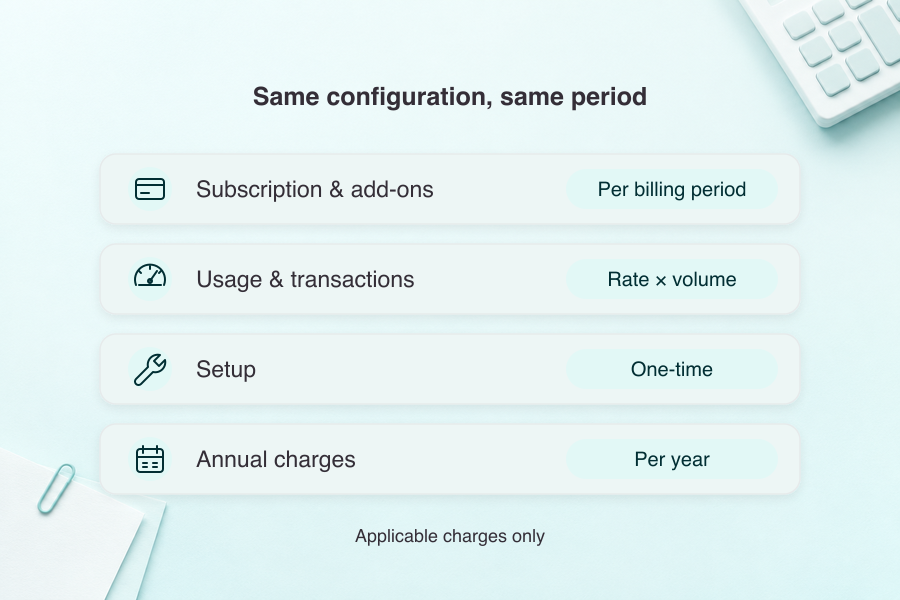
For mental health electronic health records, put the recurring subscription and implementation work into the same budget. Use a written quote for the selected plan.
Record the assumptions behind usage charges, including expected activity and the services selected.
Separate the subscription from paid services
My Best Practice lists core EHR, telehealth and AI documentation charges separately. TherapyAppointment also charges separately for AI notes and prescribing. Match those conditions to the workflow you're buying.
Ask the vendor to itemize:
- clinician and administrative seats
- AI notes and usage limits
- video visits and group support
- eRx setup and recurring charges
- claims and eligibility transactions.
Check annual charges alongside monthly ones. TheraNest's published pricing includes an annual CPT license fee in addition to the subscription. Keep temporary offers separate from the rate used in your ongoing budget.
Put implementation work into the quote
Ask what the migration covers and what happens to records left in the legacy system. Clarify training scope, the support available during launch, and any interface work another supplier must perform.
For Kipu and Qualifacts Credible, request a quote that names the proposed modules. Their reviewed public pages don't establish a complete core-and-AI amount you can use as a settled comparison price.
Use your own inputs to evaluate value
Measure the time spent finishing notes and correcting claims before the pilot. Repeat the measurement with the new workflow, including the time clinicians spend reviewing AI drafts.
Estimate value from the changes the practice observes. Compare that with implementation costs and ongoing fees. Keep the assumptions in the calculation visible so you can revisit them after rollout.
Future priorities for mental health EHR technology
For an EHR for behavioral health, plan the next review around changes that affect signed records or exchanges with another system. Current AI documentation tools already differ in recording and pricing conditions.
Keep AI changes within the review process
A new AI documentation setting can change what the clinician has to review. Keep the features-section checks attached to the product and plan you've actually contracted.
Recheck these terms when the service changes:
- audio and transcript retention
- whether content can be used for model training
- services covered by the relevant business-associate agreement
- the clinician's editing and approval step.
Give interoperability a maintenance owner
FHIR or HL7 support needs a maintenance owner after the first connection works. The agreement should identify who tests the required direction of exchange when either system changes.
Keep proposed interfaces outside the live-connection inventory until they've been demonstrated with the receiving system.
Test clinical work on the intended device
Mobile use has its own clinical and client tasks:
- finding the current note and a relevant prior visit
- submitting a client form and following it into the practice's review process.
Repeat the test on the devices staff and clients intend to use.
Check what dictation changes
Dictation changes the input step; the clinician still needs to review the resulting draft. Measure the remaining correction work before choosing an EHR for behavioral health around that feature.
Specode for mental health EHR: keep the code
Specode builds custom healthcare applications from plain-English descriptions. You review the plan and design, then iterate on the working application.
That route fits a team that needs a specific workflow or an application around an existing EHR for mental health. Scope the custom work against the ready-made products you've evaluated.
Define the application you need to build
Specify the screens and data each role needs, including the handoffs to your existing systems. Decide which reporting and group workflows the custom application must support, then include them in its acceptance criteria.
You own the generated application code and can export it for independent development and hosting.
Plan production separately
The Specode production guide describes the account setup, security review and required agreements. Development and previews use synthetic data only.
For production, you need your own Convex Pro account and its BAA. The Specode team assists with the transfer. Budget for third-party services as part of that setup.
Include any prescribing or lab access agreements in the project scope.
Keep the buying decision grounded in scope
For a practice searching for the best EHR for therapists, the ready-made clinical and billing workflow is the first decision. Bring a specific unmet requirement to the custom-build discussion, together with the systems it must exchange information with.
Frequently asked questions
An EHR holds clinical records. Practice management covers operational work such as scheduling and billing. A product can combine both functions.
Start with TherapyNotes or SimplePractice for core practice workflows. Include Credible when agency reporting is central to a larger clinic's requirements.
Agree a timeline with the vendor after reviewing migration scope, configuration and staff training. Set acceptance criteria for the pilot and go-live.
Prioritize your note formats, scheduling, billing and patient communication. Add prescribing or external clinical exchange requirements when your practice needs them.
Add the subscription and paid services to migration, training and support costs. Evaluate the complete configuration against your practice's measured workflow changes.