Is Google Forms HIPAA Compliant?

Your patient intake forms or appointment requests already run through Forms, or soon will, which is likely why you searched "is google forms hipaa compliant 2026" in the first place. The answer depends on more than the tool: the account that owns the form, whether Google's BAA has been accepted, how the form and its linked files are configured, and whether the job fits a form at all.
Protected health information (PHI) is individually identifiable health information, including demographic details collected from a patient, that relates to the person's health, care, or payment for care and identifies the person or reasonably could. It counts only when a health care provider, health plan, employer, or health care clearinghouse creates or receives it.
You'll leave with the conditional answer, three conditions to check, where submitted answers travel and what the BAA leaves open, a keep-or-move matrix, and a configuration checklist.
Is Google Forms HIPAA compliant? Yes, conditionally. Google's HIPAA Included Functionality list, as of August 31, 2026, covers Forms as part of Google Drive. Coverage applies only after a super admin of your organization's Google Workspace account accepts Google's BAA. A personal @gmail.com account has no documented path to accept it. The BAA makes Forms eligible for PHI; your configuration and safeguards, starting with a risk analysis, decide whether a form is compliant.
Key takeaways:
- Forms can hold PHI only after a super admin accepts Google's BAA on your organization's account. Google's covered list names Forms inside Google Drive. Google documents no way for a personal @gmail.com account to accept the agreement.
- The BAA covers Google's listed services, not every place patient answers travel. Add-ons and outside services sit outside it. Response sheets are covered, but form permission changes don't sync to them, so manage sharing on both files.
- Configuration is an ordered job, and part of it recurs. Account, agreement, and app controls come first, then sharing, responder access, and uploads. Activity review continues after launch.
- Forms can fit staff-side collection, but full new-patient intake usually outgrows it. Uploads that need a Google sign-in, no signature question type, and staff re-entry into the EHR push intake toward a purpose-built tool.
Why healthcare teams use Google Forms and where the answers go
You likely chose Forms because it was already there. It's on by default for organizations that use Google Drive, and responses can go straight into a linked sheet in Google Sheets. You can embed a form on your website or send it with some answers already filled in, and it can route respondents to different sections based on their answers.
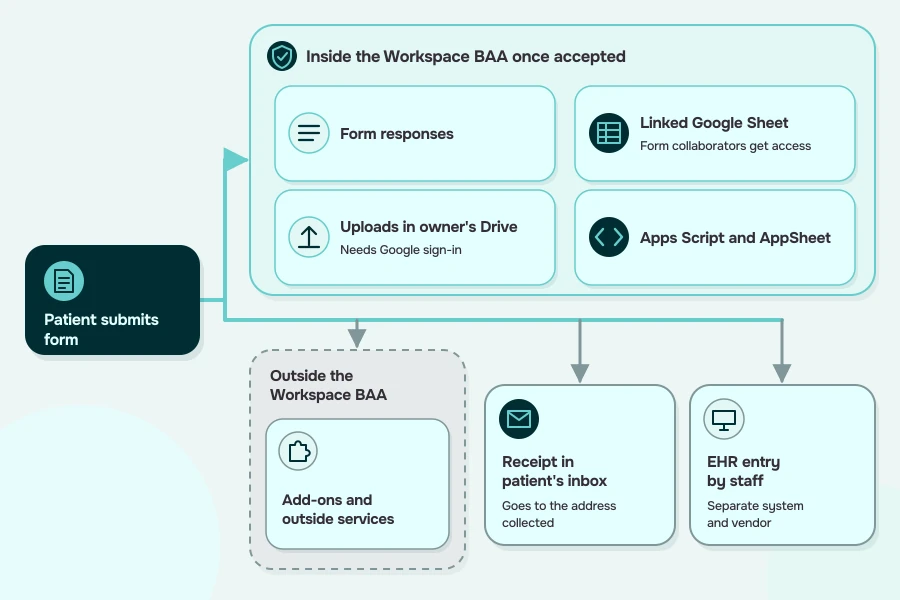
The data collection jobs are familiar: pre-visit questionnaires and other patient intake steps, appointment or callback requests, and staff-side patient lists. That leaves the Google Forms PHI question that matters: once a patient hits submit, in how many places does the answer land? Each of those places needs its own coverage and access decision.
- The form's own response store
- The linked response sheet
- Uploaded files, saved to a new folder in the form owner's Drive
- A copy of answers in the respondent's inbox, if the form sends receipts
- Apps Script or AppSheet automations that read responses
- Add-ons and outside services connected to the form
- Your EHR, once staff re-enter the answers
Three conditions before Google Forms can hold PHI
Before a form collects patient data, run three yes-or-no checks. Can Google Forms be HIPAA compliant in your practice? Only if all three come back yes. They're necessary but not sufficient: fail any one and PHI stays out of that form; pass all three and configuration comes next.
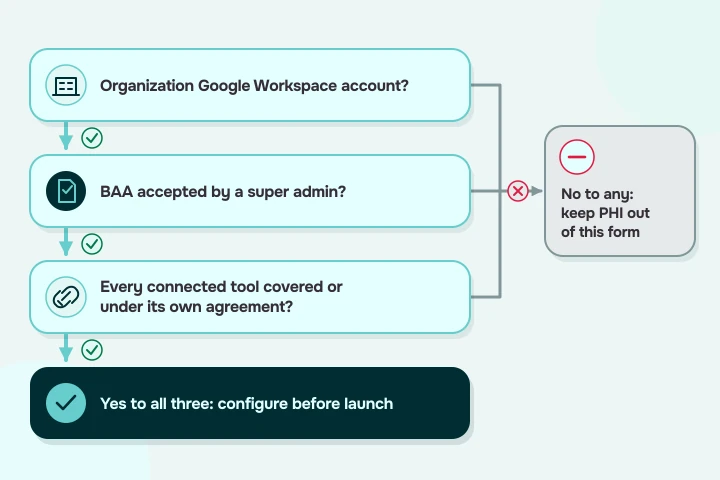
A Google Workspace account, not a personal Gmail account
Start with who owns the form. Google offers its BAA for a super administrator to accept electronically in the Admin console of your organization's Google Workspace account. Because acceptance runs through that console, Google documents no path for a free account on @gmail.com to accept the BAA. Google also says Workspace users without admin rights, and users of the legacy free edition of Google Workspace, can't review and accept a BAA at this time.
So forms that will hold PHI get built and owned inside your organization's account, not in a staff member's personal one. If a useful form already lives in someone's personal Gmail, rebuild it in the organization's account before a patient answers it.
A BAA accepted by a super admin in the Admin console
A business associate agreement (BAA) is how a covered entity documents, in writing, a business associate's assurance that PHI it handles on the covered entity's behalf will be safeguarded. A Workspace subscription alone doesn't create one: Google says customers without a BAA must not use PHI in Google Workspace or Cloud Identity services, and its terms of service bar HIPAA-regulated health information in the services except as an executed BAA permits.
If you went looking for a separate Google Forms BAA, there isn't one: Google's Workspace BAA covers Forms because it's on the covered list. The agreement takes effect once a super admin accepts it electronically, following Google's steps for accepting the BAA in the Admin console:
- Open Account settings, then Legal and compliance.
- Select Review and Accept.
- Answer the three questions confirming HIPAA covered entity status.
Forms is on the covered services list, but third-party add-ons are not
Google's HIPAA Included Functionality list, as of August 31, 2026, names Google Drive (including Forms and Sheets), Apps Script, and AppSheet. Google's implementation guide, cover dated September 2025, bars PHI from Core Services missing from its own list. That list omits services the current Included Functionality list names; check the latter, which Google may update.
Add-ons, other third-party apps, and Additional Google Services sit outside the BAA. The test: each outside service receiving patient answers is listed or has the agreement it needs. Google's guide makes a BAA or other data protection terms your call, but business associates handling PHI for you need written agreements. For cloud providers holding electronic PHI (ePHI), HHS calls skipping the BAA a violation. The guide adds that admins must configure covered services; you still owe HIPAA Security Rule safeguards, starting with a risk analysis.
Where patient answers travel and what the BAA doesn't fix
An accepted BAA won't manage your sharing. Passing all three conditions settles the Google Forms HIPAA eligibility question for your account; the rest is below.
HIPAA Security Rule duties apply wherever answers land: access control must limit ePHI to people or software granted access, and audit controls must record and examine system activity, in whatever detail you choose; records such as audit logs need regular review. Encryption is addressable: assess whether it's reasonable and appropriate, implement it if so, or document why not and adopt an equivalent alternative where reasonable.
Google says it encrypts all customer data in transit (email to non-Google servers when the receiving server supports TLS) and certain data at rest; a downloaded CSV on a staff computer sits outside Google's encryption. Encryption doesn't replace the agreement: under HHS guidance on cloud computing, a cloud provider storing only encrypted ePHI for a covered entity, without the key, is still a business associate.
Other spreadsheet-shaped tools raise the same linked-sheet questions; see Airtable and HIPAA.
Example setups where a Forms workflow creates HIPAA risk
These are illustrative configurations, not reported incidents. If one exposes patient answers, the Breach Notification Rule may apply: a covered entity must notify affected individuals of a breach of unsecured PHI without unreasonable delay, and within 60 calendar days of discovery unless law enforcement requires a delay.
When Google Forms fits and when to move on
Find your use case in the table. Every row that involves patient data assumes all three conditions already pass; if they don't, the fit column doesn't apply yet.
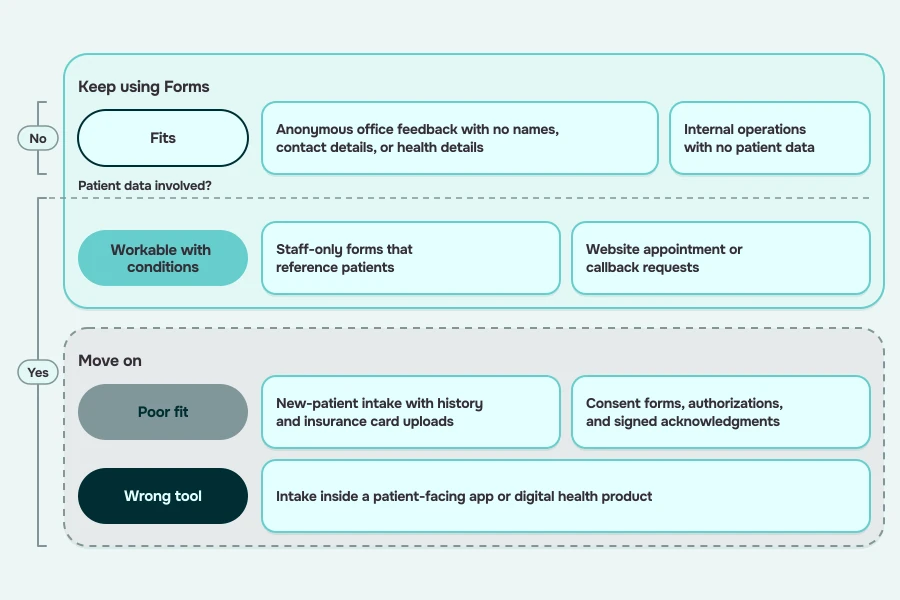
You can run HIPAA compliant Google Forms for the staff-side rows and still need a different tool for full intake. If your row says Fits or Workable with conditions, use the checklist below; otherwise, go to the comparison after it. The poor-fit and wrong-tool rows also point at a separate goal. Locking a form down protects the answers; if you also want to improve the patient intake process from the patient's side, treat that as its own project.
A configuration checklist if you keep using Forms
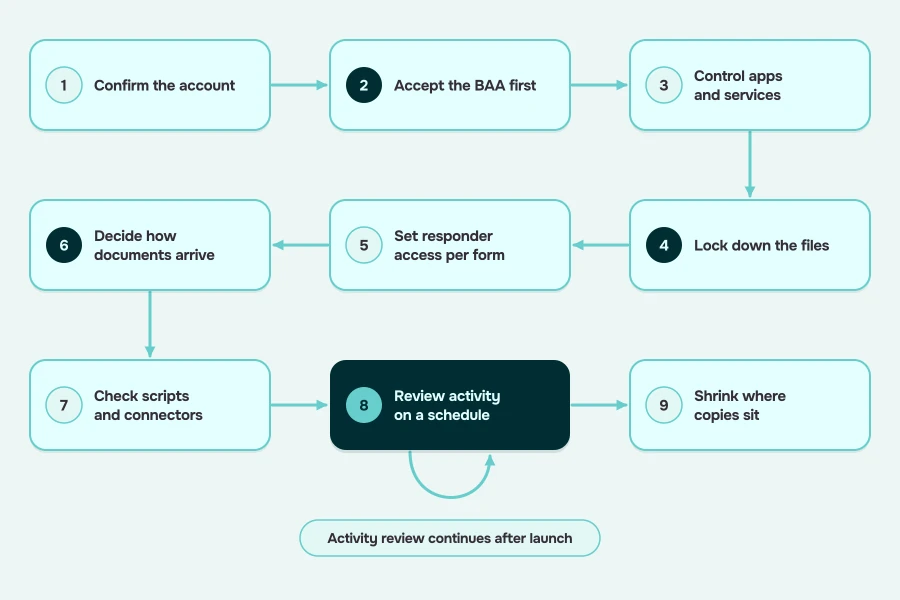
Work in order; later steps assume earlier ones. Google's implementation guide for Google Workspace HIPAA setups, cover dated September 2025, says administrators must configure covered services, so the settings are yours. Treat these steps as a starting point for running Google Forms HIPAA compliant workflows rather than a complete program; your risk analysis decides which gaps remain.
Data loss prevention isn't a control for typed answers: Google's About DLP help says it doesn't scan Forms responses other than file uploads.
- Confirm the account. Every form that will hold PHI lives in your organization's Google Workspace account, not a personal one.
- Accept the BAA first. A super admin accepts it in the Admin console before any PHI arrives; update your risk analysis to include Forms and its linked files.
- Control apps and services. Limit user Marketplace installs to allowlisted apps or none, turn off non-core services outside the Workspace agreement, such as YouTube, for users who manage PHI unless a separate BAA covers them, and keep PHI out of Core Services missing from the covered list.
- Lock down the files. Set default visibility to private, share response sheets with named staff only, remove collaborators from both form and sheet, and keep PHI out of file and folder titles.
- Set responder access per form. Restrict staff forms to your organization; on patient forms, turn results summaries off and decide deliberately on receipts.
- Decide how documents arrive. Upload questions need a Google sign-in and don't work for forms in shared drives, so plan another route for insurance cards if patients lack Google accounts.
- Check scripts and connectors. Review Apps Script projects and automations that send answers anywhere; recipients must be authorized, and outside services need BAA review.
- Review activity on a schedule. Check Drive log events for form and response files; Google's guide also suggests periodically running the file exposure reports in the Security Center for staff who manage PHI.
- Shrink where copies sit. Move finished submissions into your system of record, then clear each copy (form responses, linked sheet, uploaded files) separately under your retention policy; deleting form responses can't be undone.
Google Forms vs. a purpose-built healthcare intake solution
For poor-fit and wrong-tool rows, there are three routes: the intake module in your EHR or practice management system, a dedicated forms or intake tool that signs a BAA for its product, or a custom-built patient intake management app.
Whichever route you take, confirm the vendor's BAA covers the product and the connectors it provides. Any outside service you connect yourself that will handle PHI on your behalf needs its own written agreement, since business associate assurances must be documented in writing.
When you compare HIPAA compliant forms and intake tools, ask each vendor for evidence of that coverage, since HHS's Office for Civil Rights doesn't endorse, certify, or recommend specific products. Hold a HIPAA-compliant app builder to the same standard: who signs the BAA, what it covers, and how access and audit history work per record.
How Specode can help
Keep staff-side and low-complexity forms and work through the checklist. Full intake, consent, and in-product intake need a purpose-built flow; intake that has outgrown a form tool has become an application. For options spanning forms and database apps, compare these alternatives to Knack.
Specode is an AI-powered healthcare application builder: you describe requirements in plain English and define the UI, workflows, data model, permissions, and integrations. Patient intake is one of the patterns its AI builds from your description, asking clarifying questions as it goes.
- Consent and e-signature steps can be built into the application's own patient-facing workflows. Where a legally binding e-signature is required, you integrate an external e-signature service, which has its own terms and may need its own BAA if it handles PHI.
- You can add custom integrations with external systems such as EHR or EMR systems; EHR systems aren't pre-configured, and integrations with major ones are built case by case for the specific system. Once you provide API access, Specode's AI can build the integration, and the Specode team or your own team can get involved in more advanced ones.
- Specode's AI can plan audit logging with you and wire it into the PHI read and write surfaces you approve.
If you're moving off Google Forms for patient intake and what you need looks more like an application, book a demo and walk us through the flow.
Frequently asked questions
Not for PHI. Google documents no way for a personal @gmail.com free account to accept its BAA, so keep PHI out or build the form in an organization Google Workspace account whose super admin accepted the BAA.
Google offers one BAA for Google Workspace and Cloud Identity, which a super admin accepts electronically in the Admin console under Account settings, then Legal and compliance. It covers Google's listed services, including Forms, but not add-ons.
It can work for staff-run forms on a covered, locked-down account. New-patient intake that needs uploads without a Google sign-in, signed consent, or entry into your EHR usually outgrows it.
Look at three categories: your EHR's intake module, a forms or intake tool that signs a BAA, or a custom-built intake app. Whichever you choose, confirm the vendor's BAA covers the product and the connectors it provides.
Google's Forms help doesn't document a native EHR connection for Forms. Getting responses into a chart means staff re-entry or a custom integration, and every outside service in that path needs BAA review.