Fitness Personal Training App Development Guide
If you’re trying to develop your own personal trainer app, don’t start with “features.” Start with the uncomfortable question: what keeps someone showing up after motivation wears off? In 2026, coaching is being productized—clients expect availability, plans that adapt to real life, and progress that stays visible even when they miss a week.
This guide is built around a simple idea: the only moat is the coaching loop—what you sense, how you decide, how you coach in the moment, and how you adapt without breaking trust. From there, everything else becomes a tradeoff you can make deliberately: what’s truly V1, what’s a retention multiplier, what will explode your scope, and what will quietly kill you after launch.
By the end, you’ll have a realistic blueprint for building a product that feels like a coach—not a content library with reminders.
Key Takeaways
- Build the coaching loop, not a workout library. The winners treat sensing/adaptation/trust as the product—not “more exercises.”
- Retention is operational, not inspirational. Missed-week recovery, coach throughput, support, and honest measurement decide whether users stay.
- Specode helps you ship the “boring hard parts” faster. You get an automated platform with reusable HIPAA-compliant components plus a conversational AI assistant—so you can assemble roles, secure workflows, and iterate on coaching operations quickly while keeping code ownership.
Why Build a Personal Training App in 2026?
In 2026, fitness personal training app development isn’t a “nice digital add-on” for trainers who already have a full calendar. It’s becoming the calendar.

The shift is simple: people don’t just want workouts anymore. They want coaching that follows them around—between sessions, between cities, between motivation spikes. If they can’t get that from you, they’ll get a “good enough” version from a creator, a gym chain, or a platform that turns coaching into a product.
What changed vs 2023–2025 isn’t that more people discovered exercise. It’s that expectations got stricter:
- Availability became part of the value. Clients assume they can ask a question on Tuesday night and get a useful answer before they sabotage Wednesday.
- Personalization moved from “custom plan” to “custom plan that adapts.” People don’t want you to rewrite a PDF; they want the plan to reflect what actually happened this week.
- Trust shifted to consistency. Clients pay for feeling guided, not for one great session and six silent days after.
Remote coaching is the default delivery layer now. Not because everyone suddenly loves “working out on their phone,” but because coaching has moved from a session-based product to an always-on relationship.
The Business Shift: Coaching Is Being Productized
The most important change is that coaching is turning into something that can be packaged and delivered consistently. Fitness professionals who understand this early get leverage: they stop relying entirely on “more sessions” as the only way to grow.
An app becomes the place where your method lives:
- the way you structure training,
- the way you keep people accountable,
- the way you adjust when life happens,
- the way progress stays visible (even when motivation disappears).
That’s why building now makes sense: the category is shifting from “workout content” to “coaching infrastructure.” And if you’re entering the space, you want to design for that reality from day one.
Personal Training App Market Overview and Statistics
The headline for personal fitness app development is simple: demand is growing, and the winners are the ones who treat fitness app development like a product business (retention, pricing, and data loops), not a “build it once” project.

Market Size: Growth Is Real, Even if the Forecasts Don’t Agree
Depending on which analyst you read, the fitness apps market gets defined slightly differently (apps only vs broader digital fitness). But even within the stricter fitness app market framing, Grand View Research estimates the market at $10.59B in 2024 and projects it to reach $33.58B by 2033 (13.59% CAGR from 2025 to 2033).
Adoption Driver #1: “Hybrid” Isn’t a Trend, It’s the Default
People are mixing in-gym and at-home workouts instead of choosing one camp. Les Mills has been calling this out in its research and reported that roughly 72% of Gen Z regular exercisers take a hybrid approach (training both in and out of the gym).
This matters because hybrid behavior increases the value of an always-available coaching layer. If training happens in more than one context, the app becomes the glue.
Adoption Driver #2: Wearables Keep Deeding the Loop
Wearables are still growing fast enough to matter. IDC forecast worldwide wearable shipments to grow to 537.9 million units in 2024 (+6.1% YoY).
And on the “what people actually want” side, ACSM’s 2025 trends list puts wearable technology at #1 and mobile exercise apps at #2.
The implication for fitness app development: coaching expectations keep rising because users are surrounded by continuous data (steps, HR, sleep, workouts). The app that uses that data responsibly feels “smarter” even without doing anything magical.
Subscription Is the Default, but It’s Not a Free Lunch
Most serious coaching apps converge on a subscription model because the value is ongoing:
- plans adapt
- accountability continues
- content updates
The subscription ecosystem data backs up that Health & Fitness apps are one of the stronger categories for reaching meaningful monthly revenue milestones—though breakout success is still rare (like every other category).
A useful sanity check: Strava has publicly talked about scaling recurring revenue (reporting a goal of $500M in annual recurring revenue, with 150M+ registered users), which is basically the grown-up version of “fitness app monetizes via subscription.”
If you’re building in 2026, the market signal is clear: people will pay, but only if the experience keeps earning the renewal.
Types of Personal Training Apps
If you don’t pick a clear archetype upfront, personal trainer app development turns into a familiar mess: you build “a bit of everything,” ship late, and still disappoint users because the product never commits to a job.

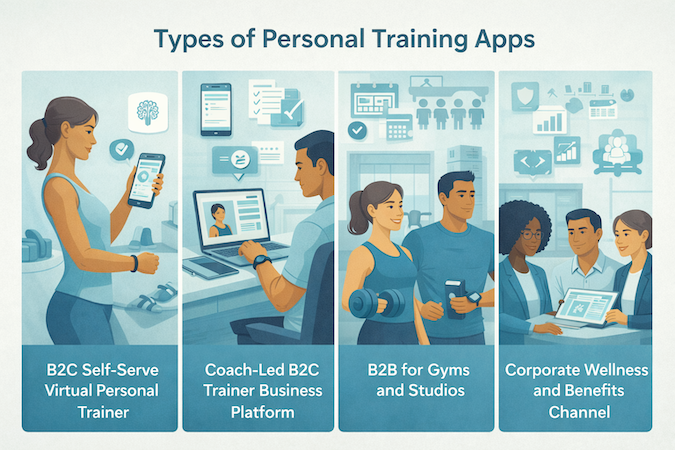
Below are the four most common archetypes. Read them less like categories and more like product promises.
B2C Self-Serve Virtual Personal Trainer
This is the “I want guidance without talking to a human” product.
What it is:
- The app generates training programs for an individual.
- The user self-serves: onboarding, plan selection, workouts, progress.
When this archetype makes sense:
- Your audience is price-sensitive, time-poor, or allergic to scheduling.
- Your “coaching value” is structured programming and clarity, not relationship.
The core decision you’re making here:
- Are you building a virtual personal trainer that primarily motivates (stickiness), or one that primarily coaches (adaptation and correctness)? You can do both eventually, but one has to win in v1.
Coach-Led B2C Trainer Business Platform
This is “help a trainer deliver coaching to many clients without drowning in admin.”
What it is:
- The app is a client-facing experience plus a coach workspace.
- The coach creates or approves plans, monitors adherence, adjusts programs, communicates.
When this archetype makes sense:
- The product is built around a coaching method, not just workouts.
- You expect high variation between clients (injuries, equipment limits, schedule chaos).
The core decision you’re making here:
- Is the coach the main “engine” (the app supports them), or is the app the engine and the coach is an override? That choice affects everything you build later.
B2B for Gyms and Studios
This is “make the facility feel like it has a coach even when staff isn’t next to you.”
What it is:
- A branded member experience plus staff/admin tooling.
- Multi-coach operations: class schedules, member plans, engagement programs, consistency across locations.
When this archetype makes sense:
- You’re solving retention and consistency, not “better workouts.”
- The environment is shared: equipment is known, policies exist, staff roles differ.
The core decision you’re making here:
- Are you supporting the gym’s programming (standardized experience), or enabling individual trainers inside the gym (more flexibility, more complexity)?
Corporate Wellness and Benefits Channel
This is “behavior change inside constraints: privacy, reporting, and participation.”
What it is:
- A structured wellness experience that can be rolled out across groups.
- Often includes cohort-based programs, nudges, and aggregated reporting.
When this archetype makes sense:
- Your success depends on participation across a population, not just power users.
- You need to accommodate mixed fitness levels and different motivations without making anyone feel singled out.
The core decision you’re making here:
- Is this a coaching product with accountability, or a wellness product with gentle guidance? They look similar in demos and diverge fast in real usage.
The Shortcut for Choosing Your Archetype
If you want a simple filter before you commit to a custom fitness app scope, answer these three questions:
- Who is the primary user: an individual exerciser, a coach, or an org admin?
- Who is responsible for program changes: the user, a coach, or the system?
- Where does “trust” come from: relationship, brand consistency, or perceived intelligence?
Once you pick the archetype, the rest of the blog becomes easier: features stop being generic, and tradeoffs stop being accidental.
The Coaching Loop: the Only Moat That Matters
If you want a fast way to waste money in fitness coaching app development, here it is: build a beautiful app that stores workouts, tracks reps, and sends reminders… and call it “coaching.”

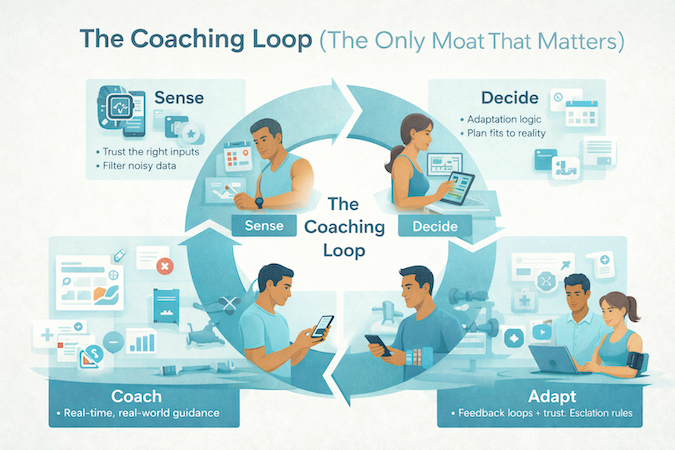
Coaching isn’t a feature. It’s a loop. A system that notices what happened, decides what to do next, delivers guidance in the right moment, then adapts based on results. That loop is the only moat that survives copycats, cheaper ads, and the next wave of “AI-powered” clones.
Here’s the blueprint.
Sense: Decide What You Trust, and What You Treat as Noise
Most apps collect everything because it feels productive. In reality, the Sense step is about signal quality.
Good inputs (usually high-signal):
- completed workouts (what was actually done)
- perceived effort and soreness (because physiology doesn’t care about your spreadsheet)
- basic constraints (time available, equipment, injury flags)
- adherence patterns (when users tend to skip)
Risky inputs (often noisy or misleading):
- perfect-looking plans with zero completion
- wearable-derived metrics without context (sleep score goes down for ten reasons)
- self-reported nutrition that’s too detailed to be honest for most people
Decide: Adaptation Rules Beat “More Data”
This is where training programs stop being a static calendar and start acting like coaching.
At a product level, “Decide” needs to answer:
- Do we progress, maintain, or deload?
- Do we swap exercises due to pain, equipment, or missed sessions?
- Do we adjust volume/intensity because adherence is dropping?
- Do we change the plan, or change the expectation?
A simple truth: people don’t churn because your plan wasn’t optimal. They churn because the plan stopped fitting their life. Your decision layer exists to keep the plan realistic while still moving fitness goals forward.
A strong coaching loop has explicit rules for:
- missed sessions (what happens after 1 miss vs 3 misses)
- plateaus (what evidence counts as a plateau)
- pain/injury signals (when to reduce load, when to recommend a professional)
- motivation dips (when to simplify, not “push harder”)
Coach: Deliver Guidance Where Behavior Actually Happens
This is the part most teams underestimate. They build a plan generator and assume the user will follow it.
But behavior happens in moments:
- right before a workout (“what am I doing today, and why?”)
- mid-workout (“am I doing this right?”)
- right after (“did this count, and what’s next?”)
- on the day they want to skip (“give me a smaller win, not a guilt trip”)
Coaching delivery isn’t just tone. It’s timing, format, and friction:
- Are you guiding with a single next action, or dumping a lecture?
- Are you reducing decision fatigue, or adding it?
- Are you building confidence, or making users feel evaluated?
If your “coach” feels like a notifications cannon, the loop breaks. If it feels like a calm, consistent guide, users stay.
Adapt: Trust Is a Feature, and Escalation Is Part of Coaching
Adapt is where your product proves it deserves authority.
Two things matter here:
- Feedback loops that don’t lie
If the plan isn’t working, the app needs to admit it and adjust. Users can forgive an imperfect plan. They won’t forgive being ignored by a system that keeps prescribing the same week forever. - Escalation rules that protect the user
Good coaching includes boundaries. Sometimes the right move is:
- suggest rest or a lighter session
- modify an exercise due to pain
- recommend talking to a clinician or qualified professional
The faster your app can recognize “this isn’t normal soreness” or “this user is sliding into overtraining,” the more trust it earns.
Map This Loop to Your Product Before You Map Features
The coaching loop is the skeleton. Everything else is a limb.
When you’re designing training programs and aiming for real fitness goals, ask one question for every feature idea: “Which part of the loop does this strengthen: Sense, Decide, Coach, or Adapt?”
If it doesn’t strengthen the loop, it’s probably a distraction—no matter how good it looks in a demo.
Essential Features of Personal Training Apps
If you want to create a personal training app that people actually use (and not just download), V1 has to feel like coaching, not content. The easiest way to fail is to treat workout app development like building a media library.
Onboarding That Doesn’t Ask for a Biography
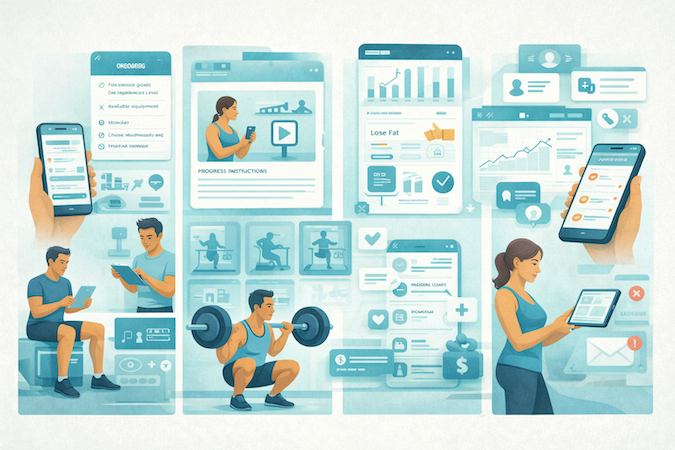
V1 onboarding should capture only what changes the plan:
- goal and timeframe
- training experience level
- constraints (time, equipment, injury flags)
- preferred training days
Anything beyond that is a conversion tax.
Assessment and Goal-Setting That Creates a Starting Point
You need a baseline so progress means something. Keep it simple:
- a short readiness/self-report screen
- 1–3 benchmark tests (scaled by level)
- clear goal definition (strength, fat loss, endurance, consistency)
This is also where you set expectations: what “good progress” looks like in 2–4 weeks.
Exercise Library With Video Demonstrations
Your exercise library isn’t about “hundreds of movements.” It’s about trust.
- fewer exercises, well filmed
- cues for common mistakes
- regressions/progressions for each movement
Video demonstrations should answer “what do I do?” in 10 seconds, not 10 paragraphs.
Plans and Workouts That Are Easy to Follow
V1 should support:
- today’s workout view (no hunting)
- sets/reps/timer tracking
- quick substitutions when equipment isn’t available
Progress Monitoring That Motivates Without Lying
People don’t need more charts. They need visibility:
- streaks and adherence
- personal bests and trend lines
- “you’re on track / off track” signals that are understandable
That’s progress monitoring as a coaching tool, not a dashboard.
Features for Coach-Led Apps
If a coach is part of the model, V1 must include:
- client profiles and notes (client management)
- a basic calendar flow (appointment scheduling)
- payment integration so coaching isn’t handled in a messy side channel
Push Notifications as Utility, Not Spam
Push notifications should be limited to:
- reminders tied to scheduled workouts or sessions
- missed-workout recovery nudges (“do the short version”)
- admin-critical messages (reschedules, payment issues)
If V1 nails these basics, you’ve earned the right to add “fun” later.
Advanced Features for Competitive Edge
Once V1 is stable, V2 is where you earn retention. If V1 answers “can I follow a plan?”, V2 answers “why should I stay here instead of bouncing to the next shiny app?”

If you’re trying to develop a fitness training app that people pay for month after month, these are the upgrades that tend to move the needle.
Personalized Workout Plans That Evolve
Most apps call it personalized because the user picked “fat loss” and “3 days/week.” That’s not personalization, that’s a dropdown.
V2 personalization should change based on reality:
- adherence patterns (they skip Fridays? adjust)
- progression (they stall? deload or swap)
- constraints (travel week? shorten sessions)
- preference signals (they hate burpees? stop forcing burpees)
Users don’t need a perfect plan. They need a plan that stays believable.
Workout Customization Without Breaking the Program
Customization is tricky because too much freedom ruins outcomes. The best approach is “guided flexibility”:
- allow swaps within the same movement pattern
- offer “short / standard / extended” versions of the same session
- preserve progression rules even when exercises change
That’s workout customization that keeps structure intact.
Nutrition Tracking That Feels Doable
Nutrition tracking is retention gold when it avoids two traps: guilt and complexity.
V2 doesn’t need calorie-math perfection. It needs consistency:
- lightweight logging (meals, habits, protein targets)
- simple feedback loops (“2 days on track, 1 day off—here’s the smallest fix”)
- optional depth for power users
People quit nutrition features when they feel like accounting.
Gamification That Drives Adherence, Not Ego
Gamification is useful when it pushes the right behavior:
- streaks tied to completing sessions (not just opening the app)
- challenges that reward consistency
- levels or badges that correspond to training milestones
If the rewards feel disconnected from fitness progress, users learn to ignore them.
Social Features That Create Belonging
Social features work when they reduce drop-off:
- small groups (friends, cohorts, gym communities)
- shared challenges with simple rules
- encouragement loops that are easy (react, cheer, nudge)
Avoid turning the app into a feed. People came to train, not to doomscroll.
The pattern across all these features is the same: V2 should make effort feel easier and progress feel more visible. That’s what keeps people paying and showing up.
Real-Time Coaching and Feedback
Real-time features are where fitness trainer app development starts borrowing constraints from telemedicine app development: you’re not “delivering content,” you’re managing live interactions that can fail, get misused, or create safety expectations you didn’t intend.

Live Sessions
If you ship live streaming workouts, real-time feedback, the differentiator is everything around video:
- Pre-flight checks (camera/mic, bandwidth hint, “switch to audio” option) so a bad connection doesn’t look like “the coach ghosted me.”
- Join rules (scheduled participants only, waiting room for group sessions, late-join handling) so sessions don’t turn into link-sharing chaos.
- Coach controls (mute, remove, end session, emergency pause message) because “1:1” still needs moderation tools.
Async Form Reviews
Most coaching improvements don’t require synchronous video:
- Let clients upload short clips and enable timestamped coach notes (“at 0:12, hips shift—slow down and reset”).
- Use structured feedback (movement pattern, cue, regression/progression, next attempt) so advice is consistent and trackable over time.
- Close the loop with client acknowledgement (“Applied / Need clarification”) to avoid repeating the same correction for three weeks.
Latency Expectations
Don’t promise “instant correction.” Instead:
- Add a visible connection quality indicator and set expectations that cues may be “near-real-time.”
- Build graceful fallback: reduce video quality → audio-only → async recap, rather than hard failure.
Safety Disclaimers
You already talk about boundaries in the coaching loop; here, make it operational:
- Before first session: “Stop if you feel pain or dizziness. This isn’t medical care.”
- Before form upload: “Don’t share sensitive medical details in video.”
- In-session: one-tap Pause/End controls that feel like a safety feature, not a UI decoration.
Moderation and Abuse Prevention
Even fitness products get bad actors:
- Report/block with categories and optional evidence (timestamp, message snippet).
- Coach protection (no personal contact info leakage by default; message limits for new accounts).
- Clear policy outcomes (warnings, temporary suspensions, account removal) so support isn’t improvising.
Session Recording Policy Options
Recording can increase trust or kill adoption—don’t wing it:
- No recording (default for many)
- Coach-initiated with explicit consent
- Client-only saved to their library
- Clear retention + deletion controls (“delete this session” should be obvious)
AI and Machine Learning in Personal Training Apps
Most AI-powered fitness products fail for one simple reason: they try to sound smart instead of acting useful. They generate “motivational” plans, sprinkle in buzzwords, and then quietly collapse the moment a user has a knee tweak, a busy week, or a dumbbell set that tops out at 12 kg.

If you’re figuring out how to build a personal trainer app with AI that actually sticks, treat ML as a decision layer—small, disciplined, and accountable.
Plan Adaptation Logic
The best adaptation engine usually isn’t a black box. It’s a hybrid:
- Hard constraints (non-negotiable): injury restrictions, contraindicated movements, equipment limits, time available, training frequency.
- Progression logic: volume/intensity adjustments based on adherence, RPE (effort), soreness, and performance markers (reps completed, rest time).
- ML assist where it helps: picking the next best exercise variation, predicting when someone is about to miss sessions, tuning difficulty without oscillating.
Stop Recommending “Workouts,” Recommend Decisions
The strongest recommendation systems don’t just output a workout. They answer practical questions:
- “Given your schedule this week, what’s the minimum effective session you can complete?”
- “You missed day 2—should we shift days, shorten sessions, or reduce intensity?”
- “You’re stuck on progression—do we change load, tempo, range of motion, or exercise selection?”
Constraints That Matter
AI fails when it ignores real constraints or assumes ideal behavior.
- Injury constraints: not just “avoid squats,” but “avoid deep knee flexion” or “avoid impact.” Your system needs constraint tags at the movement and variation level.
- Equipment constraints: “gym” isn’t a constraint; it’s a universe. Model the user’s actual tools.
- Schedule constraints: time windows, travel weeks, sleep debt, inconsistent availability.
Content Personalization
Personalization doesn’t mean “write a custom essay.” It means:
- Swap coaching cues based on known form issues (“hips shoot up first” gets different cues than “knees cave in”).
- Change instruction density (some users need 1 cue; some need 5).
- Match tone (direct vs supportive) based on what improves adherence.
Keep it grounded: the app should never pretend it “diagnosed” anything. It should coach behavior, not make medical claims.
Risk flags and Escalation
This is the grown-up part of AI:
- Flag patterns like sudden performance drops, repeated pain mentions, extreme volume spikes, chronic missed sessions, or concerning language.
- Trigger a playbook: “suggest rest day,” “recommend lighter variation,” “prompt user to consult a professional,” or “notify coach to review.”
Evaluation Metrics
If you measure the wrong thing, your AI will optimize for junk.
- Engagement metrics: session starts, streaks, time-in-app. Useful, but easy to game.
- Outcome proxies: adherence over 4–8 weeks, progression consistency, dropout rate by week, plan adjustments that reduce missed workouts.
- Quality signals: fewer “rage edits” to the plan, fewer support tickets about “this doesn’t fit my schedule,” higher completion rates after adaptations.
The goal isn’t “more AI.” The goal is fewer moments where the user thinks: this plan clearly wasn’t made for my life.
Wearable Device Integration in Trainer Apps
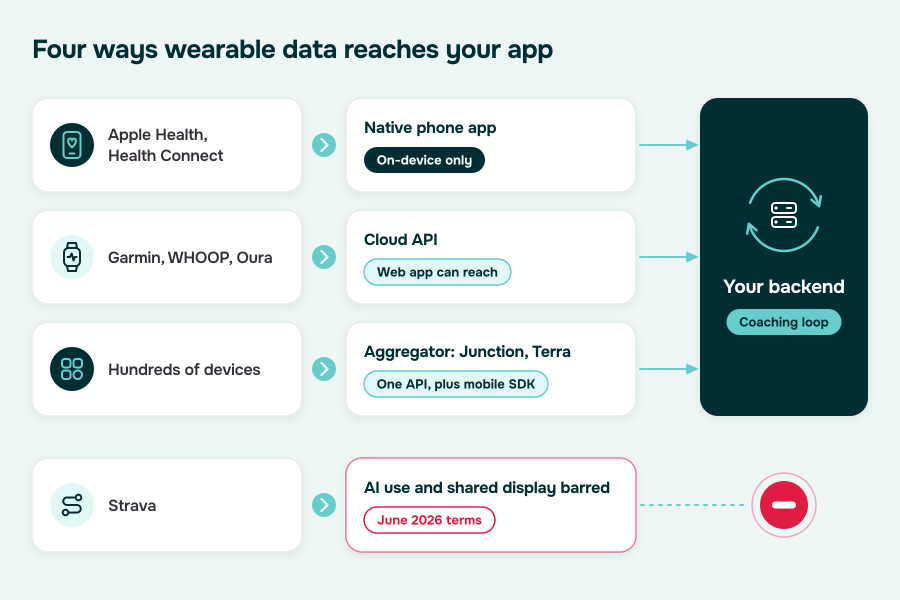
If you want to build your own personal trainer app that feels “smart” without faking it, you need wearable device integration, activity tracking, health monitoring that’s boringly reliable. Wearables don’t give you truth. They give you signals—often delayed, sometimes wrong, and always inconsistent across vendors.

This section is the build plan: what data you take, how you store it, and what you do when it disagrees with the user.
What Data You Actually Need
Start with the smallest set that supports real coaching decisions:
- Activity tracking: steps, active minutes, workouts/exercise sessions, distance, calories (treat calories as “directional”).
- Heart rate: resting HR, HR during sessions, HR zones, HR recovery (if available).
- Sleep: duration, sleep stages (optional), sleep score (vendor-defined), bedtime/wake time.
Optional but useful later: HRV, stress scores, skin temp, SpO₂. Don’t build product promises around these unless you’re ready for lots of “why is this different from my other app?” support tickets.
Normalization: Unify the “Same” Metric Across Different Worlds
Normalization isn’t a single transform; it’s a policy:
- Time: always store in UTC + user timezone context; define a “day boundary” (midnight vs 4am cutoff) for sleep and late workouts.
- Units: store canonical units (e.g., bpm, minutes, meters) and convert for display only.
- Workout taxonomy: map vendor workout types (e.g., “functional strength,” “HIIT,” “traditional strength training”) into your own stable categories.
- Confidence metadata: store the source vendor + whether it’s device-measured vs user-entered vs estimated.
Missing and Dirty Data
People forget to wear devices, permissions get revoked, batteries die, vendors throttle APIs.
Build explicit states:
- No data (never connected)
- Disconnected (permission revoked / token expired)
- Partial (steps present, HR missing)
- Delayed (data arrives 6–24 hours later)
Then make the UI honest: show “last sync” and avoid showing gaps as zeros. A missing sleep record is not “0 hours of sleep.” That’s how you accidentally scare users.
Real-Time vs Batch Sync
You don’t need real-time sync just because the marketing team loves the word “real-time.”
- Batch sync (hourly/daily) is enough for: trends, adherence, weekly summaries, sleep-informed training suggestions.
- Near-real-time (minutes) matters for: in-session coaching that uses HR zones, live safety prompts, “stop if HR is above X for Y minutes.”
If your product isn’t doing live coaching, batch wins: cheaper, simpler, less brittle.
Permissions
Permission flows will make or break adoption:
- Explain why you ask (e.g., “to adjust intensity based on recovery signals”).
- Let users connect selective sources (steps only vs steps+HR+sleep).
- Provide a “Disconnect” and “Reconnect” that works without support tickets.
Also: expect users to use multiple devices. Decide your policy:
- “Primary device wins”
- “Most recent wins”
- “Merge with conflict rules” (harder, but best for serious users)
When Wearable Data Conflicts With Self-Reports
This happens constantly: user says “I slept great,” wearable says “bad sleep.” User says “workout was easy,” HR says “you were redlining.”
Don’t turn it into a debate. Use a simple arbitration model:
- Prefer self-report for subjective states (mood, soreness, perceived effort).
- Prefer wearable for objective signals when confidence is high (consistent HR readings, clear workout session capture).
- When they disagree, don’t override—ask. Example: “We saw a short sleep window. Want to keep today’s plan, or swap to a lighter session?”
This is the difference between “smart coaching” and “the app gaslighting me.”
The Practical Outcome
Good wearable integration doesn’t just make charts prettier. It makes the training plan feel earned: intensity adjusts when recovery is down, volume nudges when adherence is strong, and the app stays calm when the data is messy—because it expects mess.
That’s how wearable device integration, activity tracking, health monitoring become a product advantage instead of a permanent edge-case factory.
Technology Stack for Personal Trainer App Development
If you’re serious about fitness trainer app development, the “stack” decision is really a reliability decision: can your mobile fitness app ship fast and keep video, messaging, payments, and data flows stable when usage spikes (January, anyone?).

One line that should guide your architecture: mobile app development, iOS and Android, cloud integration, data analytics isn’t four separate workstreams — it’s one system with four failure modes.
Mobile App Architecture Choices
- Native (Swift/Kotlin): best if your product lives and dies by performance, camera/video polish, background sync, and deep OS integrations.
- Cross-Platform (React Native/Flutter): best if speed-to-market and shared UI logic matters more than perfect platform-native feel (and you have discipline around performance and releases).
- PWA/Web App: great for early validation and coach/admin workflows; usually not enough alone for a consumer-grade experience with wearables, push, and polished video.
Practical rule: if live and async media is a core experience, you’ll feel native benefits sooner than you think.
Backend and API Layer
Build for “a lot of small writes” (workout logs, sets, notes, check-ins) and “a few heavy reads” (dashboards, history, trends):
- API style: REST is fine; add GraphQL only if your client screens are truly complex and you’re willing to manage it.
- Auth + roles: user/trainer/admin roles shouldn’t be an afterthought; it shapes every endpoint.
- Event-first thinking: workouts completed, session booked, video uploaded, payment succeeded — make these explicit events so downstream systems aren’t coupled to UI flows.
Data Model and Data Analytics Pipeline
Your app will generate messy behavioral data. Decide early what you’ll measure and how you’ll trust it:
- Operational DB: canonical source for users, plans, sessions, logs, messages.
- Analytics layer: separate store/pipeline for funnels, retention, adherence, and cohort analysis (so analytics queries don’t punish your production DB).
- Identity stitching: users change devices, reinstall, use web + mobile — you need clean identifiers or your metrics become fan fiction.
Keep analytics honest: measure “adherence and progression consistency,” not just “time in app.”
Media Delivery for Video Demos and Live Sessions
- On-demand demos: encoding pipeline + CDN with multiple renditions for variable networks.
- User uploads (form checks): direct-to-storage uploads + background processing (don’t proxy large files through your API).
- Live sessions: WebRTC-based stack with an intentional fallback path (quality downshift → audio-only → async recap).
Cloud Integration And Infrastructure
You want boring, scalable primitives:
- Object storage for videos and uploads.
- Managed DB with backups and read replicas.
- Queue/jobs for media processing, notifications, and scheduled tasks.
- Caching for feed-like screens and dashboards.
The goal of cloud integration here is not “serverless bragging rights.” It’s predictable latency and predictable cost under load.
Notifications and Messaging
Push notifications are not “engagement seasoning.” They’re operational plumbing:
- Transactional: booking confirmations, plan updates, coach feedback ready.
- Behavioral: “you missed today — here’s the smallest session that still counts.”
- Rate limits + preferences: let users control frequency or they’ll mute you (and then blame your “retention problem”).
If you support coach-client messaging, treat delivery, read receipts, and moderation as first-class backend concerns.
Payments and Entitlements
Even if monetization is a later section, the stack must support it now:
- Payment provider + entitlements service (what the user is allowed to do right now).
- Handle upgrades/downgrades, failed renewals, grace periods, refunds, and trainer-seat logic if you go B2B.
- Keep payment state out of the mobile client as much as possible — the server should be the source of truth.
Step-by-Step Personal Training App Development Process
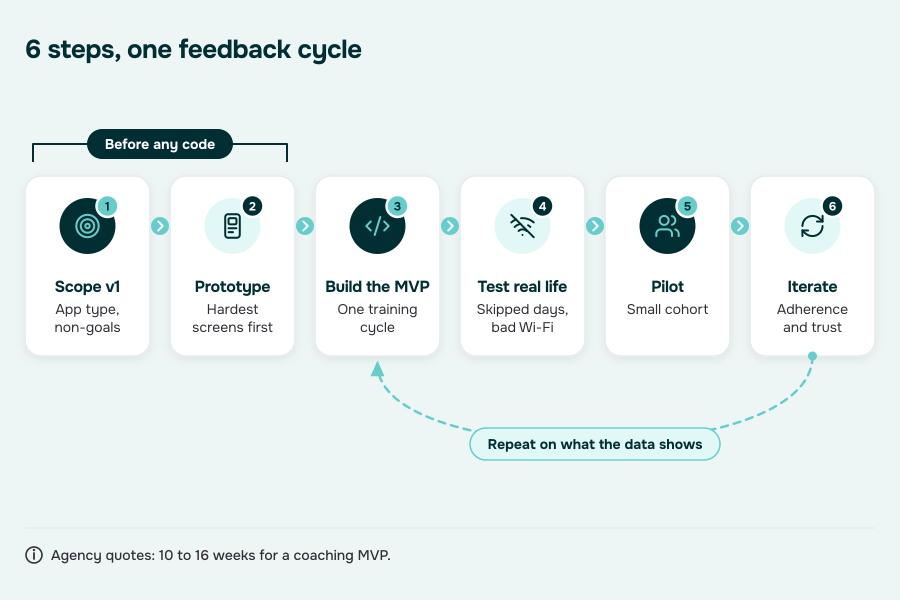
If you want to learn how to make a personal trainer app without building a beautiful prototype that collapses in week three, run the project like a product—not a feature factory. The goal is a tight loop: ship something people will actually use, measure it, and iterate until the coaching experience becomes “sticky.”

Step 1: Discovery and Scope Definition
This is where you decide what kind of product you’re building (self-serve, coach-led, B2B) and what your V1 is allowed to do.
- Define 2–3 core journeys (e.g., new user onboarding → first plan; booking → live session; workout → logging → feedback).
- Write “non-goals” that kill scope creep (no community, no advanced AI, no wearables depth—yet).
- Decide what “success” means in V1: first-week activation, adherence over 14 days, coach workload per client, etc.
Step 2: UX Prototyping and User Experience Validation
This is where user experience either becomes your advantage—or your churn engine.
- Prototype the hardest screens first: onboarding assessment, plan view, workout flow, logging, and “what happens when I miss a week.”
- Test with real users (and coaches if coach-led): watch where they hesitate, not what they say they like.
- Design for “minimum thinking”: default substitutions, clear next action, fewer taps to log, fewer places to get lost.
Step 3: MVP Build: Core Product and Plumbing
Ship the smallest version that supports a real training loop:
- Accounts + roles (client/trainer/admin if relevant)
- Plan delivery + workout flow + logging
- Basic progress views (not fancy dashboards)
- Messaging or feedback mechanism (async beats “perfect live” at this stage)
- Scheduling/payments only if they’re core to the business model
Build the instrumentation now (events, funnels, retention), or you’ll be “iterating” based on vibes.
Step 4: QA and Testing That Matches Real Life
Fitness apps break in dumb ways: bad networks, old phones, missed days, inconsistent data.
- Test offline/poor-connection scenarios.
- Test “messy users”: skip days, edit plans mid-week, change timezone, switch devices.
- Add a small internal “trainer QA” script: can a coach manage 10 clients without losing their mind?
Step 5: Pilot Rollout and Feedback Cycles
Don’t launch to everyone at once unless you enjoy support tickets.
- Start with a small cohort (your “friendly users” who will actually report issues).
- Build a feedback channel with structure: “what happened,” “what you expected,” “steps to reproduce.”
- Measure: activation, week-2 retention, adherence, and where drop-offs happen.
Your first rollout isn’t about growth. It’s about finding the leaks in the bucket.
Iteration: Fix the System, Not Just the UI
Most teams waste months polishing visuals while the product logic stays brittle.
Prioritize iterations that improve:
- Plan adherence (simpler flows, better defaults, fewer decisions)
- Coaching scalability (async review tools, templates, workload controls)
- Trust (clear “why the plan changed,” fewer surprising recommendations)
- Reliability (media, notifications, payments, sync)
That’s the real process: discovery → MVP → iteration cycles until the app stops feeling like “software” and starts feeling like “my coach is actually paying attention.”
Privacy, Compliance, and Health Data Responsibilities
In personal fitness app development, the fastest way to create brand-killing risk is to treat “health data” like just another table in your database. The practical move is to decide—up front—what you collect, why you collect it, and how quickly you can delete it when a user asks.
What Counts as Sensitive in a Fitness App
Assume these require stricter handling:
- Biometrics and body metrics (heart rate, sleep summaries, weight/body measurements)
- Health-adjacent notes (injury mentions, pain notes, recovery comments)
- Coach-client communications (messages can become the most sensitive data you store)
- Precise routines (consistent time + location patterns can be surprisingly revealing)
Consent That Matches the Moment
Skip the one giant consent wall. Use:
- Just-in-time prompts when a feature is activated (connect device, share data with a coach, upload video)
- Granular toggles (share steps but not sleep; share summaries but not raw details)
- Revocation that works (disconnect + stop collection immediately, not “we’ll stop later”)
Data Minimization: Collect What You Can Defend
A clean rule: if you can’t explain the user benefit in one sentence, don’t collect it.
- Prefer derived signals (weekly trend, adherence summary) over storing raw everything forever.
- Avoid “nice to have” collection that creates permanent risk (always-on location, excessive free-text prompts, unnecessary device scopes).
Retention and Deletion Policies Users Can Understand
Decide retention by data type, not by vibes:
- Workout logs: keep until deletion request
- Messages: keep until deletion request (or shorter, if your model allows)
- Media uploads/recordings: short retention by default unless the user explicitly opts into saving
Make account deletion explicit: what gets deleted, what gets de-identified, and what (if anything) must be retained for basic business records.
Audit Logs: the Bare Minimum to Stay Sane
Even without going deep into infrastructure, you want an audit trail for:
- Permission changes (connect/disconnect, share with coach toggles)
- Data exports/deletions
- Coach/admin/support access to user data
Audit logs aren’t “enterprise.” They’re how you resolve disputes without guessing.
Encryption and Access Controls: Basics Only
Keep it practical:
- Encrypt data in transit and at rest
- Enforce least-privilege access (support shouldn’t have “see everything” by default)
- Treat third-party analytics/crash tools as part of your data footprint (don’t leak sensitive fields into logs)
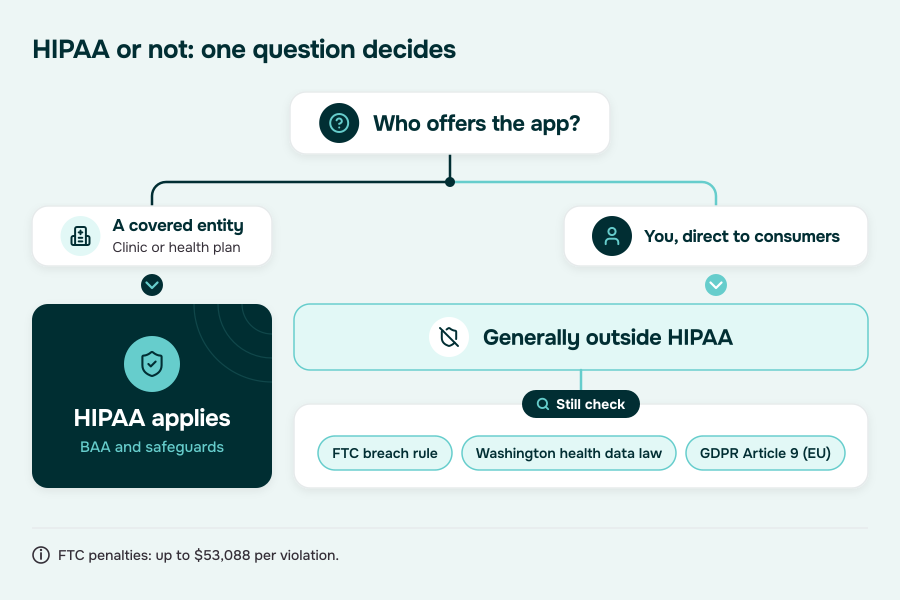
HIPAA or Not: Don’t Build on Assumptions
Not every fitness product is a HIPAA product. But if you start working with healthcare entities or clinically-adjacent workflows, expectations (and obligations) can change fast. The safe posture: build as if users’ trust is the asset, and avoid collecting data you’re not prepared to protect long-term.
Monetization Strategies for Personal Training Apps
If you’re trying to create a personal training app, monetization shouldn’t be an afterthought you bolt on after the MVP. The business model shapes the product: what gets gated, what gets measured, and how much support load you sign up for.
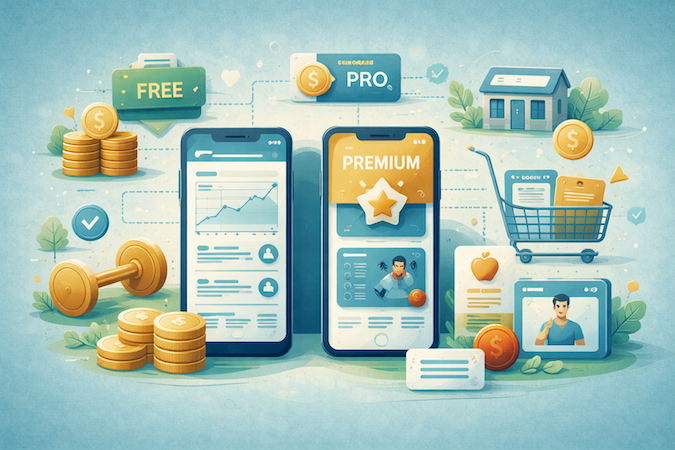
For B2C, the default is a subscription model with clear tiering:
- Free / trial: onboarding, a limited plan, basic tracking.
- Core paid: full programs, progress insights, and enough personalization to feel “worth it.”
- Premium: higher-touch value like trainer feedback, priority messaging, or live sessions.
For coach-led products (trainer business platforms), pricing usually works better when it matches how coaches think:
- Trainer seat pricing (B2B-ish): charge per coach account, with client limits or feature tiers.
- Usage-based add-ons: pay for live session minutes, extra storage for form videos, or advanced reporting.
For gyms/studios, avoid “per user” pricing unless you want constant negotiation. The cleanest pattern is:
- Per-location pricing with tiers based on member volume and feature set (scheduling, staff roles, admin reporting).
Upsells should map to outcomes, not random feature gates:
- Nutrition add-on (plans, logging, coach review)
- Messaging tier (async reviews, response SLAs)
- Live session bundles (credits or packs)
- Programs marketplace (sell specialized plans; take a cut)
Finally, don’t treat payment integration as a checkout screen. You need entitlements (who can access what), upgrade/downgrade handling, failed payments, grace periods, refunds, and “what happens to coaching access when a subscription lapses.” Get that right and monetization feels invisible—in a good way.
Personal Training App Development Challenges
Most failures in fitness coaching app development aren’t “we missed a feature.” They’re: churn you can’t explain, coaching quality you can’t scale, and operational mess you can’t staff.

Retention: Churn Hides Behind “Life Got Busy”
What typically drives drop-off:
- Plans feel repeatable elsewhere after initial novelty.
- Missed weeks create confusion (“do I pick up where I left off?”).
- Notifications become noise fast (users mute you → you misread it as a “marketing problem”).
Content Ops: the Silent Budget-Eater
Even with a great library, content work expands:
- Keeping programming coherent across levels, goals, equipment, and injuries.
- Version control (“what plan did this user follow last month?”).
- Coach consistency (two coaches shouldn’t prescribe opposite things for the same situation).
Adherence: Perfect Plans Meet Imperfect Humans
The app breaks when it assumes ideal behavior. Skipped sessions, travel weeks, and uneven motivation aren’t edge cases—they’re the median user.
Trust and Liability Perception
What goes wrong:
- The product “sounds certain” when it should sound like coaching.
- Injury/pain scenarios get handled inconsistently.
- Users can’t tell what’s automated vs coach-reviewed (trust erodes fast).
Scaling Coaching Capacity
Common failure modes:
- Messaging load balloons; response times slip; churn follows.
- Quality varies across coaches because you don’t have repeatable workflows.
- Hiring more coaches doesn’t fix it if the system forces 1:1 labor for everything.
Customer Support: Your “Real Product” Under Stress
Support volume tends to cluster around:
- Payments/refunds, scheduling chaos, device/network weirdness, wearable sync confusion.
When support is slow or inconsistent, user engagement drops even if the workouts are good.
Measurement pitfalls: dashboards that tell the wrong story
Typical mistakes:
- Optimizing “activity” (opens, clicks) instead of adherence/retention.
- Mixing cohorts (beginners vs intermediates) and calling it one funnel.
- Not being able to attribute churn to content fatigue vs coaching lag vs trust breaks.
Cost of Personal Training App Development
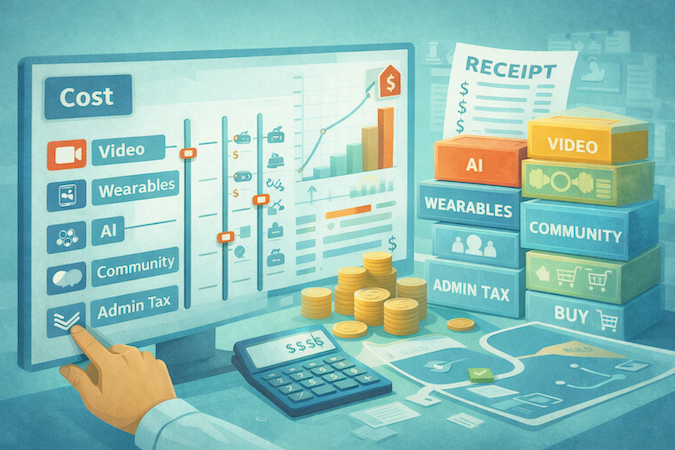
If you ask personal training app developers for “a price,” you’ll usually get a range so wide it’s basically a horoscope. The useful way to think about cost is: what are you making expensive on purpose—and what are you accidentally making expensive by skipping decisions.

Here are the real cost levers (the ones that move budgets fast), framed as scope/complexity switches rather than random numbers.
1) Your App Type Sets the Baseline (and Your “Admin Tax”)
The cost difference between a consumer workout app and a coach-led platform isn’t the pretty UI—it’s the operations layer.
- B2C self-serve: cheaper if you keep content simple and avoid live features early.
- Coach-led B2C / trainer platform: you pay an “admin tax” (client management, scheduling, messaging, notes, billing rules, cancellations, refunds, trainer permissions).
- B2B for gyms/studios: add org structure (locations, staff roles, reporting, revenue splits).
- Corporate wellness: add identity (SSO), reporting, and stakeholder dashboards (the “someone will ask for a CSV” tax).
If you’re building anything coach-led or B2B, assume admin tooling is not optional—it’s where “small features” go to become big invoices.
2) Video Is a Multiplier, Not a Feature
“Just add video” is how budgets quietly triple.
- Exercise demo videos (pre-recorded) are manageable: hosting, encoding, CDN delivery, and a decent content pipeline.
- Live streaming is the expensive cousin: real-time infra, session orchestration, reconnection logic, recording policy options, moderation/abuse prevention, and “what happens when a client’s Wi-Fi dies mid-squat.”
Rule of thumb: if you do live, you’re no longer building a fitness app—you’re also building a mini media platform.
3) Wearables Integration Cost Depends on How Honest You Want to Be About Data
Wearables cost scales with how decision-driving you make the data (normalization + conflict policy). The more your Coaching Loop depends on wearable inputs, the more you’re paying for data reliability, not just API wiring.
4) AI Costs Are Mostly Evaluation + Guardrails (Not “the Model”)
AI becomes expensive when you stop doing vibes and start doing responsibility:
- Constraint handling
- Escalation rules to humans
- Evaluation
- Content personalization
5) Community/Gamification Is a Retention Bet—With Moderation Overhead
Community features aren’t “add a feed.” They’re:
- reporting, blocking, content policies
- spam prevention
- community ops workflows
- push notification strategy (aka: how to annoy people just enough)
If you can’t afford moderation and support, keep community in V2.
6) Build vs Buy Decisions: You’re Buying Time
You can compress cost/time by using third-party services for:
- payments
- scheduling
- notifications
- video/live infrastructure
- analytics
But you’ll pay later in constraints (pricing rules, data access limits, UX compromises). The best approach is usually: buy infrastructure, build differentiation (your Coaching Loop + trainer workflows).
A Practical “Cost Planning” Checklist
Decide these up front and your estimate stops being fiction:
- Are we B2C, coach-led, B2B, or corporate (pick one primary)?
- Do we need live streaming in V1, or can we start with async form reviews?
- Will wearables data be display-only or decision-driving?
- Is AI suggestive (coach approves) or autonomous (app changes plans)?
- Do we need community now, or can we ship retention with challenges + streaks first?
- What are the non-negotiable admin workflows (refunds, reschedules, trainer access, audit trail)?
If you tell a team “MVP” but can’t answer those, congrats: you’ve invented Surprise Scope, the leading cause of budget inflation.
How to Choose a Fitness App Development Company
Picking a fitness app development company is less “who has the prettiest Dribbble” and more “who won’t quietly ship you a churn machine.” Keep it short, keep it ruthless.
1) Discovery Quality
Do they challenge you, or just quote you? A solid team will push back on:
- who the app is for (B2C vs coach-led vs B2B)
- what “success” means (adherence, retention, coach capacity)
- what you’re not building in V1
If they say “yes” to everything, they’re not partners—they’re order takers with a Stripe account.
2) UX Capability
Can they design behavior change, not just screens? Ask to see:
- onboarding that reduces drop-off (not “sign up + goals + done”)
- “missed week” / restart flows
- coach/client workflows that don’t bury trainers in taps
Pretty UI is table stakes. Practical UX is revenue.
3) Data and Privacy Maturity
Do they treat health-ish data as sensitive by default? They should be fluent in:
- consent, data minimization, retention rules
- encryption basics and audit trails
- role-based access (coach vs client vs admin)
Even when HIPAA isn’t strictly required, “trust” is. Sloppy data handling kills conversion.
4) Video and Wearables Experience
Don’t ask “can you do video?” Ask:
- how they handle poor networks and device chaos
- what their approach is to content delivery and streaming reliability
- how they deal with missing/dirty wearable data and permissions
If they can’t describe tradeoffs, they haven’t shipped it.
5) QA
What’s their release discipline? You want evidence of:
- test plans that cover payments, scheduling, notifications, and edge-case devices
- regression testing before every release
- monitoring post-release (crashes, latency, drop-offs)
Fitness apps fail on “small” bugs that wreck routines.
6) Post-Launch Support
Who owns outcomes after day 1? Clarify:
- response times and on-call coverage
- analytics + iteration cadence
- how they handle backlog triage (what gets fixed vs deferred)
7) References
When you talk to past clients, ask:
- “What broke after launch?”
- “How did they handle scope pressure?”
- “Would you hire them again—with your own money?”
If you’re buying fitness app development services, buy the team that can say “no,” ship reliably, and iterate like retention depends on it—because it does.
Case Studies: What Winning Personal Training Apps Do Differently
No logos on a pedestal here. Just three “this actually works in the wild” patterns you can steal.

They Scale Coaching by Making Async the Default: Future
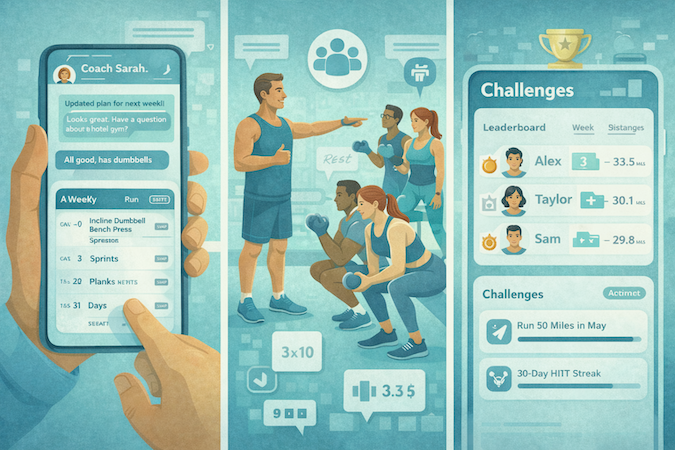
Future doesn’t pretend a coach is “always on.” It makes coaching continuous-but-manageable: in-app messaging, plus a weekly cadence where the coach refreshes the plan for the next week.
Users consistently describe a weekly rhythm: coach check-in → plan refresh → small adjustments when travel/equipment changes hit.
What to copy:
- A weekly reset rhythm (plan refresh + check-in)
- Fast plan swaps when reality changes (travel, hotel gym, no equipment)
- Messaging that’s designed for throughput, not “infinite chat”
They Make Community Structured, Not a Scrollable “Feed”: Ladder
Ladder positions itself around progressive strength with in-ear coaching, pacing, and video demos. It also pushes a “team/coach” framing—users pick a team, and workouts are programmed and updated weekly in that context. That’s community with a job to do: keep you showing up, not keep you scrolling.
What to copy:
- Cohorts/teams tied to a program (not generic social)
- Coaching that’s integrated into the workout experience (pacing + cues)
- Weekly programming cycles that create “freshness” without content chaos
They Turn Engagement Into a Game With Rules: Strava
Strava’s challenges work because they’re concrete: you join, you do eligible activities, you track status—often with a leaderboard. That simple structure creates repeat behavior without needing “content drops” every week.
What to copy:
- Challenges with measurable goals + visible progress
- Optional leaderboards where it makes sense (competition is a feature, not a default)
- Gamification focused on the behavior you want repeated (consistency), not random badges
Future Trends in Personal Training Apps
Over the next 12–24 months, the biggest shift isn’t new features — it’s what users will expect by default because Apple/Google-tier ecosystems keep raising the baseline.

AI Coaching Becomes a Product Tier
Not “AI-generated plans,” but ongoing guidance packaged as part of Premium subscriptions. That shifts your roadmap from “ship AI” to “ship entitlement + trust”: what’s included, what’s coach-reviewed, and what the app is allowed to change without a human.
Sensor Fusion Moves Past Wearables
The next wave is combining wearables with additional signals (labs/metabolic-style inputs) to explain why performance is trending up or down — which means your data layer needs to support multiple sources without treating any single metric as gospel.
Privacy Expectations Tighten Outside HIPAA
You already built for consent/minimization/retention — the trend is that users (and regulators) will punish “health-ish data” handled casually, even when you’re not a healthcare product.
Hybrid Wellness Adjacency
Fitness apps will keep borrowing loops from mental health app development (check-ins, stress/sleep framing, safety boundaries) — not to become clinical care, but to feel like a calmer, more trustworthy coach.
How Specode Handles Personal Training App Development
If your app is coach-led (or even “mostly self-serve” but with messaging, payments, and sensitive data), you end up rebuilding the same foundation every time: multi-role access, workflows that don’t leak data between clients, and a loop that lets you change the plan without rewriting the product.

That’s where Specode fits: it’s an automated platform with reusable HIPAA-compliant components plus a conversational AI assistant that helps teams assemble and modify real app workflows quickly—while keeping code ownership.
What Specode actually changes for a personal training app:
1) You Start With a Real “Coach Business” Foundation
Most products underestimate the coach side. Specode starts from a working base that assumes multiple roles (client/coach/admin) and role-based access patterns, then you shape the experience around your model: async-first coaching, hybrid coaching, B2B teams, or a studio setup.
2) Faster Iteration on the Parts That Drive Retention
Instead of hard-coding every workflow tweak, you can iterate quickly: adjust onboarding questions, refine check-ins, change progress summaries, tune messaging/scheduling rules—by describing changes to the AI assistant and then tightening the result with code where it matters.
3) “Sensitive-Data Ready” by Default
Fitness products increasingly collect health-adjacent signals (sleep, HR, mood, injury notes). Specode is built for PHI-grade patterns (roles, auditability, secure workflows), which is a strong posture even when your app isn’t formally a healthcare system.
One reality check: some integrations (wearables hubs, advanced EHRs, eRx/labs at scale) are typically partner/custom work, not “flip a switch,” and Specode is explicit about that.
If your goal is to create a fitness training app that supports real coaching operations (not just workouts on a screen), Specode gives you a faster path to a production-grade foundation—so your time goes into coaching quality and retention mechanics, not rebuilding the plumbing.
Ready to stop planning and start shipping? Sign up for a free trial (no credit card required) and start building your fitness app with Specode’s AI right away.
Frequently asked questions
Start with the coaching loop and the minimum workflows that make it usable week after week: onboarding and assessments, goal setting, a basic exercise library with clear demos, progress tracking, scheduling, payments, and a simple coach/client management area if you’re coach-led. Skip anything that multiplies complexity early (live streaming, big community features, deep wearables, heavy AI automation) until you’ve validated retention and coaching capacity.
If you already have coaches, clients, or a gym/studio channel, a coach-led platform is usually the faster path to revenue because you’re selling a service with software. If you’re going pure B2C, you’ll need stronger content, stronger retention mechanics, and usually more marketing spend to make the unit economics work. Pick one primary model so features and pricing don’t become a confused mix.
Not if you don’t have clean data and a clear coaching workflow. AI helps most when it supports plan edits, summaries, check-ins, and constraint handling, but it can also create trust and liability headaches if it sounds too certain or changes plans without guardrails. A practical approach is to ship AI as suggestive support for coaches first, then expand automation once you can measure its impact on adherence and outcomes.
Treat wearables as a data quality problem, not an integration task. Decide which signals you’ll actually use, how you’ll handle missing and conflicting data, what counts as “good enough” to influence coaching, and how you’ll explain discrepancies to users. For many apps, starting with batch sync and display-only insights is safer than trying to drive real-time coaching decisions immediately.
Churn you can’t explain, content fatigue, coaching capacity bottlenecks, and support load. The app often looks great, but the experience fails when users miss a week, coaches get overwhelmed by messaging, progress feels unclear, or “small” issues in payments, scheduling, and video reliability break routines. The teams that win treat ops, measurement, and iteration as part of the product—not an afterthought.