From Paper to HIPAA App: Digital Transformation for Private Practices

Private practice digital transformation usually starts with a lie you tell yourself: “We’re too small to need this.” Then you spend another Tuesday hunting paper charts, retyping the same info three times, and watching staff do Olympic-level gymnastics to keep the day from collapsing.
This isn’t about buying shiny software. It’s about removing the hidden tax of manual work—lost time, revenue leakage, and patient frustration—without wrecking productivity during the transition.
In this guide, you’ll map your real workflows (not the fantasy version), run a phased roadmap that creates quick wins, migrate records without creating a digital junk drawer, and build adoption so your new system becomes the way you operate—not another tool people avoid.
Key Takeaways
- Don’t “go digital” — sequence it: quick wins in weeks, core systems in months, then advanced features once the foundation is stable.
- Migration isn’t scanning; it’s turning messy history into usable structure with clear rules for data entry, verification, and ownership.
- Adoption is the ROI lever: consistent change management + simple training beats feature overload every time, and that’s where the biggest gains show up.
The Hidden Cost of Paper-Based Private Practices
Let’s be blunt: paper isn’t “charming” or “reliable.” It’s a tax—one your small practice has been paying for years without noticing the invoice quietly growing in the drawer.

Time Lost to Manual Processes
Every minute staff spend hunting for paper charts, re-entering the same data, or deciphering handwriting is a minute not spent on revenue-producing or care-enhancing work.
Clinicians and staff routinely spend between 19% and 35% of each shift on documentation and related manual processes — time that could be reclaimed with digital transformation and smarter workflows.
Call it what it is: a drag on practice velocity. You don’t feel it day-to-day, but it compounds like credit-card interest—quietly stealing time savings you could have banked every single day.
Revenue Leakage From Inefficiencies
Paper introduces friction into everything that should be automated: the revenue cycle, eligibility checks, follow-up tasks, billing queues.
Every extra handoff increases error probability; every error delays cash.
One underappreciated killer: “lost” orders and unsigned clinical documentation that never make it into billing.
In real examples, clinics replacing paper processes with automated workflows have reported cost reduction on the order of several thousand dollars per month, simply by eliminating manual handling and tracking of post-visit tasks.
That’s not “growth.” That’s money you already earned—just stuck in a manila folder.
Patient Satisfaction Impact
Patients notice inefficiency more than providers think. Waiting for forms, repeating histories, being called to “confirm appointments” the system should handle automatically—these erode trust and chip away at the overall patient experience.
Digital transformation healthcare isn’t about looking modern. It’s about this simple psychological truth:
A practice that feels organized feels safer.
And safety drives retention, reviews, and referrals far more reliably than any billboard or postcard campaign.
Signs Your Practice Is Ready for Digital Transformation
Most independent practices don’t wake up one morning and declare, “Today we modernize.” The shift usually starts with a few subtle—then not-so-subtle—signals that the current setup is reaching its breaking point.
Here are the patterns you see when a private practice is quietly asking for digital transformation.

1. Daily Operations Feel Harder Than They Should
If your front desk is constantly juggling callbacks, misplaced messages, or time-consuming routing of paperwork, that’s not “just how clinics work.”
That’s a sign that your workflows have outgrown the tools supporting them.
A simple readiness evaluation often surfaces the truth: the clinic isn’t inefficient; the infrastructure is.
2. Patients Complain Despite Great Care
Long wait times, repeated questions, and preventable scheduling misfires erode patient trust.
Technology adoption becomes unavoidable when the experience gap widens between clinical quality and operational quality.
The moment you catch yourself saying, “But we’re doing our best—why does it still feel chaotic?”, you’re already in private practice digital transformation territory.
3. Team Spends More Energy Maintaining vs. Using Systems
Legacy habits often masquerade as “the way we’ve always done it.”
But if staff are building workarounds, maintaining parallel spreadsheets, or manually double-checking what software should handle automatically, that’s a bright red modernization flag.
Independent practice success correlates strongly with the ability to streamline—not heroically compensate for outdated processes.
4. Decision-Making Relies on Anecdotes Instead of Data
If you can’t quickly answer:
- How long patients wait
- How many tasks fall through the cracks
- How much time is lost to rework
- Which services are the biggest revenue drivers
…then the next step is clear.
A practice assessment isn’t a bureaucratic exercise—it’s the foundation of high-confidence decision-making.
5. Growth Feels Capped—Not by Demand, but by Capacity
A full schedule is great. A full schedule that feels unsustainable is not.
Digital transformation is often triggered when providers realize the ceiling isn’t market demand—it’s workflow friction.
When scaling requires more staff rather than better systems, you’re overdue for modernization.
Pre-Digital Assessment: Mapping Your Current Workflows
Before you digitize anything, you need a clear picture of how your practice actually works today—not how you think it works. Most clinics skip this step, then wonder why their shiny new tools don’t solve the real problems. For a solo practitioner or small team, this assessment is the single highest-ROI step in the entire paper to digital healthcare journey.

Document Your Existing Processes
Start with the mundane: check-in, scheduling, documentation, referrals, billing, follow-ups.
Put every step on paper (ironically) or in a shared document:
- Who does what?
- What triggers each step?
- Where does information get recorded?
- Which tasks depend on someone remembering them?
This isn’t “busywork.” It’s practice management in its most honest form—exposing the invisible glue that holds your clinic together.
The goal: create a baseline map of clinical documentation and operational touchpoints through workflow mapping before introducing technology.
Identify Pain Points and Bottlenecks
Once the workflow is mapped, the friction becomes impossible to ignore.
You’ll see:
- Redundant data entry
- Delays caused by handoffs
- Charting gaps
- Tasks that rely too heavily on one person
- Moments where things commonly “fall through the cracks”
These aren’t isolated inefficiencies—they’re the compounding blockers that prevent process optimization.
Digitization only works when it targets the right failure modes.
Calculate Your Baseline Metrics
You can’t improve what you can’t measure. Capture a simple before-state so the impact of digital tools becomes quantifiable:
- Average check-in time
- Documentation lag (same day? next day?)
- % of no-shows
- Follow-up task completion rate
- Billing lag days
- Time spent per patient on administrative work
Even rough numbers are enough.
Most solo practitioners are surprised by how large the gaps actually are once they finally count them.
Your future decisions—vendors, budget, staffing, workflow sequencing—become dramatically easier and more rational when grounded in a real baseline.
Building Your Digital Transformation Roadmap
Digitizing a clinic isn’t a flip-the-switch moment—it’s a phased approach that balances momentum with stability. The fastest way to stall a transformation is to try to digitize the medical practice all at once. The smartest way is to sequence change so every step pays for the next.
Think of this as an implementation timeline designed for real-world clinics, not vendor demos.

Phase 1: Quick Wins (Weeks 1–4)
The first month is about credibility. You’re proving—internally—that change is worth it.
Focus on areas where workflow automation removes obvious friction with minimal disruption:
- Digital intake forms to eliminate clipboards and re-entry
- Automated appointment reminders to reduce no-shows
- Basic task routing so follow-ups aren’t dependent on memory
These quick wins create immediate time relief for staff and visible improvements for patients. More importantly, they buy you trust—critical social capital for what comes next.
This phase isn’t about perfection. It’s about momentum.
Phase 2: Core Systems (Months 2–3)
Once the practice feels the benefits, you can modernize the operational backbone.
This is where the digital strategy gets serious:
- Billing automation to reduce delays, errors, and rework
- Structured documentation workflows that feed clean data downstream
- Better coordination between front desk, clinical staff, and billing
By now, the practice should feel less reactive. Tasks move forward without constant nudging. Financial visibility improves. The clinic starts operating like a system instead of a collection of heroic individuals.
Phase 3: Advanced Features (Months 4–6)
Only after the foundations are stable does it make sense to layer on advanced capabilities.
This phase is about scale and sophistication:
- Electronic prescribing to reduce administrative load and errors
- More nuanced automation across clinical and administrative workflows
- Refinements that improve throughput without increasing staff workload
At this stage, the practice isn’t just digital—it’s resilient. Growth no longer automatically means chaos.
A clear roadmap turns digital transformation from a vague aspiration into a controlled, repeatable process. When each phase is aligned to outcomes—and sequenced realistically—digitization stops feeling risky and starts feeling inevitable.
Choosing Between Build, Buy, or Hybrid Solutions
When clinics get serious about private practice automation, they usually ask the wrong first question: “What platform should we use?”
The better question is: “What do we need to standardize, and what do we need to keep unique?” That answer determines whether you should buy, build, or go hybrid—without turning this into a tech vanity project.

Buy: Best When Your Workflows Are “Normal Enough”
Choose an off-the-shelf vendor when:
- Your processes match common patterns (scheduling, reminders, basic intake, billing workflows)
- You want predictable costs and fast rollout
- Your team has limited capacity for implementation complexity
Pros: fastest path, low internal load, clear support path.
Cons: you’ll adapt your practice to the software, not the other way around—sometimes in annoying ways that feel small at first and painful later.
What matters most here is vendor selection: look for fit with your specialty, integrations you actually need, and the vendor’s track record with small practices (not just hospital logos on the homepage).
Build: Best When Your Clinic’s “Secret Sauce” Is the Workflow
Consider custom healthcare software when:
- Your workflow is truly differentiated (specialty protocols, multi-step patient journeys, unusual staffing model)
- Your competitive advantage depends on experience and process—not just having a portal
- You’re ready to own ongoing improvement, not “set it and forget it”
Pros: tailored operations, less compromise, better long-term leverage.
Cons: higher responsibility. Even if you don’t build in-house, you still own decisions, training, iteration, and change.
Build only makes sense if the clinic has the appetite to treat the system as a living part of the business.
Hybrid: the Default Best Choice for Most Small Clinics
For many clinics, the smartest move is:
- Buy commodity systems (scheduling, billing, standard comms)
- Build only the parts that make your workflow unique (specialty intake logic, follow-up pathways, provider ops, patient engagement flows)
Hybrid protects your timeline and reduces risk while still letting you automate what’s specific to your practice.
This is also where budget planning becomes real (and not wishful thinking). Instead of “How much is a system?”, you plan:
- what you can roll out in 30–60 days
- what can wait
- what will pay for itself first (no-shows, staff time, billing delays)
- what requires training and process change, not just software
A Practical Decision Test
Pick your path by answering these three questions:
- How much can we change our workflows without harming care or staff sanity?
- How quickly do we need impact (weeks vs months)?
- Do we have bandwidth to manage implementation, training, and iteration?
The Paper-to-Digital Migration Process
This is the part most clinics underestimate. They think the “digital transformation” work is choosing software. In reality, healthcare digitization for clinics succeeds or fails based on how well you move messy, inconsistent, human-created history into a system that expects clean structure.
If you treat this like a one-time admin chore, you’ll end up with a digital mess instead of a digital practice.

Scanning and Digitizing Historical Records
Start by being ruthless about scope. Not everything needs to be digitized.
A practical approach to scanning documents:
- Define what must be immediately accessible (recent charts, active treatment plans, chronic conditions, key consents)
- Define what can be “scan-only” (older history that’s rarely referenced)
- Define what should stay archived unless requested (deep legacy history)
This is especially important if your practice has years of paper records and fragmented legacy systems (old billing tools, spreadsheets, misc. PDFs, even a “system” that is basically a filing cabinet).
Pro tip: scanning everything is easy; finding anything later is not. Scans need naming conventions and indexing rules from day one.
Data Entry Best Practices
Scanning creates searchable images. It does not create usable data.
For anything you want the system to actually act on—problem lists, allergies, meds, immunizations, key lab values—you need structured entry. That’s where most errors happen, so set guardrails:
- Standardize fields (don’t let five people invent five formats)
- Use dropdowns and templates where possible
- Assign ownership (who enters what, and when)
- Don’t overload clinical staff—use a staged approach with clear priorities
This is data migration in the real world: not a clean export/import, but a controlled process of translating your practice’s history into consistent digital structure.
Verification and Quality Control
Quality control is the difference between “we went digital” and “we trust our system.”
A lightweight verification loop that works in small clinics:
- Spot-check a sample set every week (not everything)
- Validate the most risk-sensitive categories first (meds, allergies, active diagnoses, upcoming care plans)
- Track recurring errors and fix the process—not just the record
Also: decide upfront how you’ll handle discrepancies between scanned notes, patient memory, and what staff typed into the system. The goal isn’t perfection; it’s reliable truth for day-to-day care.
Done right, migration doesn’t just move information—it cleans it, reduces future rework, and makes the practice faster every week after the transition.
Change Management for Small Practice Teams
You can buy the best tools on the market and still fail—because the hard part isn’t software. It’s people. When you transform paper records to digital, you’re not just changing where information lives; you’re changing routines, roles, and the little coping mechanisms that kept the clinic running.
Real change management in a small practice is less “corporate initiative” and more “keep the day from falling apart while we improve it.”

Overcoming Staff Resistance
Resistance to change is rarely stubbornness. It’s usually one of these:
- Fear of slowing down and looking incompetent
- Worry that “digital” means more work, not less
- Loss of control (paper felt flexible; systems feel rigid)
- Bad memories from a previous rollout that went sideways
The fix isn’t speeches. It’s credibility:
- Acknowledge what will get worse temporarily
- Show what gets easier immediately (small wins matter)
- Give staff a safe way to flag issues without being blamed
If you don’t address the emotional side, staff will “comply” and still quietly route around the system—creating a shadow workflow that kills adoption.
Training Strategies That Work
Small clinics don’t need marathon training sessions. They need training that respects reality.
Effective staff training looks like:
- Short role-based sessions (front desk vs MA vs provider)
- One “golden path” workflow first (e.g., check-in → intake → documentation → follow-up)
- A sandbox or dummy patient for practice without risk
- A single shared cheat sheet for the 10 actions they do daily
Also: identify your internal “super user” early—the person who can answer questions in real time. In small practices, peer support beats any vendor help center.
Maintaining Productivity During Transition
The biggest adoption killer is when the clinic tries to run at full speed while changing the engine.
Protect staff productivity with simple guardrails:
- Run a short hybrid period intentionally (not forever)
- Reduce discretionary work for 2–4 weeks (less “nice-to-haves”)
- Build extra time into the schedule early on (even 5 minutes per patient helps)
- Track a few friction points daily and fix the process weekly
The goal is not “no disruption.” The goal is controlled disruption—so the clinic doesn’t lose confidence halfway through.
Real Private Practice Transformation Case Studies
These aren’t “we bought software and everything was perfect” stories. They’re examples of what actually works when you digitize messy, human workflows: pick the right wedge, reduce coordination overhead, and make the system do the remembering.
One pattern shows up in both cases: digital transformation for doctors sticks when it removes daily friction (the stuff that quietly drains attention), not when it adds another dashboard people feel guilty about ignoring.
Case Pattern #1: Turn Scheduling Chaos Into a Reliable Workflow
DyadSync was built to replace the fragmented reality of clinician coverage—texts, spreadsheets, calendar invites—with a single operational flow: role-based onboarding, smart scheduling, contextual messaging, automated payments, notifications, and an admin layer to keep everything controlled.
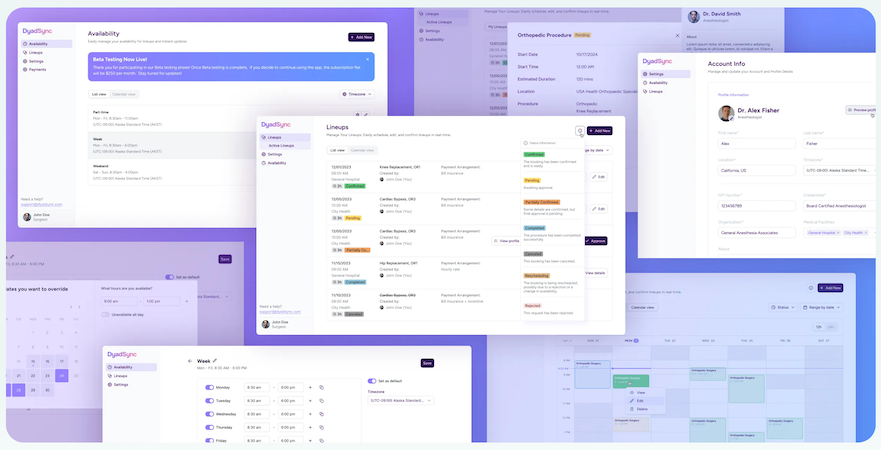
What to take from this: if your “system” relies on people manually coordinating availability and follow-ups, you don’t just have inefficiency—you have risk. Tight scheduling and communication loops create immediate time relief and unlock capacity, which is one of the most direct paths to practice growth.
Case Pattern #2: Digitize Revenue-Critical Workflows End-To-End
AlgoRX focused on eliminating friction in a complex, compliance-sensitive workflow: patient onboarding, eligibility screening, provider automation, ePharma routing, checkout, payments, and secure messaging—so the experience feels simple even when the backend isn’t.
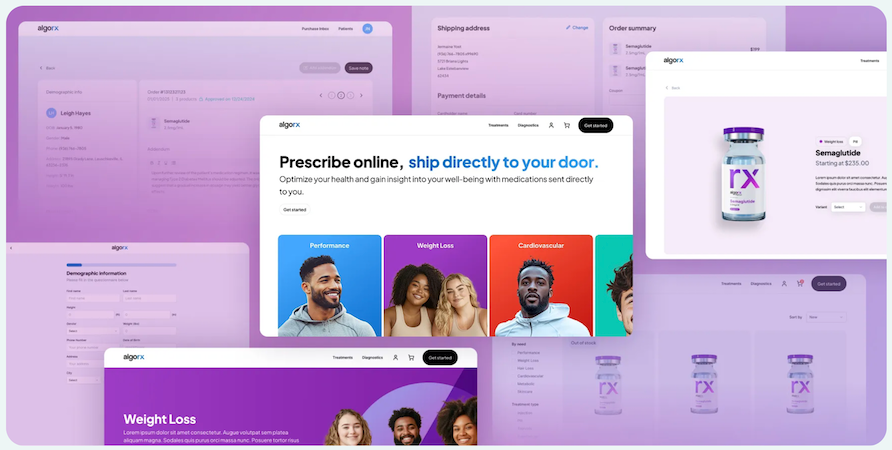
Their outcomes were explicitly tied to measurable leverage: 12× ROI, $1M+ sales by month 2, and 7-figure ARR by month 3.
Why it matters: operational digitization isn’t ‘nice to have’—it becomes a revenue engine when you remove bottlenecks that block throughput.
The Takeaway: Leverage Becomes the Moat
Both examples show the same real-world truth: the strongest competitive advantage usually comes from making your operations easier to run than your peers’—fewer manual coordination points, fewer dropped tasks, faster turnaround, and workflows that don’t collapse when one person is out sick.
Measuring ROI and Success Metrics
If you don’t measure outcomes, medical practice digitization turns into a vibe. And vibes don’t survive budget conversations. The goal isn’t to “go digital.” The goal is to run a smoother clinic with measurable returns—especially in a small practice where every hour and every missed charge matters.
Below is a simple measurement framework that keeps you honest.
Financial Impact Tracking
You’re tracking ROI healthcare in plain numbers—not “we feel less stressed.”
Start with a before/after baseline and monitor:
- Days in A/R (do claims get out faster?)
- Denial rate and the top 3 denial reasons (are errors dropping?)
- Charge capture rate (are services making it to billing consistently?)
- No-show rate (did reminders + easier scheduling move the needle?)
- Admin labor cost per visit (how much staff time is spent per patient on non-care tasks?)
A good rule: if you can’t tie a metric to cash flow, cost, or capacity, it’s not a “ROI” metric—it’s a vanity metric.
Operational Efficiency Gains
This is where you prove operational efficiency without needing a CFO.
Track time-based indicators:
- Average check-in time
- Documentation lag (same-day vs backlog)
- Task completion time for follow-ups (referrals, lab follow-up, prior auth)
- % of calls that are “status checks” (a sign your system isn’t self-serve enough)
- Number of handoffs per patient journey (handoffs are where errors breed)
These metrics translate directly into throughput. More importantly, they expose bottlenecks that stop practice efficiency from improving even after tools are implemented.
Patient Satisfaction Improvements
Yes, measure patient satisfaction—but measure it like an operator, not a marketer.
Use a mix of:
- Short post-visit surveys (3 questions max)
- Appointment friction metrics (how often patients reschedule/cancel)
- Portal adoption and usage signals (messages answered, forms completed before visit)
- Complaints by category (wait time, communication, billing confusion)
Patients don’t usually say “your workflows are broken.” They say “this feels disorganized” or “I had to repeat myself.” Digitization works when those complaints drop.
Common Pitfalls and How to Avoid Them
Most clinics don’t fail at digitization because they chose “the wrong software.” They fail because they run the project like a shopping trip instead of a clinic digital transformation strategy.
Here are the pitfalls that show up again and again—and the practical way to dodge them.

Pitfall 1: Digitizing Chaos
If your current workflow is messy, digitizing it just makes the mess faster and harder to unwind.
Avoid it: map the workflow first, then digitize. If you can’t describe the process in five steps, you’re not ready to automate it.
Pitfall 2: Treating Adoption as Optional
A system half-used is worse than paper: you get the work of both, plus confusion.
Avoid it: define the “source of truth” rules early (where scheduling lives, where documentation lives, where tasks live). Make it explicit, then enforce it gently but consistently.
Pitfall 3: Overbuying Features and Underinvesting in Rollout
Small practices burn time learning features they don’t need, while the basics still don’t run smoothly.
Avoid it: prioritize a short list of high-frequency workflows. If the team does it daily, it gets optimized first. If it’s “nice someday,” it waits.
Pitfall 4: Ignoring the Compliance Transition Until the End
This one gets expensive. When clinics bolt on security and policy later, they often redo workflows, permissions, and data handling—exactly the stuff that disrupts operations.
Avoid it: treat compliance transition as a design constraint from day one:
- minimize what data is collected
- restrict access by role
- keep auditability in mind
- validate vendor BAAs and responsibilities early
Compliance shouldn’t be a last-minute checklist; it should shape the workflow choices upfront.
Pitfall 5: No Owner, No Cadence, No Accountability
If “everyone owns it,” no one owns it—and the project drifts until people hate it.
Avoid it: assign one accountable owner (even part-time), run a weekly review, and track 3–5 metrics that prove progress.
Post-Implementation: Continuous Improvement
Going live isn’t the finish line. It’s the moment your clinic stops guessing and starts learning. The real win is turning “we implemented software” into a paperless medical office that keeps getting smoother every month—not a system that slowly decays into workarounds.
Here’s how small practices keep momentum without burning out the team.
Keep a “Friction Log” for 30 Days (Then Fix the Top 3)
For the first month, collect issues in one place:
- steps that take too long
- tasks that still require double entry
- errors that repeat
- questions staff ask more than once
Then choose the top three and solve those, not everything. Continuous improvement works when it’s boring and consistent.
Treat Adoption Like a Product, Not a Policy
Most clinics assume people will use the portal because it exists. They won’t—unless it’s clearly better than calling.
Drive patient portal adoption by making it the easiest path for:
- pre-visit forms
- appointment confirmations and simple reschedules
- prescription refill requests (where appropriate)
- secure questions that don’t need a phone call
And just as important: respond fast early on. If portal messages disappear into a black hole, patients learn not to use it.
Standardize What “Done” Means
Post-go-live chaos often comes from ambiguity:
- Is intake “done” when the form is submitted—or reviewed?
- Is documentation “done” when drafted—or signed?
- Is a follow-up “done” when scheduled—or completed?
Make these definitions explicit, so staff don’t invent their own standards (and quietly reintroduce paper workarounds).
Upgrade in Small, Scheduled Steps
Don’t let optimization become constant disruption. Use a simple cadence:
- monthly: workflow tweaks
- quarterly: larger changes (new forms, new automation rules)
- as-needed: training refreshers for common errors
That’s how practices stay modern without feeling like they’re “implementing” forever.
How Specode Can Accelerate Your Transformation
By the time a practice gets serious about going digital, the bottleneck is rarely “we don’t know what to do.” It’s that the work is bigger than any single off-the-shelf tool: workflows don’t match, permissions get messy, compliance needs guardrails, and you still want the flexibility to evolve.
That’s where Specode fits—not as “yet another system,” but as a way to assemble the missing pieces when your clinic needs something more tailored than a standard vendor setup.

What Specode Changes in Practice
Specode is an automated platform with reusable HIPAA-compliant components and an AI assistant that helps teams assemble healthcare apps faster than building from scratch—while keeping code ownership (so you’re not boxed into a walled garden).
In plain terms: if your digitization roadmap requires custom workflows—patient intake flows, provider worklists, internal coordination, secure messaging, scheduling, documentation patterns—Specode gives you a healthcare foundation you can shape instead of reinventing.
Where It Helps Most in a Paper-to-Digital Journey
- Workflow-driven tools that match how your clinic actually operates (instead of forcing you into generic flows).
- A safer path for handling PHI-heavy features because components are designed with HIPAA-friendly defaults (roles, auditability, secure patterns).
- A realistic way to extend beyond what your current systems can do—without turning the project into an endless rebuild.
And yes, if your transformation includes digitizing patient records into structured, usable workflows (not just scanned PDFs), Specode is designed for exactly that kind of “make it operational” digitization effort—forms, dashboards, basic EMR patterns, and automated tasks that reduce rework.
The Right Expectation to Set
Specode is best thought of as a healthcare app builder for clinics and health-tech teams who need speed and flexibility: assemble from HIPAA-ready components, iterate fast with the AI assistant, then extend in code as your needs mature.
Frequently asked questions
Most small practices can get core workflows live in a few months, but “fully digitized” usually means adoption + cleanup + process stabilization, which commonly lands in the 6–12 month range depending on how much scanning and data cleanup you take on and how many workflows you change at once. A post–go-live stabilization period of ~1–3 months is also common even after the system is technically “live.”
ROI varies a lot by starting point (paper-heavy vs already semi-digital) and whether you actually change workflows, but there is credible evidence that primary care clinics can recover EHR investments within about 10 months on average (with a wide confidence interval), largely via throughput and operational improvements. Treat that as a directional benchmark, not a promise for every specialty and every clinic.
Often you can reduce or eliminate routine paper handling after high-quality scanning, but retention rules depend on your payer mix and jurisdiction, and you need a defensible process for scan quality, indexing, and legal holds. CMS makes clear that records can be retained in the original form or a legally reproduced (including electronic/digital) form, and also highlights that retention timeframes are governed by a mix of state rules plus CMS requirements for certain providers; AHIMA guidance discusses post-scan handling as part of a document management program.
Don’t turn it into a moral crusade. Offer a “digital-first, not digital-only” path: let patients opt into the portal with assisted signup at the front desk, show one immediate benefit (forms done before the visit, faster results messaging, fewer phone calls), and keep a clear non-digital fallback for those who truly can’t or won’t use it. Research on patient perspectives and portal adoption shows barriers aren’t just “the digital divide” — trust, perceived usefulness, and usability matter a lot.
Meaningful usually means you can stop paying the “paper tax” in staff time, but costs are highly variable. Peer-reviewed and government-linked sources put EHR adoption/implementation costs for small practices in the tens of thousands per clinician (with additional ongoing maintenance/support), and AHRQ work estimating real implementation effort found substantial first-year costs in a five-physician practice when you include planning, training, and workflow redesign time. A practical “minimum budget” should also include scanning, data cleanup, staff time for training, and a short-term productivity dip—those hidden costs are where plans fail.
Yes, and for small practices it’s often the safest approach—but only if it’s intentional and time-boxed. Run a short hybrid period for the highest-risk areas (historical records, edge-case workflows), while making one system the “source of truth” for each workflow so you don’t end up doing double work forever. Plan for a stabilization window after each rollout step so staff can regain speed before you introduce the next change.