Is Replit HIPAA Compliant?

Updated October 2026
Replit gets healthcare demos running fast. Before connecting patient data, check the services behind your prototype.
Is Replit HIPAA compliant?
No, Replit's public agreements don't provide a HIPAA BAA for your app. Use synthetic data for prototyping, and move PHI onto a stack with the required agreements and safeguards before launch.
Last verified: October 29, 2026.
Already built on Replit? We'll move your prototype onto a HIPAA-ready stack with a signed BAA, without starting over. Migrate my Replit app
Key Takeaways:
- Public BAA gap: The current Terms, Enterprise Agreement, DPA and Pro Agreement contain no HIPAA or BAA provisions.
- 5 places to check: Agent conversations, databases, logs, Secrets and test requests can bring patient data into your development workflow.
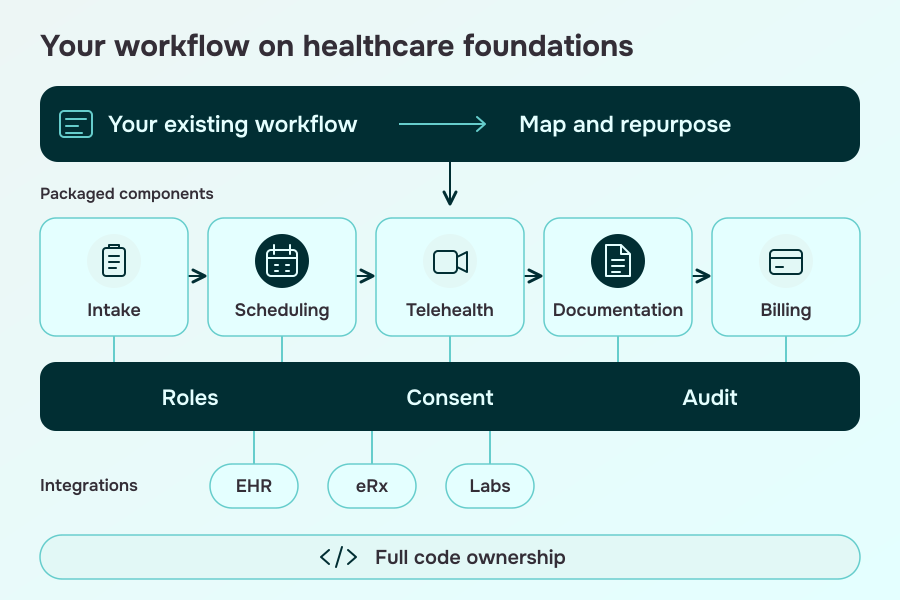
- Specode's healthcare AI builder: Turn plain-English prompts into live intake, scheduling, telehealth and billing flows on HIPAA-ready rails (BAAs, audit logs, RBAC), with EHR/eRx/labs integrations and full code ownership. Launch in weeks, not months, without vendor lock-in.
Replit's public agreements leave a HIPAA gap
Before calling Replit HIPAA compliant, check the agreement covering the services your app actually uses. We reviewed the following public documents on October 29, 2026.
| Document | Current version shown | HIPAA or BAA mentioned? | Primary source |
|---|---|---|---|
| Terms of Service | August 3, 2026 | N | Terms |
| Enterprise Agreement | September 9, 2026 | N | Enterprise |
| Data Processing Agreement | April 1, 2026 | N | DPA |
| Pro Agreement | No date displayed | N | Pro |
The old Commercial Agreement URL now redirects to the Enterprise Agreement. Use the current document when reviewing a plan; an older February agreement doesn't describe the latest published terms.
Across these 4 documents, we found no public HIPAA BAA. If you're considering an enterprise arrangement, ask Replit to identify the exact services and terms that would cover your PHI workflow. Keep patient data out while that question is unresolved.
What the 2025 forum answer actually said
In a May 13, 2025 forum reply, Replit sales engineer Kody Low described enterprise HIPAA requests as logged but not prioritized, and said support probably wouldn't arrive that year.
That was a statement about 2025. It doesn't establish a permanent policy or a 2026 launch plan. The current public agreements above are the starting point for today's purchase decision.
SOC 2 and security controls still have a role
Replit publishes its SOC 2 Type II status and describes security controls in its security documentation. It also documents Enterprise workspace audit logs, environment isolation, incident handling and data-recovery mechanisms.
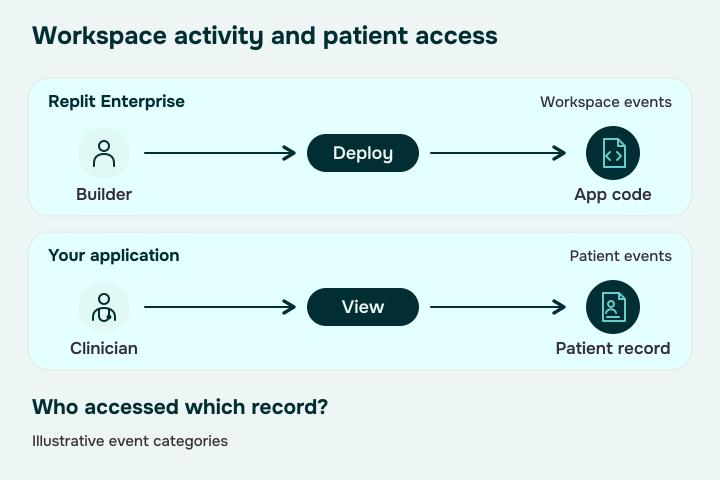
Your application still needs appropriate patient-access logging and a PHI incident process. Workspace activity logs and a general DPA notification clause don't settle those application-specific questions.
Shared infrastructure alone doesn't disqualify a cloud service under HIPAA. HHS cloud guidance focuses on the agreements and safeguards for the actual use. Underlying Google Cloud infrastructure doesn't automatically establish what your own Replit agreement covers.
Keep these documents with your architecture notes. When the service mix changes, check the terms again, including any separately signed agreement. That gives your team a concrete basis for deciding which features can handle PHI.
Where PHI ends up in a Replit app
A healthcare prototype has more data paths than its patient-record table. Replit HIPAA compliance depends on what enters those paths. Walk through these 5 before connecting anything live; you can run every check with synthetic records.
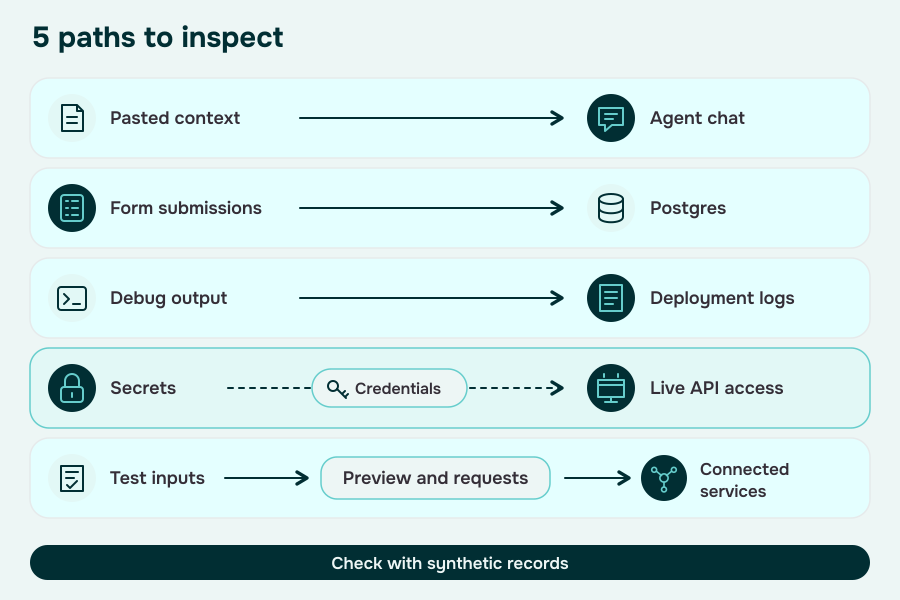
Agent chat keeps project context
Patient details pasted into a prompt or attachment can become part of your build conversation. Replit's checkpoints preserve conversation context alongside project state, so closing the chat isn't a cleanup plan.
Self-check: Search prompts and attachments for patient details. When asking Agent to debug an intake problem, use a fabricated example rather than a screenshot or export from your clinic.
The built-in Postgres database can hold test submissions
An intake form can write a record to Replit's SQL database as soon as your app runs. Replit separates development and production databases; inspect both.
Self-check: Review connection settings, seed files and imported records. Check which database receives a synthetic form submission, and whether someone previously loaded real patient data into either environment.
Deployment logs can copy what your app prints
Deployment logs contain application output and errors. A debug statement such as console.log(req.body) can copy a patient intake into a second place. Agent can inspect logs while investigating problems.
Self-check: Submit a synthetic record, trigger a failed request and read the resulting logs. Look for identifiers, form fields and credentials. This tests your app's behavior; it doesn't assume Replit logs every request body automatically.
Secrets can connect a prototype to live systems
Secrets encrypts stored credentials and exposes them to application code as environment variables. A key can give a prototype access to a live patient API even when its local database contains only fake records.
Self-check: Review development and production keys separately. Are they test-only and narrowly scoped? Keep patient details out of secret values, and replace live integration credentials with sandbox credentials during development.
Preview and test requests run real application code
A Preview is a running app. Entering patient details can send them to its backend or connected services before publication. Replit's App Testing can also exercise forms and integrations.
Self-check: Use synthetic inputs to inspect browser network traffic and test replays. Confirm the destination of each request and who can access the preview. Check access settings on your actual project.
Then check who can read or change the records behind those screens. Our HIPAA authentication requirements guide covers that application layer in more detail.
What you can safely prototype in Replit
Use Replit to prove the workflow: an intake form, an appointment journey, a clinician dashboard. Synthetic patients let you test those screens without pulling a clinic's records into a development workspace. Our replit vs lovable guide compares this prototyping approach with Lovable on speed, cost and code control.
The boundary follows the data and your role in handling it. A health-themed app or an EHR integration isn't automatically a HIPAA violation. When you're handling PHI for a covered entity or business associate, the services in that flow need the appropriate coverage and controls.
| Scenario | Replit decision | Boundary to check |
|---|---|---|
| Intake demo with fabricated patients | Good prototype use | Keep prompts, storage and integration calls synthetic |
| EHR sandbox with synthetic records | Useful for testing | Confirm the endpoint and credentials stay in the test environment |
| Live patient records entering Replit | Hold the PHI | Verify service-specific agreements and safeguards before connecting |
| Replit code deployed to another host | Assess the full workflow | Review the new host plus everything still entering Replit during development |
Renaming patients in a copied spreadsheet doesn't automatically de-identify it. If you plan to use existing records, follow an appropriate HIPAA de-identification method. For a product demo, fabricated records are usually the simpler choice.
External hosting also deserves a closer look. Replit supports project export and Git workflows. Its Full Bring Your Own Cloud option is in private preview; Published Apps BYOC and Image Exports are Enterprise early-access options. Published Apps BYOC leaves development and previews Replit-managed, so check those paths even when production hosting changes.
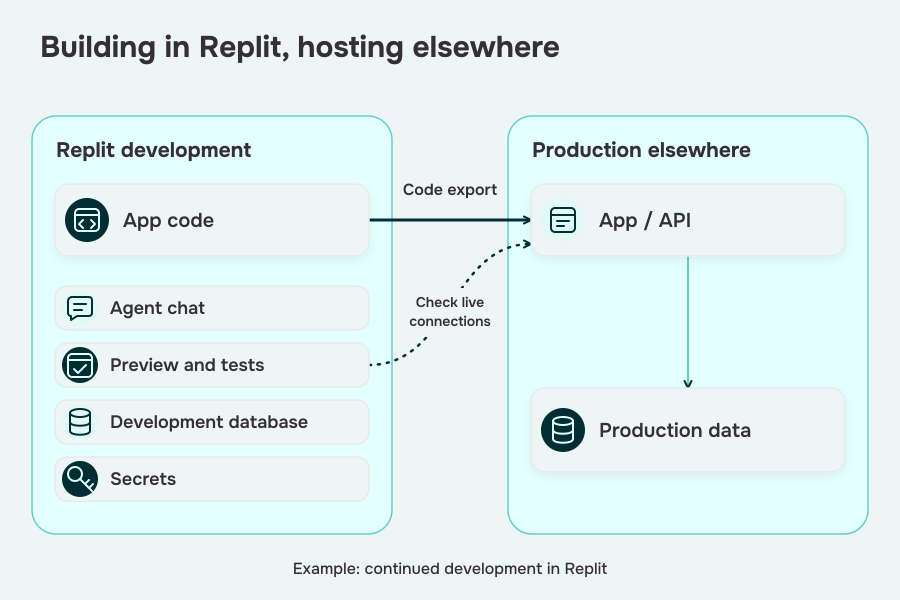
You can keep iterating on a useful prototype while preparing the production stack. Decide where patient data will enter before handing the demo to a clinic for live use.
How to migrate a Replit prototype
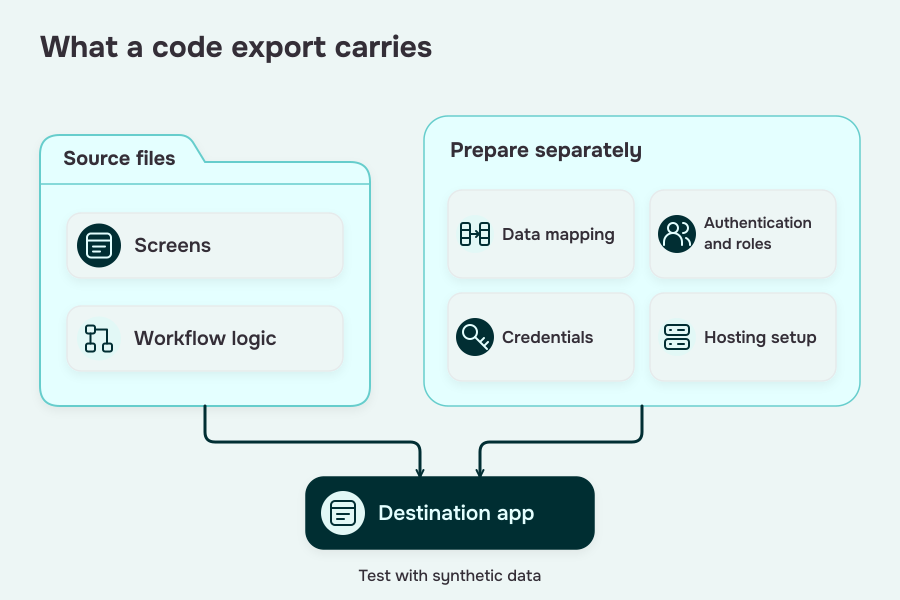
Keep the screens and logic you've already proved. Plan the migration around the data flow, then move each production dependency with it. A code export is the beginning of that work.
1. Map the data flows
List every place your app receives or sends patient information, including background jobs and error paths. Start with the 5 checks above, then add uploads and connected clinical systems.
Mark which parts of the existing code can move unchanged and which depend on Replit's database, authentication or deployment setup. This gives you a useful migration scope before anyone starts rebuilding a working screen.
Specode's migration app can inspect selected GitHub repositories with read-only access. Connect the existing code, review the proposed plan and check that it preserves the workflows you've already validated.
2. Move the data layer
Map your schema and relationships to the destination backend. Prove the new connections with synthetic records before moving patient data.
- Application data: Check forms, queries and file uploads against the destination schema.
- Environment setup: Recreate the required configuration and test credentials outside the code export.
Check relationships as well as individual fields. A patient, their appointments and message threads must still point to the right records after the move.
Replit documents ZIP export and Git options. Database contents, credentials and deployment configuration need their own migration steps.
3. Move authentication and hosting
Recreate the roles and permissions your workflow needs, then test them through the deployed app. A patient account should see its own records; a clinician account should see the records assigned to that role. Test those boundaries directly with synthetic users.
Set up production hosting and integration credentials, and verify that application logs don't print patient payloads. If you're considering Replit's Bring Your Own Cloud options, confirm availability and which services remain Replit-managed before choosing that route.
4. Sign the BAAs before PHI cutover
Finish the required agreements for the services handling PHI before importing real records or running a live patient test. Check the service list against the data-flow map so a forgotten integration doesn't get missed.
Before cutover, confirm:
- The production accounts and covered services match the agreed setup.
- Access controls and recovery procedures work in the deployed environment.
Specode's migration workflow maps your existing pages, data model and authentication, then repurposes the app's features and logic. You keep the useful work while moving onto healthcare foundations.
Specode advertises a 3-day migration to a HIPAA-ready foundation, with scope confirmed per app. For context, its basic telehealth development estimate is 1–2 weeks. Your migration plan depends on the existing app and the integrations left to connect.
Specode shortcut: HIPAA-ready modules on day 1
If Replit got you to MVP, Specode gets you to production, without rewriting your app from the ground up.
Specode is what Replit would be if it grew up, got a BAA, and learned how to talk to Epic.
We built Specode after helping dozens of startups and hospitals run in circles trying to “compliance-wash” their prototypes. The pattern was always the same: great idea, fast dev, then the brakes screech when PHI enters the chat. So we took what every healthtech founder kept rebuilding (scheduling, eRx, AI-assisted charting, EHR connectors) and packaged it as modular, HIPAA-compliant components. Available from day one.
What you get with Specode:
- 🔒 Built-in HIPAA compliance
- 🧩 Reusable components for telehealth, EMR, labs, messaging, eRx, and more
- ⚙️ Full-code ownership, no platform lock-in
- 🚀 AI-assisted development to reduce time-to-launch
Healthcare AI builder: from prompt to live, on HIPAA rails
Build and preview with synthetic data. Production hosting uses your own Convex account and its BAA.
Describe what you want (intake → scheduling → telehealth → documentation → billing) and see it appear with an instant preview. You start on healthcare foundations (roles, consent, audit), connect your own data early so screens and rules reflect real patients, providers, and payers, and theme it end-to-end. Full code ownership, zero lock-in.
- Prompt → preview: build from plain English; iterate in minutes.
- Integration switchboard: EHR/EMR, eRx/pharmacy, labs, insurance, payments/subscriptions, and custom APIs.
- Don’t rebuild what exists: modify packaged intake, messaging, scheduling; add only what’s net-new.
- Guardrails: Change Log restore and role-scoped testing keep fast iteration safe.
- Your team or ours: mix AI-built assembly with custom code; Custom tier adds managed help and purpose-built AI agents.
We’ve helped launch everything from mental health coaching apps with mood tracking and journaling, to national-scale care coordination platforms and ePharma storefronts with automated workflows. If it needs to scale and stay compliant, we’ve probably built it, or a piece of it.
Prototype anywhere. But when you’re ready to go live with PHI, start here.
Migrate your Replit app
Your Replit prototype, production-ready for PHI.
Once you've answered “is Replit HIPAA compliant,” the next decision is how to get your app into production. Bring the prototype you've already built; we'll map the next steps.
- Keep your code: Full ownership, without starting over.
- Get the BAA in place: Move onto a HIPAA-ready production stack with the required agreements.
- Move fast: A 3-day migration to HIPAA-ready foundations, scoped to your app.
Frequently asked questions
Replit's current public agreements don't include a HIPAA BAA. Keep PHI out until the services in your workflow have the required agreements and safeguards.
Synthetic-data prototyping is a useful fit. Check transmission and processing too, including Agent prompts, application logs and calls to live patient systems.
Ask Replit directly for written, service-specific terms. Its public agreements don't establish a BAA offering or confirm that a private request will be accepted.
SOC 2 doesn't replace a HIPAA BAA or your application's safeguards. Review the covered services and your PHI workflow separately.
Code export and Enterprise cloud options exist. Keep PHI out of unapproved development paths, and confirm the destination host's coverage before using real patient data.
Start with a platform like Specode that includes HIPAA compliance, reusable components, and production-ready infrastructure. You keep full code ownership.
Moving hosting can address the production layer. Your Replit development workflow and application still need appropriate agreements, access controls and PHI-safe data handling.